

Identity and Access Management | How IAM Works in Practice
Continue Reading

November 18, 2026
Learn how insider threat detection works: key signs, UEBA vs SIEM vs DLP, a five-step process, and how to build a program HR and legal can support.

November 17, 2026
What is data loss prevention? See how DLP finds, monitors, and blocks risky data movement, plus types, policy rules, and a four-phase rollout plan.

November 12, 2026
Learn what a software bill of materials (SBOM) is, what it must include under CISA’s 2026 elements, which formats to use, and how to create one step by step.
Identity and access management (IAM) is the set of policies, processes, and technologies that verify who a user or system is and control what that identity can access. Its goal is that the right people, applications, and devices reach the right resources at the right time, and no one else does. Modern IAM covers employees, contractors, service accounts, and increasingly AI agents, across on-premises systems, cloud platforms, and SaaS tools.
IAM matters because identity is where most breaches are decided. Verizon's 2026 Data Breach Investigations Report found credential abuse at some stage in 39% of breaches, even though vulnerability exploitation has now overtaken it as the most common first step. An attacker who logs in with valid credentials looks like a normal user, so perimeter defenses rarely stop them. Strong identity controls are what limit the damage.
This guide explains how IAM works, the core components of an IAM system, and the main types of IAM. It also covers how IAM supports compliance with ISO/IEC 27001, NIST SP 800-63, GDPR, and regional requirements such as the UAE PDPL, and it ends with a practical implementation path and the best practices that separate a working program from one that only exists on paper.
Identity and access management (IAM) is a security framework of policies, processes, and technologies that confirms who or what is requesting access to a system and decides what that identity is allowed to do. It works by assigning each user, device, or application a verified digital identity, authenticating it when it signs in, authorizing only the permissions it needs, and recording what it does. IAM applies to employees, customers, contractors, and non-human identities such as service accounts and APIs.
Identity management and access management are the two halves of IAM. Identity management answers "who is this?" Access management answers "what can they do?" IAM is the combined discipline that connects the two, so that every permission traces back to a verified identity.
Identity management covers creating, maintaining, and retiring digital identities. That includes the directory where identity records live, the attributes attached to each one (role, department, manager), and the lifecycle events that change them, such as a new hire, a promotion, or a departure. Access management covers authentication, authorization, and enforcement when someone requests a resource, including multi-factor authentication (MFA), single sign-on (SSO), and role-based or attribute-based policies.
Discipline | Core question | Typical controls |
|---|---|---|
Identity management | Who is this, and is the record accurate? | Directory services, provisioning, deprovisioning, lifecycle workflows |
Access management | What may this identity do right now? | MFA, SSO, RBAC/ABAC, session controls, policy enforcement |
IAM | Does every permission trace back to a verified, current identity? | Both, plus governance, access reviews, and audit logging |
The terms "access and identity management" and "identity access management" describe the same practice. Privileged access management (PAM) is a narrower specialty that adds tighter controls for administrator and other high-risk accounts. It extends IAM rather than replacing it.
Security. IAM reduces the damage a stolen or misused account can cause. When access follows least privilege and every sign-in is verified, an attacker who obtains one set of credentials reaches far less. IAM also removes common weak points: orphaned accounts left active after someone leaves, permissions that accumulate as people change roles, and shared passwords that can't be traced to one person. The Verizon 2026 DBIR figure cited earlier shows why this matters. Credential abuse appeared in 39% of breaches even after vulnerability exploitation took over as the leading first step.
Compliance. Most major frameworks expect demonstrable control over who has access to what. ISO/IEC 27001:2022 includes dedicated Annex A controls for access control (5.15), identity management (5.16), authentication information (5.17), and access rights (5.18). GDPR Article 32 requires appropriate technical measures to secure personal data, and access control is a standard way to show that. Regional regimes such as the UAE PDPL expect the same discipline. IAM produces the evidence auditors ask for: who had access, who approved it, and when it was removed.
Productivity. Well-run IAM speeds up legitimate work. SSO lets employees reach their applications with one verified sign-in instead of juggling separate passwords. Automated provisioning gives new hires the access their role needs on day one, and automated deprovisioning closes it the day they leave. IT teams also spend less time on password resets and manual access requests, which frees them for higher-value security work.
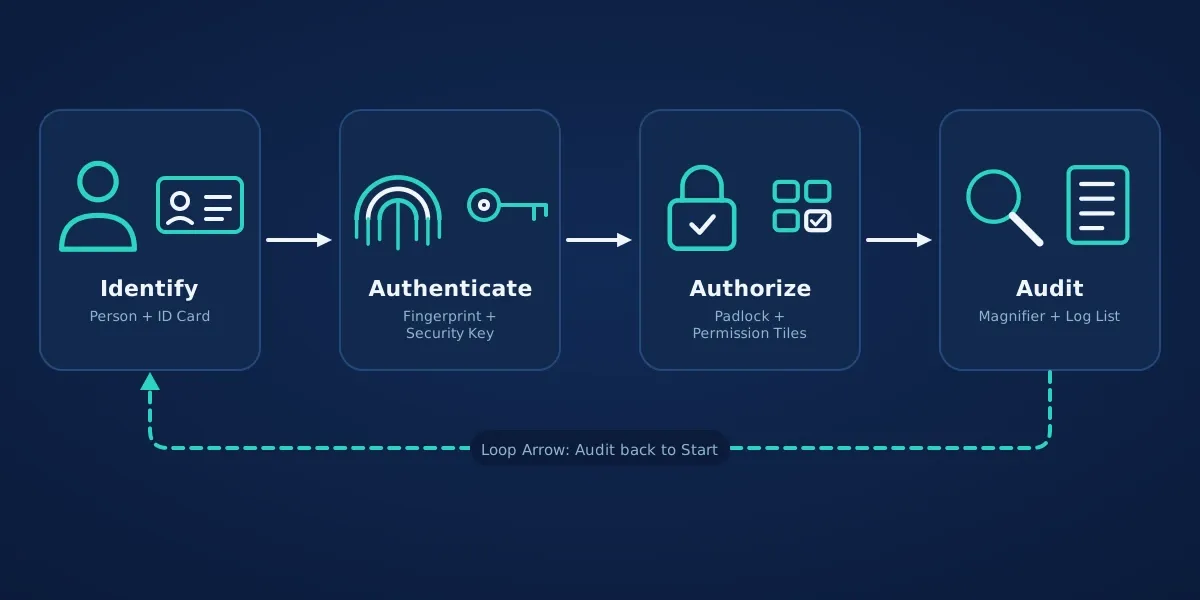
Identity and access management works by verifying who is asking for access, confirming they are allowed to have it, enforcing that decision, and keeping a record of what happened. That cycle repeats every time an identity signs in or requests a resource, and a separate lifecycle process keeps the underlying identity data accurate as people join, change roles, and leave.
Every IAM decision follows the same four steps.
Identify. The user, device, or application presents a claim about who it is, usually a username, email address, or workload ID. The IAM system matches that claim to a record in its identity store, such as a directory. Identification is only a claim, so it proves nothing on its own.
Authenticate. The system verifies the claim. This is where passwords, one-time codes, hardware security keys, passkeys, and biometrics come in. Authentication is stronger when it combines more than one factor, which is the idea behind multi-factor authentication (MFA). Phishing-resistant methods such as passkeys and FIDO2 security keys resist credential-theft attacks that defeat passwords and one-time codes.
Authorize. Once the identity is confirmed, the system checks what it is permitted to do. It evaluates policy: the user's role (RBAC), their attributes such as department, device health, or location (ABAC), and the sensitivity of the resource. The result is a decision to allow, deny, or require something extra, such as step-up authentication for a high-risk action.
Audit. The system logs the sign-in, the decision, and the activity that followed. These logs support incident investigation, access reviews, and compliance evidence. Without this step, IAM can enforce rules but can't prove it did.
In practice, the first three steps happen in milliseconds, often through single sign-on (SSO), where one verified authentication grants access to many applications. Auditing runs continuously in the background.
Authentication proves who you are. Authorization decides what you can do once you're in. The two are often confused, but they fail in different ways: a strong login does nothing if the account is authorized to access far more than it should.
Consider a finance analyst named Maya signing in to a company's expense platform. She enters her username and approves a prompt on her phone, and the system confirms she is Maya. That is authentication. The platform then checks her role. As an analyst, she can view and submit reports for her own cost center, but she cannot approve payments or see other departments' budgets. That is authorization. If Maya's account were stolen, the attacker would inherit only those limited permissions, not the whole finance system.
That limit is the point of least privilege: grant the minimum access a role needs, and no more. NIST SP 800-63, the US federal digital identity guideline, treats these as distinct concerns, with separate assurance levels for how strongly an identity is proofed, how strongly it authenticates, and how reliably that result is passed between systems. Mixing them up is a common design mistake.
Authentication and authorization are only as accurate as the identity data behind them. The identity lifecycle keeps that data current through three events: joiner, mover, and leaver.
Joiner. When someone is hired or onboarded, the IAM system creates their identity and provisions the accounts and permissions their role requires. Ideally, the HR system triggers this automatically so access is ready on day one and matches a defined role instead of a manager's guess.
Mover. When someone changes teams, roles, or locations, their access should change with them. This is the stage most organizations handle badly. Permissions are added for the new role, but the old ones are rarely removed, so access piles up over time. This is called privilege creep, and it quietly breaks least privilege.
Leaver. When someone departs, every account and credential must be disabled promptly. This includes the easy-to-forget ones: SaaS accounts, API keys, and shared credentials. An account left active after departure becomes an orphaned account, a standing opportunity for misuse.
Periodic access reviews, where managers confirm that each person's permissions are still appropriate, act as a safety net across all three events. ISO/IEC 27001:2022 Annex A control 5.18 expects access rights to be provisioned, reviewed, modified, and removed in line with the organization's policy, which is the lifecycle in formal terms.
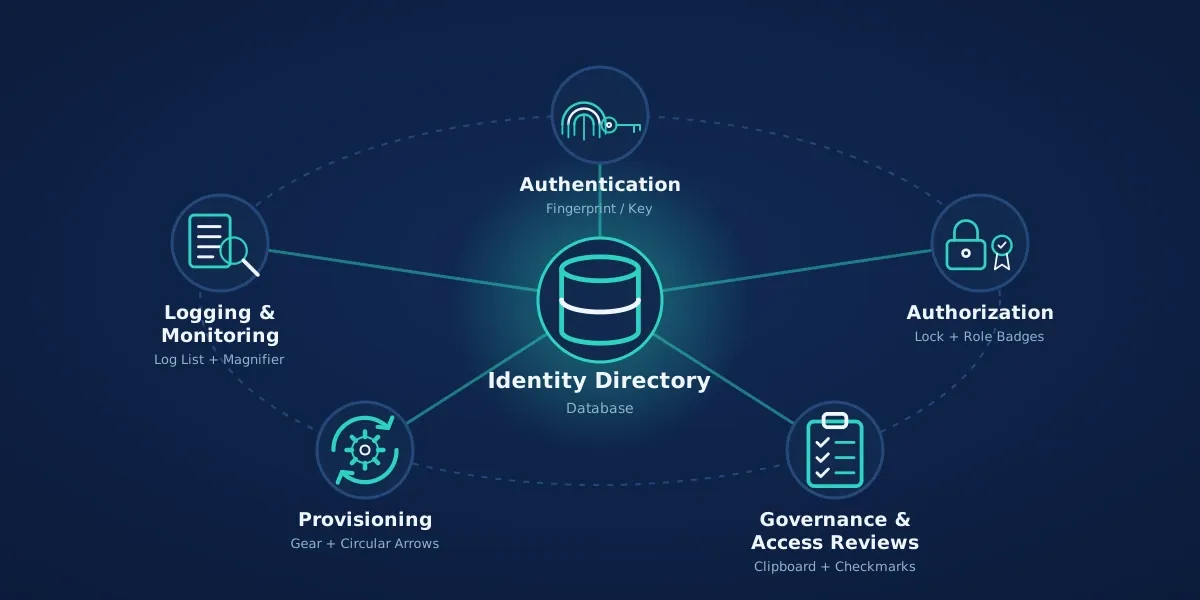
An identity and access management system consists of six core components: a directory that stores identities, authentication, authorization, identity governance, automated provisioning, and logging. Each one covers a different part of the question "who has access to what, and can we prove it?", and a gap in any one of them weakens the rest.
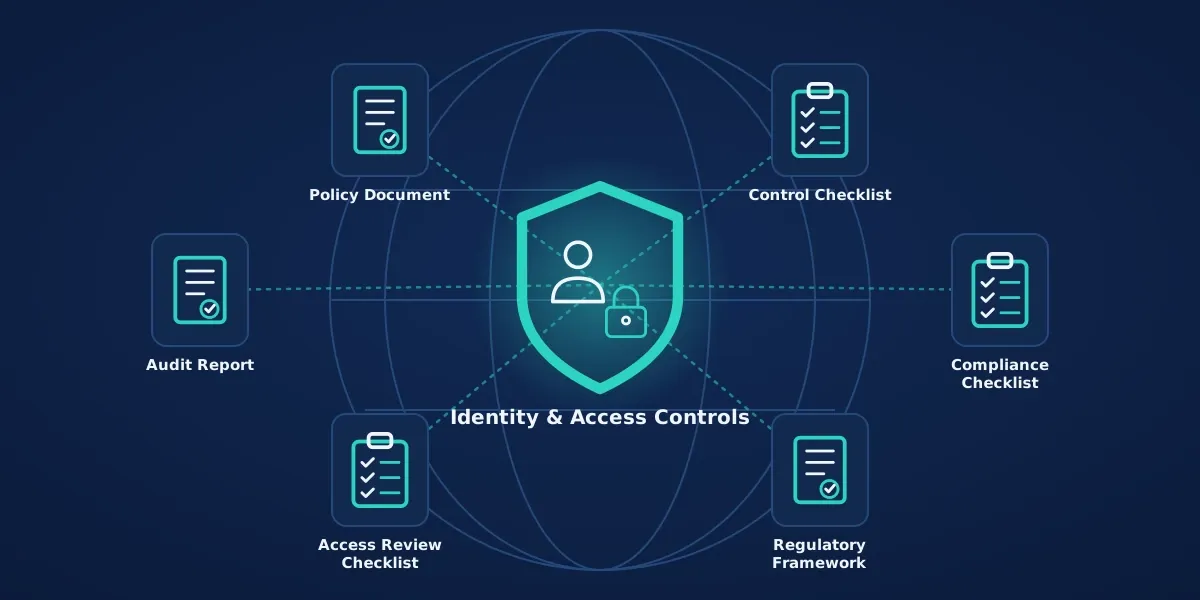
The directory is the system of record for identities. It holds the user, group, device, and application records that every other IAM component reads from, along with the attributes attached to each one, such as job title, department, manager, and employment status. Common examples include Microsoft Active Directory, LDAP directories, and cloud directories.
The directory matters because every access decision depends on its accuracy. If a record says someone is still an active employee, every downstream system treats them as one. Many organizations end up with several directories after acquisitions or cloud migrations, fragmenting identity data and creating duplicate or conflicting accounts. Consolidating or federating them into one authoritative source is usually the first step of a serious IAM program.
Authentication verifies that an identity is who it claims to be. Three mechanisms do most of the work.
Multi-factor authentication (MFA) requires two or more independent factors: something you know (a password), something you have (a security key or phone), or something you are (a biometric). Single sign-on (SSO) lets one verified authentication grant access to many applications, reducing password sprawl and giving administrators one place to enforce policy. Passwordless methods, such as passkeys built on the FIDO2 and WebAuthn standards, replace the password entirely with a cryptographic credential tied to a device.
Not all MFA is equally strong. One-time codes sent by SMS or generated by an app can still be phished. Phishing-resistant methods such as FIDO2 security keys and passkeys bind the credential to the legitimate website, so a fake login page can't capture it. For high-value accounts, prefer these over codes.
Authorization decides what an authenticated identity can do. The two main models differ in how they make that decision.
Role-based access control (RBAC) grants permissions based on a user's role. An "accounts payable clerk" role, for example, bundles the permissions that job needs. RBAC is simple to understand and audit, which is why it's the most common starting point, but it can multiply into hundreds of overlapping roles in large organizations. Attribute-based access control (ABAC) evaluates attributes at the time of the request, such as the user's department, the device's health, the data's sensitivity, and the location or time. NIST SP 800-162 is the standard reference for ABAC. It's more flexible and fine-grained than RBAC, but harder to design and test.
Both models should be built on least privilege, which means granting the minimum access a role requires and nothing more. Many organizations combine them: roles for the broad baseline, and attributes for context-sensitive rules.
Identity governance and administration (IGA) answers the question authentication and authorization can't: should this person still have this access? It adds the policy layer, approval workflows, and review processes that keep permissions appropriate over time.
The most visible practice is the access review, sometimes called access certification. On a set schedule, managers and resource owners confirm that each person's permissions are still justified, and revoke anything that isn't. Reviews catch privilege creep, orphaned accounts, and toxic combinations of permissions that violate segregation of duties, such as one person being able to both create and approve a payment. Governance also produces the evidence auditors request. ISO/IEC 27001:2022 Annex A control 5.18 expects access rights to be reviewed and adjusted as roles change.
Provisioning creates accounts and assigns access when someone joins or changes roles. Deprovisioning removes that access when they leave or no longer need it. Automating both closes the gap between an HR event and an access change, which is where most lingering and excessive permissions come from.
SCIM (System for Cross-domain Identity Management) is the open standard that makes this automation portable. Defined in IETF RFCs 7642, 7643, and 7644, it gives applications a common way to receive user creation, update, and deletion events from an identity provider. Without it, teams often rely on manual tickets or custom scripts per application, and deprovisioning is the step most often missed. Not every application supports SCIM, so a realistic IAM program tracks which ones don't and handles them through another route.
Logging records who authenticated, what they were authorized to do, and what actions they took. Monitoring analyzes those records in near real time to flag anomalies, such as a sign-in from an unusual location, a burst of failed attempts, or a sudden permission change. Audit trails preserve the history for investigations and compliance.
This component is what turns IAM from a set of controls into something verifiable. When an incident happens, incident response teams rely on these logs to see which identity was used and how far it reached. When an auditor asks who approved a particular access, the trail answers. Logs also need protecting: they should be retained for an appropriate period, stored where administrators can't quietly edit them, and sent to a central system such as a SIEM so they can be correlated with other security events.
Component | What it does | What breaks without it |
|---|---|---|
Directory and identity store | Holds the authoritative record of every identity and its attributes. | Duplicate accounts, conflicting data, and access decisions based on outdated records. |
Authentication (MFA, SSO, passwordless) | Verifies an identity before granting access. | Stolen or guessed credentials give attackers direct entry. |
Authorization (RBAC, ABAC, least privilege) | Limits what a verified identity can do. | A single compromised account reaches far more than it should. |
Identity governance and access reviews | Checks that existing access is still appropriate. | Privilege creep, orphaned accounts, and failed audits. |
Provisioning and deprovisioning (SCIM) | Automates access changes as people join, move, and leave. | Delays, manual errors, and accounts left active after departure. |
Logging and monitoring | Records and analyzes identity activity. | No way to detect misuse, investigate incidents, or prove compliance. |
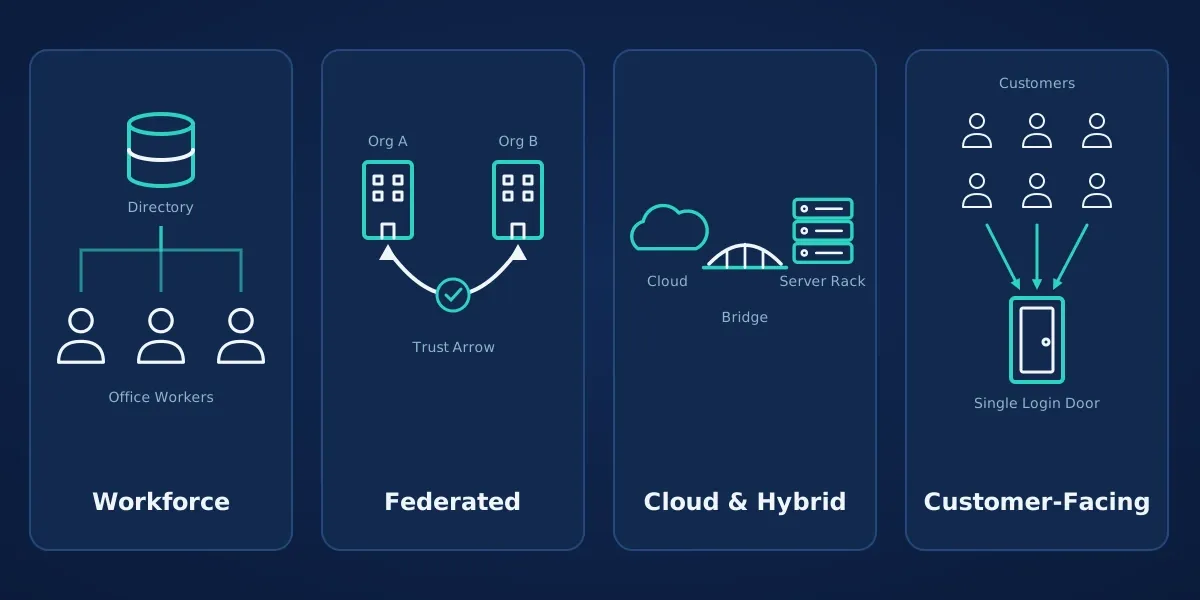
The main types of identity and access management are workforce IAM, federated IAM, cloud and hybrid IAM, and customer-facing IAM (CIAM). They differ in who the identities belong to and where the systems run. Most organizations use more than one at the same time.
Workforce IAM manages the identities of people who work for an organization: employees, contractors, interns, and partners. Its job is to give those people the access their role requires and to remove it when they leave. It typically combines a directory, SSO, MFA, automated provisioning tied to the HR system, and periodic access reviews.
Workforce IAM is defined by the organization controlling the relationship. It knows who these people are because it hired or contracted them, so identity proofing happens through HR onboarding, and access can be tied directly to job function. Governance is a central concern, since employees change roles and accumulate permissions over the years. Workforce IAM also increasingly covers non-human identities such as service accounts and automation, which often outnumber human users and are easier to overlook.
Federated IAM lets one trusted system vouch for a user's identity to another, so the user doesn't need a separate account everywhere. When you sign in to a partner's application with your company credentials, or use a "sign in with" button on a website, you're using federation. The organization that holds the identity is the identity provider (IdP). The application that relies on it is the service provider or relying party.
Three standards underpin most federation, and each solves a different problem.
SAML 2.0, an OASIS standard, passes authentication and attribute information between systems using XML assertions. It is widely used for enterprise SSO to business applications.
OpenID Connect (OIDC) is an identity layer built on top of OAuth 2.0. It lets an application verify who a user is and receive basic profile information, and it uses lightweight JSON tokens, which suits web, mobile, and API-driven applications.
OAuth 2.0, defined in RFC 6749, is an authorization framework. It lets an application obtain limited access to a resource on a user's behalf without handling the user's password. It does not authenticate the user on its own, which is why OIDC exists.
A common mistake is treating OAuth 2.0 as a login protocol. It grants access; it doesn't confirm identity. If an application needs to know who the user is, it should use OIDC or SAML, not bare OAuth.
Federation reduces password sprawl and shifts authentication to a system built to do it well. The trade-off is concentration: if the IdP is compromised or misconfigured, every connected application is exposed. That makes strong MFA and careful IdP monitoring essential.
Cloud IAM controls access to cloud services and the resources inside them, such as storage, databases, virtual machines, and APIs. Each major cloud provider has its own native IAM service, with its own policies, roles, and permission model. Cloud IAM is also delivered as identity-as-a-service (IDaaS), where the identity platform itself runs in the cloud and the vendor operates it.
Cloud environments change the nature of the identity problem in two ways. First, the perimeter is gone. Access depends on identity rather than network location, since resources are reachable from anywhere. Second, non-human identities multiply quickly: workloads, containers, functions, and API keys all need credentials and permissions. Overly broad cloud permissions are a persistent weakness, and the shared responsibility model means the provider secures the platform while the customer is responsible for correctly configuring identities and access.
Hybrid IAM connects on-premises identity systems to cloud ones. Most established organizations land here, because legacy applications and directories stay in place while new workloads move to the cloud. The goal is a consistent identity across both, usually by synchronizing or federating the on-premises directory with the cloud identity platform. The risk is inconsistency: two sets of policies, two sets of accounts, and gaps where they don't line up. Multi-cloud setups add another layer, since each provider's native IAM works differently, so organizations often need a central identity layer on top to keep policy consistent.
Customer identity and access management (CIAM) manages the identities of an organization's customers rather than its staff. It sits behind sign-up, login, and account pages for consumer-facing apps and websites.
It differs from workforce IAM in several ways. Scale is far larger, often millions of identities instead of thousands. The user experience matters more, because friction at login costs sales or sign-ups. Customers register themselves rather than being onboarded by HR, so identity proofing is lighter and fraud prevention matters more. And privacy obligations are heavier, since CIAM holds personal data and must manage consent and data-subject rights under laws such as GDPR and the UAE PDPL. Governance, the access-review discipline central to workforce IAM, plays a much smaller role.
If your main concern is securing customer sign-ins rather than your own workforce, the design priorities are different enough that CIAM deserves its own evaluation.
In cybersecurity, identity and access management is the control layer that decides who can reach which systems and data, and it is one of the most effective ways to limit damage from stolen credentials, insider misuse, and compromised accounts. Attackers increasingly log in instead of breaking in, so controlling and monitoring identities has become a core defense and not just an administrative task.
IAM prevents credential-based attacks by making stolen credentials harder to use and less valuable when they are used. It works at three points. Strong authentication, especially phishing-resistant MFA, makes a captured password insufficient on its own. Least-privilege authorization limits what a compromised account can reach. Monitoring and conditional access flag unusual behavior, such as an impossible-travel sign-in or a sudden surge of failed attempts, so the account can be challenged or blocked.
The scale of the problem explains why. Verizon's 2025 Data Breach Investigations Report found that stolen credentials were involved in 88% of breaches in the basic web application attack pattern. The 2026 edition shows the same story from a different angle: credential abuse appeared in 39% of breaches across the full attack chain. Attackers get credentials through phishing, infostealer malware, credential stuffing, and leaked repositories, then reuse them wherever they work. Dark web monitoring can show whether your organization's credentials are already circulating.
No single control stops all of this. MFA reduces risk but can be bypassed through phishing kits and MFA fatigue prompts. Least privilege limits blast radius but doesn't prevent the initial login. Layering the two with monitoring is what makes IAM effective, and security awareness training reduces the phishing that feeds stolen credentials in the first place.
Zero trust is a security model that treats no user, device, or network location as trusted by default, and identity is its foundation. Every access request is verified explicitly using identity, device, and context, and access is limited to what's needed. NIST SP 800-207 defines the architecture and describes the policy engine and enforcement points that make those decisions.
IAM is the part of zero trust that answers "who is asking and what are they allowed to do." Without strong IAM, zero trust has nothing reliable to base its decisions on. For the full model, including network segmentation, device trust, and continuous verification, see our guide to zero trust security.
IAM governs access for all identities. Privileged access management (PAM) adds tighter controls for the accounts that can do the most damage, such as domain administrators, database admins, and cloud root accounts. Standard IAM decides whether an admin can sign in. PAM adds controls like just-in-time elevation, credential vaulting, and session recording around what they do once they are in.
Think of PAM as a specialized layer on top of IAM and not a separate replacement for it.
Most IAM failures come from gaps between policy and reality, not from missing technology. Four are especially common.
Orphaned accounts. These are accounts that remain active after the person has left or the project has ended. They have no owner watching them, so misuse goes unnoticed. Automated deprovisioning tied to HR events and regular account reviews are the standard fixes.
Excessive permissions. Access accumulates as people change roles, and nobody removes the old entitlements. Over time, users hold far more access than their job requires, which means any compromise of their account reaches further than it should. Access reviews and role cleanup address this.
Weak MFA coverage. MFA rolled out to most users but not all, or only on some applications, leaves exploitable gaps. Common holes include legacy applications that don't support modern authentication, service accounts exempt from MFA, and fallback methods such as SMS that attackers can abuse. Coverage has to be measured per application and per account type, not assumed.
Shadow identities. These are accounts and credentials outside central IAM visibility: SaaS accounts created without IT approval, personal accounts used for work, hardcoded API keys, and unmanaged service accounts. They bypass policy, MFA, and logging entirely. Discovering them usually requires scanning identity logs, SaaS usage, and secrets repositories, not just reading the directory.
A practical way to find all four is a risk assessment that inventories identities, maps permissions, and tests MFA coverage. We cover that process later in this guide.
In cloud computing, identity and access management controls who and what can use cloud services, data, and APIs, replacing the network perimeter as the primary security boundary. Because cloud resources are reachable from anywhere, identity is the main thing standing between an attacker and your data, which makes cloud IAM configuration one of the highest-impact security decisions an organization makes.
Traditional security assumed a trusted internal network behind a firewall. Cloud breaks that assumption. Applications run on infrastructure the organization doesn't own, users connect from any location, and storage, databases, and management consoles are exposed through internet-facing APIs. A valid identity with the right permissions can reach those resources directly, without ever touching the corporate network.
This shifts the security question from "is this request coming from inside the network?" to "is this identity verified, and is it allowed to do this?" Network controls still matter, but they no longer decide who gets in. Identity does.
Responsibility is also shared. Under the cloud shared responsibility model, the provider secures the underlying platform, while the customer is responsible for correctly configuring identities, permissions, and authentication. Most cloud security failures trace back to customer-side choices, such as overly broad roles, public storage permissions, or unprotected administrator accounts, not to flaws in the provider's infrastructure. Cloud security posture management helps surface these misconfigurations. Cloud providers also each have their own IAM model, with distinct policy languages, role structures, and permission names, so knowledge of one doesn't transfer cleanly to another.
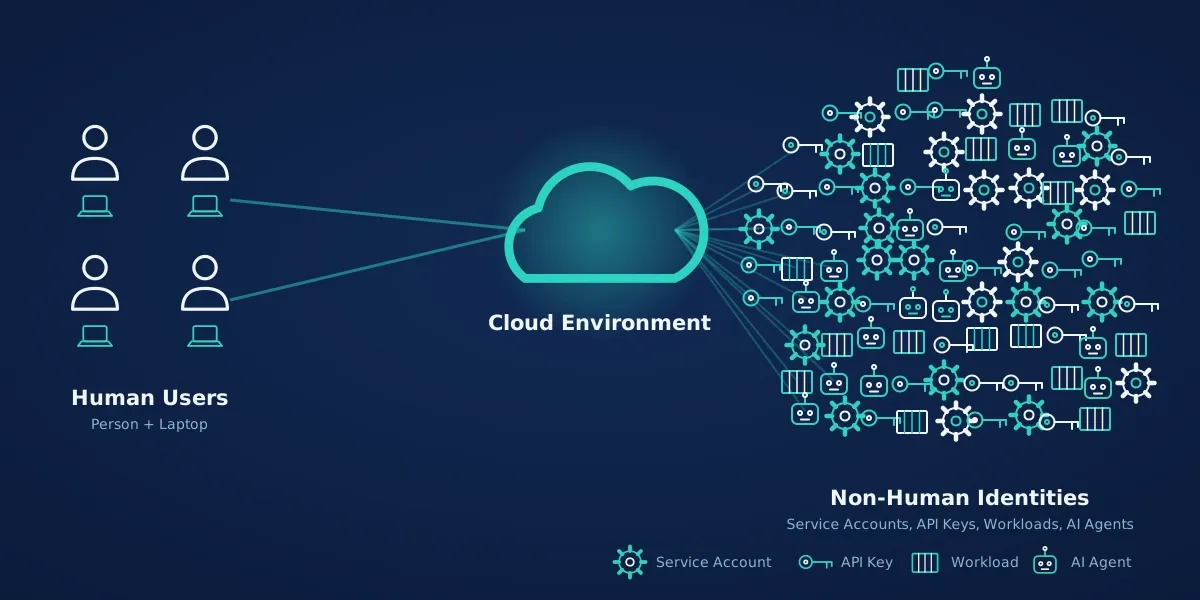
Cloud environments contain two kinds of identities. Human identities are employees, contractors, and administrators who sign in interactively. Non-human identities are the accounts and credentials that software uses to talk to other software: service accounts, API keys, access tokens, certificates, and the roles assigned to virtual machines, containers, and serverless functions.
Non-human identities now dominate. CyberArk's 2025 Identity Security Landscape survey of 2,600 security decision-makers found machine identities outnumber human identities by 82 to 1. The same survey found that 42% of machine identities have privileged or sensitive access, yet 88% of organizations define "privileged user" as human only. Because it is a vendor-run survey, treat it as an indicator of scale, not a precise measurement.
Non-human identities are risky for practical reasons. They don't use MFA, rarely have a named owner, and often have long-lived credentials hardcoded into scripts or configuration files, where they can leak through code repositories. When the person or project that created one moves on, the credential keeps working. Because APIs are where most of these credentials are used, API security testing also checks for authentication and authorization flaws.
Managing them follows the same principles as human IAM, adapted for machines:
Inventory every one, recording an owner and purpose for each.
Scope permissions tightly. A workload that reads from one storage bucket should not be able to write to others.
Prefer short-lived credentials issued on demand over long-lived keys, and use the cloud provider's workload identity features where available.
Rotate and expire whatever must remain static, and scan code and configuration for exposed secrets, for example through a source code review.
Identity sprawl happens when an organization runs identities across multiple clouds, SaaS platforms, and on-premises systems, each with its own accounts, roles, and policies. A single engineer may have separate accounts in three cloud consoles, plus permissions inside dozens of SaaS tools. No one has a single view of who can access what, so excess permissions and forgotten accounts pile up unnoticed.
Containing it usually comes down to five practices.
Centralize authentication. Use one identity provider with SSO and federation (SAML or OIDC) so people sign in once and their access is controlled from a single place. Disable standalone local accounts wherever possible.
Standardize roles. Define a consistent role model that maps to each provider's native permissions, so "developer" or "read-only analyst" means the same thing everywhere.
Automate the lifecycle. Drive provisioning and deprovisioning from the HR system, so departures remove access everywhere at once.
Gain visibility. Use cloud infrastructure entitlement management (CIEM) tools or native access-analysis features to find unused, excessive, and externally exposed permissions across providers.
Review regularly. Run access reviews on a set schedule, with the highest-risk accounts and roles reviewed most often.
No single tool removes sprawl entirely. The aim is steady reduction: fewer standing permissions, fewer unmanaged identities, and one authoritative place to ask who has access to what.
The best identity and access management tool covers your actual identity types, integrates with the systems you already run, and enforces the controls your risk and compliance requirements demand. Feature lists look similar across the market, so selection should start from your environment and requirements, not from a vendor's category label.
Judge a platform against what it must do for you, then confirm each capability with a live test and not a datasheet.
Authentication strength. Look for support for phishing-resistant methods such as FIDO2 security keys and passkeys, not only SMS and app-based codes. Check whether policies can vary by risk: stricter requirements for administrators, sensitive applications, or unfamiliar devices.
Authorization flexibility. The platform should support role-based access control and, where needed, attribute-based rules that use context such as device health or location. Ask how it handles temporary elevated access, because permanent standing permissions are a common weakness.
Lifecycle automation. Verify that it can take joiner, mover, and leaver events from your HR system and act on them automatically, including SCIM provisioning to connected applications. Ask specifically what happens for applications that don't support SCIM, since those are where deprovisioning usually fails.
Governance and reporting. Look for built-in access reviews, approval workflows, and segregation-of-duties checks, plus reports that map to the frameworks you answer to, such as ISO/IEC 27001, SOC 2, or GDPR. If audit evidence takes weeks to assemble by hand, the tool isn't doing its job.
Non-human identity coverage. Machine identities outnumber human ones by roughly 82 to 1 in CyberArk's 2025 survey, so a platform designed only for people leaves most of your identities unmanaged. Ask whether it can inventory and govern service accounts, API keys, and workload identities.
Standards support. Confirm support for SAML 2.0, OpenID Connect, OAuth 2.0, and SCIM. Open standards are the best protection against vendor lock-in because they let you swap components later without rebuilding every integration.
Visibility and logging. Check the depth of audit logs, whether they can stream to your SIEM, and how long they're retained. Also ask how the platform detects risky behavior and whether it can respond automatically, for example by forcing re-authentication or revoking a session.
Resilience. The IAM system sits in front of nearly everything, so an outage locks everyone out. Ask about availability commitments, failover design, and what the "break-glass" procedure is if the platform itself is unreachable.
There are three ways to get an IAM capability, and each trades control against effort and expertise.
Build means developing in-house or assembling open-source components. It offers maximum control and customization, and it avoids licensing fees. But identity is a poor area for reinvention. You take on responsibility for security patches, standards compliance, scaling, and long-term maintenance, and you need people with the specialized skills to do it. Building makes sense only when requirements are truly unusual and the team can sustain it.
Buy means licensing a commercial platform, either self-hosted or delivered as a cloud service. It gives you mature features, vendor-maintained standards support, and faster deployment. The trade-offs are licensing cost, dependence on the vendor's roadmap, and the work of configuring it properly. Buying a platform does not buy a working program. Misconfiguration and weak governance are common reasons purchased tools underperform.
Managed means a service provider runs identity operations for you, covering tasks like monitoring, access reviews, and administration. It suits organizations without a dedicated identity team, and it provides continuous coverage. The trade-offs include less direct control, reliance on the provider's quality, and the need for clear contract responsibilities about who owns which decisions and what data the provider can see.
Many organizations mix these: a bought platform at the core, with managed services for monitoring and in-house ownership of policy decisions. Whatever the model, keep decision authority, such as who gets access to what, inside the business. A provider can run the process, but it shouldn't set your risk appetite.
Most IAM projects succeed or fail on integration, not on the platform's feature set.
Start with an inventory. List your applications, directories, and identity sources before evaluating anything. Note which support modern federation, which need connectors, and which are legacy systems with no standards support. The legacy list is usually where cost and timelines grow.
Plan for hybrid reality. Few organizations are fully in the cloud. Confirm how the platform handles on-premises directories, legacy applications, and multiple clouds, and whether it can present one consistent identity across them.
Phase the rollout. A common sequence starts with a consolidated directory and SSO, adds MFA for all users with the strongest methods for privileged accounts, then automates the lifecycle, and finally layers on governance and access reviews. Rolling out everything at once tends to stall and frustrates users.
Design for the user experience. Controls that make daily work painful get bypassed. Test sign-in flows, recovery processes, and MFA enrollment with real users before broad rollout, and plan how people regain access when they lose a device.
Keep an exit path. Understand how identity data, policies, and logs could be exported if you switched platforms. This is where standards support and data portability pay off.
Test before committing. Run a proof of concept against your most difficult use cases, such as a legacy application, a contractor population, and a leaver scenario, not the vendor's demo path.
Identity and access management governance combines a written IAM policy, the technical and procedural controls that enforce it, and the oversight that proves it is working. The policy states the rules, the controls apply them, and governance checks that reality still matches the rules. It also feeds your wider governance, risk, and compliance program.
An IAM policy should be short enough that people read it and specific enough that an auditor can test it. Anything vague, such as "access will be managed appropriately," can't be enforced or evidenced. A usable policy covers the following areas:
Scope. State which identities and systems it covers: employees, contractors, service accounts, and third parties, across on-premises, cloud, and SaaS.
Roles and ownership. Name who owns the policy, who approves access, and who is responsible for each application's permissions. Every system and every non-human identity needs an owner.
Access principles. Commit to least privilege and need-to-know, and define how roles are structured and who may create or change them.
Authentication requirements. Set minimum standards by risk: which accounts and applications require MFA, which methods are acceptable, and where phishing-resistant methods are mandatory, such as administrators.
Lifecycle rules. Define how access is requested, approved, changed, and removed, including how quickly departing users' access must be revoked.
Privileged and non-human access. Set stricter rules for administrator accounts, shared accounts, service accounts, and API keys, including ownership, credential storage, and rotation.
Review and monitoring. State how often access is reviewed, what is logged, how long logs are kept, and who reviews them.
Exceptions and enforcement. Describe how exceptions are requested, approved, time-limited, and recorded, and what happens when the policy is breached.
Write it so a new IT administrator could follow it without asking anyone, and keep it consistent with your wider information security policy. Then test it by asking whether each statement could be checked against evidence, such as a log, a ticket, or a report. If not, rewrite it.
Frameworks give you a defensible baseline. ISO/IEC 27001:2022 Annex A controls 5.15 to 5.18 cover access control, identity management, authentication information, and access rights, and NIST SP 800-53's Access Control (AC) and Identification and Authentication (IA) families provide detailed control language you can adapt. Use them as a reference, not as text to paste, because a policy copied wholesale rarely matches how your organization actually works.
Policy only matters if controls enforce it. Four do most of the work.
Access approval. Every new or changed permission should go through a recorded approval by someone who understands the business need, usually the resource owner or the user's manager, not IT alone. Role-based access can pre-approve the standard bundle for a job so people don't wait for routine requests. Anything outside the standard role, and anything sensitive, should need explicit approval. Keep the record, since it is the evidence of who approved what.
Review cadence. Access that was appropriate last year may not be now. Schedule periodic access reviews where managers and system owners confirm each person's permissions are still needed, and revoke the rest. A common approach is to review high-risk access, such as administrators and sensitive financial or customer data, more often than low-risk access, for example quarterly versus annually. The right frequency depends on your risk and regulatory expectations. Pair scheduled reviews with event-driven ones triggered by role changes or departures.
MFA. Require MFA for all remote access, all administrative access, and all access to sensitive applications, and then work toward universal coverage. Treat the method as part of the control: phishing-resistant options such as FIDO2 security keys and passkeys should protect privileged accounts. Measure coverage per application and per account type, because gaps in legacy systems and service accounts are where attackers look.
Session management. Control how long access lasts after sign-in. Set sensible session timeouts, require re-authentication for sensitive actions, limit concurrent sessions where appropriate, and be able to terminate a session or revoke tokens immediately when an account is suspected to be compromised. For high-risk accounts, session recording and monitoring add accountability, which is where privileged access management tools come in.
Segregation of duties (SoD) means no single person can complete a sensitive process from start to finish without a second person's involvement. It limits both fraud and honest error by making sure one compromised or careless account can't do everything.
The classic example is finance: the person who creates a vendor and the person who approves payments to that vendor should not be the same. The same logic applies in IT, where the developer who writes code should not be the only one who can push it to production, and the administrator who grants access should not be able to approve their own access. NIST SP 800-53 addresses this in control AC-5 (Separation of Duties), and it is a recurring expectation in financial audits and compliance regimes.
To make SoD work in IAM:
Define the conflicts. Identify which combinations of permissions are incompatible, such as "create supplier" with "approve payment." Start with the highest-risk processes, not every system.
Build them into roles. Design roles so incompatible permissions never land in the same role by default.
Check at request time. Where your tooling supports it, flag conflicts when access is requested, before it is granted, instead of finding them later.
Review existing access. Include SoD checks in periodic access reviews, since conflicts often appear gradually as people change roles.
Document compensating controls. When a small team can't fully separate duties, record an approved exception with compensating controls, such as independent review of the person's activity and logging.
Small organizations often can't split every duty across multiple people. That is acceptable as long as the risk is acknowledged, the exception is approved, and monitoring is in place.
Most compliance frameworks don't ask for an identity and access management product. They ask you to control and prove who has access to what: unique identities, strong authentication, least privilege, timely removal, and regular review. IAM is the program that produces that evidence, and the wording differs by framework and region.
ISO/IEC 27001:2022 covers identity and access through four consecutive controls. Control 5.15 (access control) requires rules for physical and logical access based on business and security needs. Control 5.16 (identity management) covers the full identity lifecycle, from registration to de-registration. Control 5.17 (authentication information) governs how passwords and other secrets are issued and managed. Control 5.18 (access rights) covers provisioning, review, modification, and removal of access. Controls 8.2 (privileged access rights) and 8.5 (secure authentication) add detail for administrators and sign-in.
Auditors typically ask for an access control policy, joiner-mover-leaver records, access review results, and proof that departed users were removed on time. If your IAM program already runs those processes, the evidence is a by-product, not a separate project. For how ISO 27001 compares with other frameworks, see ISO 27001 vs SOC 2 vs PCI DSS.
NIST published SP 800-63 Revision 4 as a final document in July 2025, replacing Revision 3. It has four volumes: the base volume on digital identity risk management, 800-63A on identity proofing, 800-63B on authentication, and 800-63C on federation. Together they define assurance levels for how strongly an identity is proofed (IAL), how strongly it authenticates (AAL), and how reliably that result is passed between systems (FAL).
Revision 4 updates the guidance for passkeys and syncable authenticators, adds digital wallet models, and expects proofing processes to account for threats such as deepfakes and synthetic identities. US federal agencies must follow it. Private organizations use it voluntarily as a benchmark for authentication design.
RegulationWhat it expects on identityStatus notes
Regulation | IAM / Access Control Requirements | Current Status |
|---|---|---|
GDPR | No dedicated IAM clause. Article 32 requires appropriate technical and organizational security measures, and access control is a standard way to meet it. | In force |
NIS2 (Directive (EU) 2022/2555) | Article 21(2)(i) lists access control policies, and 21(2)(j) lists multi-factor or continuous authentication "where appropriate." | In force; national laws vary |
DORA (Regulation (EU) 2022/2554) | Financial entities must manage ICT risk, including controls over access and authentication. The detail sits in supporting technical standards. | Applies since January 2025 |
HIPAA Security Rule | Current rule requires access control and person or entity authentication but doesn't name MFA. A January 2025 proposal would require MFA, with limited exceptions. | Proposal not final as of November 2026; reports point to final action around July 2027 |
For NIS2 and DORA, document the access control policy, enforce MFA where risk justifies it, and maintain records that can be presented to a regulator.
UAE (federal). The UAE PDPL (Federal Decree-Law No. 45 of 2021) requires controllers and processors to protect personal data with appropriate technical and organizational measures. Access control and authentication are common ways to demonstrate this. The SIA Information Assurance Regulation (formerly NESA) applies to government and critical infrastructure entities. Its technical access control family covers user registration, privilege management, access-rights review, and secure log-on.
CBUAE-licensed financial institutions follow the central bank's own information security and operational risk requirements, so confirm the current rulebook for your license type. For the wider picture, see our overview of cybersecurity regulations in the UAE.
Dubai only. VARA-licensed virtual asset firms also face access control expectations under the VARA Technology and Information Rulebook. Our VARA cybersecurity requirements checklist covers those.
Saudi Arabia only. The NCA Essential Cybersecurity Controls (ECC-2:2024) include an Identity and Access Management subdomain (2-2). It requires documented and approved IAM requirements and, at a minimum, covers authentication, multi-factor authentication for remote access, need-to-know and least-privilege authorization with segregation of duties, privileged access management, and periodic review of identities and access rights. SAMA's Cyber Security Framework separately binds SAMA-regulated financial institutions.
MFA is moving from recommendation to named requirement. NIS2 names it directly, NCA ECC requires it for remote access, and the proposed HIPAA update would make it mandatory. The HIPAA change is still a proposal, so don't treat it as law yet.
Phishing-resistant authentication is becoming the reference point. NIST's Revision 4 guidelines fold passkeys and syncable authenticators into the standard. The FIDO Alliance's 2026 Passkey Index reportedly shows passkeys used in 36% of successful sign-ins, which suggests the user experience is no longer the barrier.
Non-human identities are the governance gap. Estimates of the machine-to-human ratio vary by methodology, from about 50:1 to more than 100:1 in vendor surveys. Frameworks mostly cover these identities through existing access control and credential management expectations, not dedicated rules, so organizations must deliberately apply those controls to service accounts and workloads.
Identity is central to breach chains. Verizon's 2026 DBIR found credential abuse in 39% of breaches across the full attack chain and added pretexting as a tracked initial access method, which is identity-based social engineering. Auditors increasingly test whether access controls hold up against these paths, not whether a policy exists.
Digital identity wallets are arriving in the EU. Under eIDAS 2.0, member states must offer digital identity wallets by the end of 2026. This matters mainly if you serve EU customers or verify identities across borders.
AI in identity and access management means using machine learning to score access risk in real time, spot abnormal identity behavior, and automate routine governance work. It also means governing AI agents that now hold identities of their own. AI works best as decision support for people. It adds new risk when it approves or denies access without human review.
Risk scoring builds a baseline of normal behavior for each identity: usual hours, locations, devices, and resources. Each sign-in or action is compared to that baseline, and the system responds in proportion. It might allow the request, require step-up authentication, or block it and alert the security team.
Take a finance analyst who normally signs in from one city during office hours. A sign-in from a new country at 3 a.m., followed by a bulk export of customer records, breaks the pattern even though the password and MFA were valid. A static rule might miss it. A behavioral model flags it. That matters because valid-credential abuse is exactly what attackers rely on, and Verizon's 2026 DBIR found credential abuse in 39% of breaches.
AI also helps with governance. It can recommend which access to certify or revoke by comparing a user's permissions with their peers', and flag outliers during access reviews. These tools are often sold as user and entity behavior analytics (UEBA) or identity threat detection and response (ITDR). Their quality depends on clean identity data and a long enough baseline period.
AI agents sign in, call APIs, and take actions on behalf of people and systems, so they need identities like any other workload. Each one needs a named owner, a defined purpose, tightly scoped and short-lived credentials, full logging, and a way to be revoked quickly.
Most organizations haven't built these controls yet. CyberArk's 2025 survey of 2,600 security decision-makers found that 68% of organizations lack the identity security controls needed to manage AI safely. This is a vendor survey, so treat it as a signal and not a precise measure. For the identity, authorization, and monitoring design of agents, see our guide to AI agent security.
False positives and false negatives. A model that blocks legitimate users disrupts work. One that misses abnormal behavior gives false confidence. Neither error is visible without measurement.
Opacity. If a model denies access and nobody can explain why, auditors and users have no way to challenge the decision. Prefer systems that record the signals behind each decision.
Adversarial pressure. Attackers adapt. They can behave slowly enough to blend into a baseline or exploit gaps the model hasn't seen.
Drift and data quality. Behavior changes with new roles, tools, and working patterns, so baselines go stale. Poor identity data produces poor scores.
Privacy. Behavioral monitoring of employees is personal data processing. Under GDPR, the UAE PDPL, and similar laws, it needs a clear purpose, proportionality, and transparency. Automated decisions that significantly affect individuals may carry additional obligations, so involve legal counsel.
Over-automation. A model that locks out an on-call engineer during an incident causes its own damage.
A sound approach keeps deterministic controls as the floor: MFA, least privilege, and timely deprovisioning. Use AI to prioritize and recommend, and require human approval for high-impact decisions. Test models against real scenarios, keep a break-glass path, and review model performance regularly. For model governance, see our guides on the NIST AI Risk Management Framework and ISO 42001.
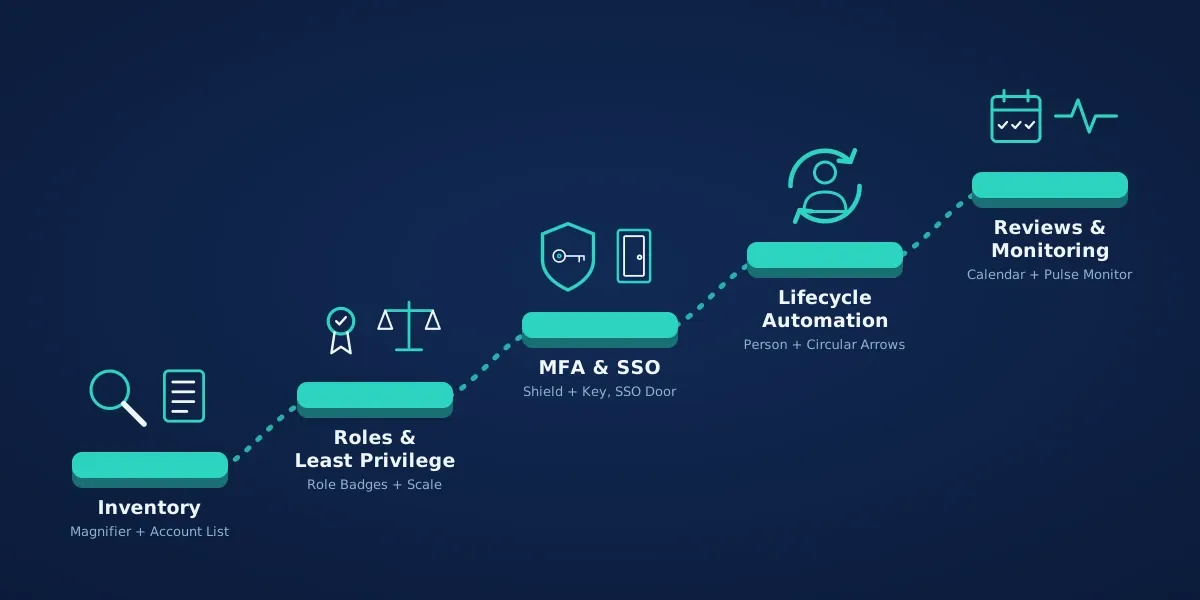
To implement identity and access management, inventory every identity and permission, define roles around least privilege, enforce MFA and single sign-on, automate the joiner-mover-leaver lifecycle, and then continuously review access and monitor. The order matters. Each step depends on the accuracy of the one before it, and skipping ahead to tooling is the most common reason IAM projects stall.
Start by finding out what you actually have. You can't protect or review access you can't see, and most organizations discover more accounts than they expect.
Build three lists. First, identities: employees, contractors, partners, shared accounts, service accounts, API keys, and any AI agents or automation running with credentials. Second, applications and systems: on-premises, cloud, and SaaS, including ones teams adopted without IT approval. Third, entitlements: who holds which permissions in each system, and who approved them.
Pull data from the directory, the HR system, cloud provider consoles, and SaaS admin panels, then reconcile them. Look for accounts with no matching HR record (orphaned), accounts with no named owner, and people holding access that doesn't match their role. Mark the highest-risk items first: administrator accounts, access to sensitive data, and anything exposed to the internet. Non-human identities deserve special attention, since CyberArk's 2025 survey of 2,600 security leaders put machine identities at 82 for every human identity. That is a vendor survey, but the direction is consistent across industry reports.
Expect this step to be uncomfortable. Its output is a baseline and a prioritized cleanup list, not a finished state.
Next, turn the inventory into a role model. Group people by what they actually do, such as accounts payable clerk, support agent, or developer, and define the standard access each role needs. This is role-based access control (RBAC). Where context matters, such as device health or location, add attribute-based rules on top.
Start with the roles that cover the most people and the most risk, not a perfect model for the whole company. Interview application owners and managers instead of copying what users currently hold, since current access reflects years of accumulated permissions. Set least privilege as the default: each role gets the minimum access it needs, and anything extra goes through an approval workflow with an expiry.
Two guardrails help. Define segregation-of-duties conflicts early, such as creating a vendor and approving payment to that vendor. And cap the number of roles. Hundreds of overlapping roles are as unmanageable as no roles, so review and merge them regularly.
With roles defined, tighten how people prove who they are. Single sign-on (SSO) gives you one place to enforce authentication policy and cuts password sprawl. Multi-factor authentication (MFA) makes a stolen password insufficient on its own.
Roll out in order of risk. Begin with administrators and privileged accounts, then remote access and email, then applications holding sensitive data, and then everyone else. Use phishing-resistant methods such as FIDO2 security keys or passkeys for the highest-risk accounts. SMS and one-time codes are better than nothing, but attackers can phish them.
Measure coverage instead of assuming it. Track the percentage of users and applications behind SSO and MFA, and list the exceptions. Legacy applications, service accounts, and break-glass accounts are where gaps usually hide, and each exception needs a documented compensating control. Plan the user experience as well: enrollment, lost-device recovery, and help desk procedures. Weak recovery flows are a common way attackers bypass strong MFA.
Manual access changes are slow and error-prone, so automate the three lifecycle events: joiner, mover, and leaver.
Connect the HR system as the source of truth, so a hire, role change, or departure triggers access changes automatically. For joiners, provision the role's standard access on day one. For movers, add the new role's access and remove the old role's, which is the step most organizations skip. For leavers, disable all accounts promptly, including SaaS logins, API keys, and shared credentials.
Use SCIM where applications support it. For applications that don't, track them on a list, handle them through scripted or ticket-based workflows, and assign each one an owner. Test the leaver process with real scenarios, such as a contractor whose contract ends or an employee who moves departments, and confirm that access actually disappears. Also define a process for non-human identities: every service account and key should have an owner, a purpose, and an expiry or rotation schedule.
Automation reduces drift, but it doesn't eliminate it. Access reviews and monitoring catch what slips through.
Schedule recurring access reviews in which managers and application owners confirm each person's permissions. Review high-risk access, such as administrator and sensitive data access, more often than low-risk access. Make reviews easy to complete. A review with thousands of line items and no context gets rubber-stamped, so show the user's role, last sign-in, and peer comparison. Track completion rates and the number of permissions revoked, since a review that revokes nothing may mean nobody is looking closely.
Monitoring should cover sign-in anomalies, privilege changes, spikes in failed authentications, and use of dormant or high-risk accounts. Send identity logs to your SIEM so they can be correlated with other security events. This matters because attackers target identities directly: Verizon's 2026 DBIR found credential abuse in 39% of breaches across the full attack chain. Finally, review the program itself on a regular schedule. Check MFA coverage, orphaned account counts, and time-to-deprovision, and adjust.
Timelines vary widely with company size, number of applications, and data quality, so treat the following as a planning pattern, not a promise. It reflects typical phasing and isn't drawn from a published benchmark.
Phase 1: Foundation (roughly the first one to three months). Complete the inventory, clean up the directory, and consolidate or federate identity sources. Quick wins include removing obviously orphaned accounts and enabling MFA for administrators.
Phase 2: Core controls (roughly months two to six). Roll out SSO and MFA by risk, define the first set of roles, and integrate the highest-priority applications.
Phase 3: Automation and governance (roughly months four to nine). Connect HR-driven provisioning and deprovisioning, launch the first access review cycle, and bring non-human identities under ownership.
Phase 4: Maturity (ongoing). Extend coverage to remaining applications, tighten privileged access, add risk-based policies, and measure continuously.
Phases overlap, and legacy applications almost always take longer than planned. A few common mistakes slow things down: buying a tool before the inventory, trying to model every role before shipping anything, rolling out MFA without a recovery process, and treating the project as finished at go-live. Aim for steady, measurable improvement, such as fewer orphaned accounts, higher MFA coverage, and faster deprovisioning, rather than a single launch date.
The most effective identity and access management practices are enforcing phishing-resistant MFA, granting least privilege by role, automating the joiner-mover-leaver lifecycle, governing non-human identities, and reviewing access on a schedule. These are not exotic. Most IAM failures come from skipping the basics, or from doing them once and never revisiting them.
Use this as a working checklist. Each item can be tested with evidence, which is what makes it useful in an audit as well as in daily operations.
Authentication
Require MFA for all administrators, remote access, email, and any application holding sensitive data, then extend it to all users.
Use phishing-resistant methods (FIDO2 security keys or passkeys) for privileged accounts.
Put applications behind SSO so authentication policy is enforced in one place.
Secure account recovery as carefully as login.
Authorization
Assign access through roles, with least privilege as the default.
Require documented approval and an expiry date for access outside the standard role.
Define segregation-of-duties conflicts for high-risk processes and block them at request time.
Remove standing administrator access where just-in-time elevation is possible.
Lifecycle
Drive provisioning and deprovisioning from the HR system as the source of truth.
Remove old-role access when someone changes roles, not only when they leave.
Disable all accounts and credentials promptly at departure, including SaaS logins and API keys.
Non-human identities
Give every service account, API key, and AI agent a named owner and a documented purpose.
Prefer short-lived, scoped credentials over long-lived static keys, and rotate what must stay static.
Scan code and configuration for exposed secrets.
Governance and monitoring
Run access reviews on a set schedule, with high-risk access reviewed most often.
Log authentication and privilege changes centrally and protect the logs from tampering.
Alert on anomalies such as unusual sign-ins, privilege escalations, and use of dormant accounts.
Track a few measurable indicators: MFA coverage, orphaned account count, time to deprovision, and access review completion.
Resilience
Maintain a tested break-glass procedure for when the identity platform itself is unavailable.
Know how to export your identity data and policies, so you aren't locked into one platform.
Strong IAM programs rarely fail because of the technology they chose. They fail because of gaps in scope, ownership, and follow-through. These patterns most often undermine a rollout.
They treat go-live as the finish line. An IAM project launches, the team moves on, and within a year permissions have accumulated again. IAM is an operating process, so budget for the ongoing work: reviews, role maintenance, and exception handling.
They cover people and forget machines. CyberArk's 2025 survey of 2,600 security decision-makers found that 88% of organizations define "privileged user" as human-only, even though 42% of machine identities have privileged or sensitive access. That is a vendor survey, but the gap it describes is real and common. Service accounts and API keys usually have no MFA, no owner, and no expiry, which makes them attractive targets.
They roll out MFA unevenly. Declaring "MFA is enabled" is easy. Proving it covers every application, every account type, and every fallback method is harder. Legacy systems, service accounts, and SMS-based recovery are where attackers look, and a single unprotected path undermines the rest.
They fix the front door and ignore recovery. Teams harden login but leave password resets and help desk verification weak. An attacker who can talk a support agent into resetting an account bypasses the strongest MFA. Treat recovery as part of authentication.
They build roles from current access instead of actual need. Copying what people hold today bakes years of privilege creep into the new model. Start from what each job requires and approve the difference.
They run access reviews as a checkbox. When reviewers face thousands of items without context, they approve everything. A review that never revokes anything is a warning sign, not a success. Give reviewers context, such as last sign-in and peer comparison, and track how much access is actually removed.
They leave ownership vague. If nobody owns an application's permissions or a service account, nobody reviews or removes them. Every system and identity needs a named owner who is accountable.
They underestimate legacy applications. The long tail of older systems without modern federation or SCIM support is where timelines slip and exceptions pile up. Inventory them early and decide, for each, whether to integrate, isolate, or retire.
The cost of these gaps shows up in breach data. Verizon's 2026 DBIR found credential abuse in 39% of breaches across the full attack chain, and each pattern above creates the kind of unmonitored, over-permissioned access that makes valid credentials so valuable to an attacker.
To assess IAM risk, list your identities and the access they hold, identify how each could be misused or compromised, rate the likelihood and impact, and check whether your current controls reduce that risk. To assess maturity, compare how consistently those controls operate against a defined scale, from ad hoc to continuously improved. The first shows where you're exposed, and the second shows how reliably you can fix it.
A useful IAM risk assessment doesn't need a heavy methodology. Frameworks such as NIST SP 800-30 give a formal structure, and the steps below follow the same logic in a lighter form.
1. Define the scope. Choose what you're assessing: the whole organization, a business unit, or a set of critical applications. Start with the systems holding your most sensitive data and the accounts with the most power.
2. Inventory identities and access. List human and non-human identities, the applications they reach, and the permissions they hold. This is the same inventory described in the implementation steps earlier in this guide, so reuse it.
3. Identify risk scenarios. For each high-value system, ask how identity could fail. Common scenarios include a phished employee account, a stolen administrator credential, a leaked API key, an orphaned account used after departure, and a contractor whose access was never removed. Verizon's 2026 DBIR found credential abuse in 39% of breaches across the full attack chain, so credential compromise belongs on every list.
4. Rate likelihood and impact. Score each scenario on how probable it is and how damaging it would be, using a simple high, medium, low scale or a 1–5 score. Consider what an attacker could reach with that identity, not only how likely the compromise is.
5. Evaluate existing controls. For each scenario, check what actually reduces the risk today: MFA coverage, role design, deprovisioning speed, monitoring, and recent access review results. Test the control, don't just confirm it exists. "MFA is enabled" and "MFA covers every administrator and every remote access path" are different findings. Penetration testing is one way to check whether these controls hold up against a real attacker.
6. Prioritize and treat. Rank scenarios by residual risk, then decide to reduce, accept, transfer, or avoid each one. Most identity risks can be reduced with a short list of fixes: closing MFA gaps, removing excess privilege, deleting orphaned accounts, and assigning owners to non-human identities.
7. Record and repeat. Document findings, owners, and deadlines, and reassess on a schedule and after major changes such as an acquisition or a cloud migration.
Useful indicators to track over time include MFA coverage by account type, the number of orphaned and dormant accounts, time to remove access after departure, the share of privileged accounts with standing access, and access review completion and revocation rates.
Maturity describes how consistently and reliably identity controls run. The five-level scale below is a generic planning model, not a published standard. Similar scales appear in many frameworks, and you can adapt the labels to match whichever your auditors use.
Level | Name | What it looks like |
|---|---|---|
1 | Ad hoc | Access is granted manually and inconsistently. No central directory or clear ownership. Departures are handled when someone remembers. |
2 | Basic | A central directory exists. MFA covers some users. Policies are written but unevenly followed. Reviews happen occasionally. |
3 | Defined | Roles and least privilege are documented. SSO and MFA cover most applications. Lifecycle events are partly automated. Reviews run on a schedule. |
4 | Managed | Provisioning and deprovisioning are automated from HR. Privileged and non-human access are governed. Metrics are tracked and reported. Monitoring feeds the SIEM. |
5 | Optimized | Risk-based and adaptive controls operate across human and machine identities. Continuous monitoring and regular improvement are routine. Exceptions are rare and time-limited. |
To place yourself, score each area below from 1 to 5, using the level descriptions as a guide. Be conservative. Rate each area by its weakest important system, not its best one.
Area | Question to Ask | Your Score (1–5) |
|---|---|---|
Inventory | Do we know every identity, application, and entitlement, including non-human ones? | |
Authentication | Is MFA enforced everywhere it should be, with phishing-resistant methods for privileged accounts? | |
Authorization | Are access rights based on roles and least privilege, with segregation-of-duties conflicts defined? | |
Lifecycle | Are joiner, mover, and leaver events automated, and is access removed promptly? | |
Non-human identities | Does every service account, key, and agent have an owner, purpose, and expiry? | |
Governance | Do access reviews run on schedule, and do they actually revoke access? | |
Monitoring | Are identity events logged centrally and monitored for anomalies? | |
Resilience | Is there a tested break-glass process and a documented recovery plan? |
Read the results by pattern. A low score in inventory or lifecycle usually explains weak scores elsewhere, so fix those first. If your average is below 3, prioritize foundational controls before advanced ones such as adaptive risk scoring. A score of 3 or higher across most areas suggests the basics are in place, and effort is better spent on automation, non-human identities, and measurement.
Repeat the self-assessment at least annually and after major changes, and keep the scores. The trend matters more than any single number.
Good identity and access management comes down to knowing who and what has access, giving each identity only what it needs, and proving that those controls keep working. The technology matters less than the discipline: a complete inventory, role-based least privilege, MFA and SSO covering every path, automated lifecycle changes, and reviews that actually remove access. Verizon's 2026 DBIR found credential abuse in 39% of breaches across the full attack chain, which is why these basics are worth getting right before adding more advanced tooling.
You don't need to do everything at once. Start by finding out where you stand. Take stock of your identities, including service accounts and AI agents, and check MFA coverage on administrator and remote access. Then count your orphaned accounts and measure how long it takes to remove access after someone leaves. Those four checks usually show where the real exposure is, and they give you a baseline to improve against. A domain data breach scan can also show whether your organization's data is already exposed.
If you'd like an independent view, Femto Security can help assess your identity and access controls against your regulatory requirements, whether that's ISO/IEC 27001, NIS2, or GCC frameworks such as the UAE IA Regulation and NCA ECC, through our compliance services. Our vCISO services can also help you turn the findings into a prioritized roadmap and keep it on track. You can request a security assessment to start with a scoped review of your highest-risk identities and applications.
Identity and access management is how an organization ensures the right people and systems can access the right resources, and no one else can. It verifies who is signing in, limits what they can do, and records what they did. It covers employees, customers, contractors, and non-human identities such as service accounts and AI agents.
IAM manages access for every identity in an organization. Privileged access management (PAM) adds tighter controls for the highest-risk accounts, such as system administrators and cloud root users. Typical PAM controls include credential vaulting, just-in-time elevation, and session recording. PAM extends IAM and doesn't replace it, so most organizations need both.
No. MFA is one control inside IAM. It strengthens how a user proves their identity at sign-in by requiring more than a password. IAM is the broader program that also covers directories, authorization, provisioning, access reviews, and logging. Verizon's 2026 DBIR found credential abuse in 39% of breaches across the attack chain, which is why MFA matters, but MFA alone doesn't limit what a compromised account can reach.
Yes, depending on their size. A small business doesn't need an enterprise platform. However, it still needs unique accounts, MFA on email and administrator access, least-privilege permissions, prompt removal of departed staff, and a basic review of who has access to what. Many cloud productivity and identity services include these features. The risk is the same in principle, because attackers target small organizations as well, and the cost of one compromised account can be proportionally larger.
Zero trust treats no user, device, or location as trusted by default, and identity is its foundation. IAM supplies the verified identities, strong authentication, and policy-based authorization that zero trust decisions rely on. NIST SP 800-207 describes the architecture, including policy engines and enforcement points that evaluate each request.
IAM supports both but doesn't satisfy either on its own. ISO/IEC 27001:2022 Annex A includes access control (5.15), identity management (5.16), authentication information (5.17), and access rights (5.18), and a well-run IAM program produces much of the evidence auditors ask for. GDPR has no dedicated IAM clause, but Article 32 requires appropriate technical and organizational security measures, and access control is a standard way to meet it. Certification and compliance also depend on policies, risk assessment, and other controls outside IAM.
There is no single required frequency. It depends on risk and on the regulations that apply to you. A common approach is to review high-risk access, such as administrators and sensitive data, more often than standard access. Quarterly for high-risk access and annually for the rest is a frequent pattern, but treat that as an illustration and not a rule. Add event-driven reviews when someone changes roles or leaves. Check your sector's requirements, since some frameworks set specific cadences.