
Data Loss Prevention (DLP) | What It Is and How It Works
Continue Reading
November 12, 2026
Learn what a software bill of materials (SBOM) is, what it must include under CISA’s 2026 elements, which formats to use, and how to create one step by step.
November 10, 2026
Cyber insurance requirements: is it required? Learn the controls insurers demand, how underwriting works, and what voids a claim, plus a readiness checklist.
November 6, 2026
Learn how business email compromise protection works: how BEC attacks happen, warning signs, and the technical and payment controls that stop them.
Data loss prevention (DLP) is a set of tools, policies, and processes that detect and stop sensitive data from leaving an organization through leaks, misuse, or exfiltration. It discovers and classifies sensitive information, monitors how it moves across endpoints, networks, email, and cloud apps, and blocks or flags risky actions. It is not a backup tool.
The stakes are high: IBM's 2026 Cost of a Data Breach Report puts the global average cost of a breach at a record $4.99 million, up 12% from the year before. This guide explains what DLP is, how it works, the main types, and how to build a policy and roll it out step by step.
Data loss prevention (DLP) is a cybersecurity discipline that prevents sensitive data from being exposed, stolen, or sent where it shouldn't go. It combines software controls with written policies to find sensitive information, watch how people and systems handle it, and step in when a risky action happens, such as emailing a customer database to a personal address.
The name is slightly misleading. In DLP, "loss" means losing control of data, not losing the data itself. A DLP program works across three states of data: at rest (stored in databases, drives, and cloud storage), in motion (traveling across networks and email), and in use (open on a laptop, being copied, printed, or uploaded). For each state, DLP uses content rules (what the data is) and context rules (who is handling it, from where, and to whom) to decide whether to allow an action. When a rule is triggered, DLP can log the event, warn the user, encrypt the file, or block the action. It covers accidental mistakes and deliberate theft, and it works because most data exposure starts with an ordinary action by an authorized person, not an outside attacker.
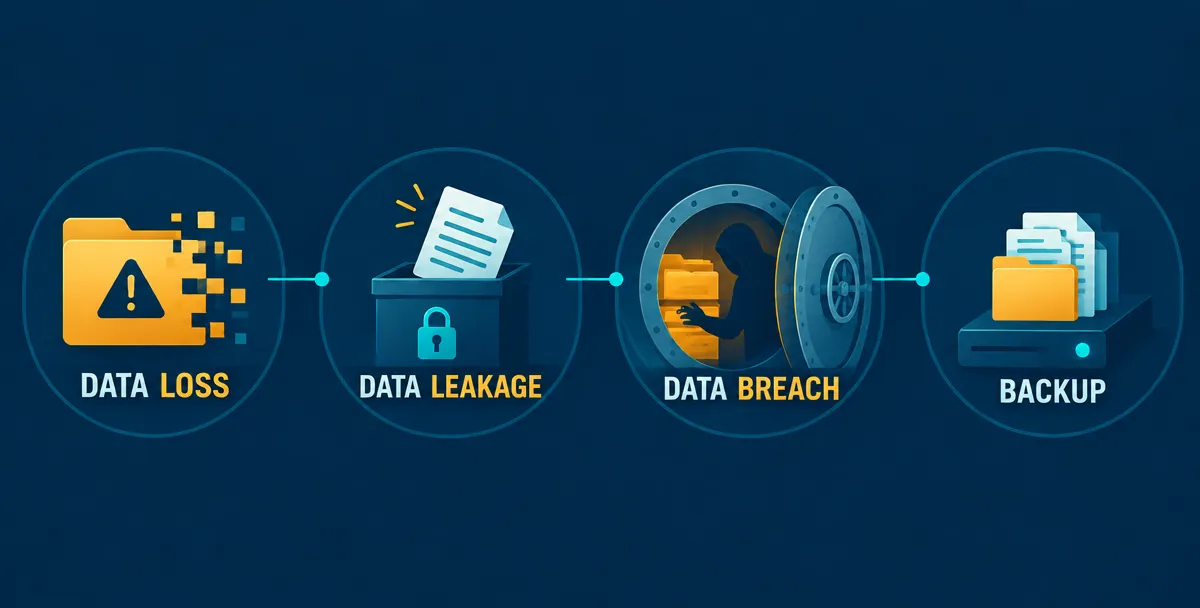
These four terms are related but not interchangeable, and mixing them up is the most common reason teams buy the wrong control. Data loss is about availability, data leakage and data breaches are about confidentiality, and backup is a recovery safeguard rather than an incident.
Term | What it means | Typical cause | Example | Primary control |
|---|---|---|---|---|
Data loss | Data becomes unavailable, corrupted, or destroyed | Accidental deletion, hardware failure, ransomware encryption | A failed drive wipes a shared project folder | Backup and recovery |
Data leakage | Sensitive data reaches people or systems that should not have it | Misdirected email, public file-sharing link, upload to an unapproved app | An employee sends a client contract to a personal cloud drive | DLP |
Data breach | Confirmed unauthorized access to or disclosure of data | Attacker intrusion, stolen credentials, insider theft | An attacker exports customer records from a compromised account | Detection, response, and preventive controls, including DLP |
Backup | A separately stored copy of data kept for recovery | Not an incident; it is a safeguard | A nightly snapshot stored in a separate environment | Recovery control, not a leak control |
DLP's main job is stopping leakage and exfiltration, which lowers the chance that an exposure becomes a breach. A backup cannot do this. It can restore a file that was deleted, but it does nothing for a file that was copied out the door, because the original stays intact and so does the exposure.
Sensitive data is any information whose exposure would cause legal, financial, or competitive harm, and DLP programs usually protect two groups of it. The first is regulated data. This includes personally identifiable information (PII) such as national ID numbers, home addresses, and dates of birth, which falls under laws like GDPR and U.S. state privacy statutes. It also includes protected health information (PHI) governed by HIPAA, and payment card data covered by PCI DSS.
The second group is business-critical data that no regulation names but that a competitor or attacker would value. That means source code, credentials, and secrets such as passwords, API keys, tokens, and private keys; intellectual property like designs and product roadmaps; and contracts and financial records, including pricing terms and board materials. The cost of getting this wrong is measurable. IBM's 2026 Cost of a Data Breach Report found healthcare, where PHI is the core asset, was the most expensive industry for breaches for the thirteenth year in a row, at an average of $6.64 million.
DLP can only protect what it can recognize, so organizations start by labeling data into tiers, commonly public, internal, confidential, and restricted. Those labels drive enforcement: a restricted file may be blocked from leaving the network, while an internal one only triggers a warning. The policy section later in this guide covers how to set those rules.
Data loss prevention matters because sensitive data can leave an organization through routine actions by authorized people, and perimeter tools like firewalls and antivirus are not built to inspect those actions. DLP closes that gap by watching the data itself, not just the network around it, so a risky copy, upload, or send can be flagged or blocked before it becomes an incident.
Data leaves an organization in three main ways, and a single DLP program has to handle all of them. The first is the accidental insider: someone emails a spreadsheet to the wrong recipient, attaches the wrong file, or shares a folder with "anyone with the link" access. There is no bad intent, but the exposure is the same.
The second is the malicious insider, such as a departing employee who copies a client list or source code to a personal drive before leaving. This person already has legitimate access, so access controls alone will not stop them.
The third is the external attacker. Once a criminal has stolen a password or compromised an account, the final step is almost always moving data out, and that step often looks like normal user activity. DLP does not prevent the intrusion itself. What it adds is a chance to catch exfiltration, the point where a security incident becomes a reportable breach.
Most DLP incidents come from a handful of everyday channels rather than exotic attacks. Personal email and unsanctioned cloud apps are the most common, because they are the fastest way to move a file, and they sit outside the company's logging. USB drives and other removable media let large volumes of data leave a managed laptop in seconds, often with no trace in network logs.
Screenshots and photos of screens are harder to control. DLP can restrict screenshots on managed endpoints, but a phone camera pointed at a monitor is beyond the reach of any software, which is why policy and training still matter. Misconfigured shares are a quieter risk: a public link on a document, an overly broad folder permission, or an open cloud storage bucket can expose data to anyone who finds it, without a single employee acting maliciously.
The newest path is AI chat tools. An employee who pastes customer records, contract language, or proprietary code into a public AI assistant has moved that data to a third party, usually without realizing it. DLP can inspect what is typed or pasted into approved and unapproved AI tools, and apply the same rules it uses for email.
The cost of a data exposure rises with the time it goes unnoticed, which is the core argument for monitoring how data moves. IBM's Cost of a Data Breach Report 2026 found that it took an average of 247 days to identify and contain a breach, and breaches with lifecycles longer than 200 days cost an average of $5.65 million, compared with $4.32 million for those contained sooner.
That gap of roughly $1.3 million is not a DLP-specific measurement, so it should not be read as a guaranteed saving. It does show why early visibility into data movement is valuable. DLP shortens the time between data leaving and someone noticing, which is the stretch of the timeline where costs compound.
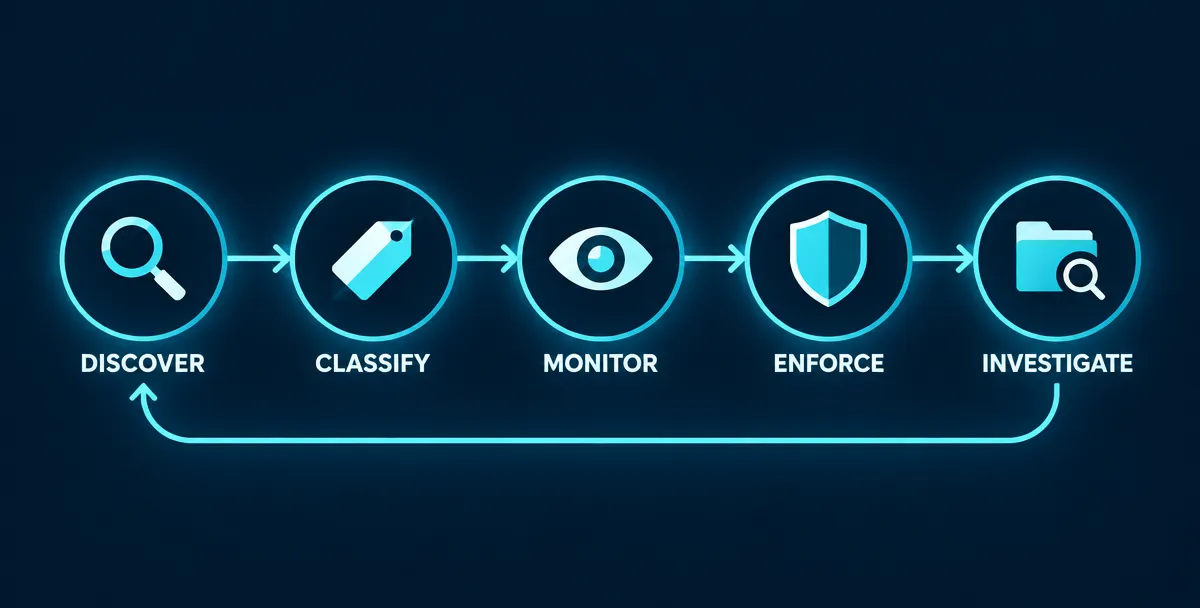
A data loss prevention system works by finding sensitive data, labeling it, watching how it moves, applying rules when something risky happens, and recording each event for review. In practice, those controls run through software agents on endpoints, network gateways, and integrations with email and cloud apps, all enforcing one shared set of policies.
Every DLP system follows the same five-step loop, whatever the vendor or product category.
Discovery scans the places data is stored, including laptops, file servers, databases, email archives, and cloud storage, to find out what sensitive data exists and where. This step matters more than it sounds, because scattered data is hard to defend. IBM's Cost of a Data Breach Report 2026 found that breaches involving data stored across multiple locations took the longest to identify and contain, at 256 days.
Classification then labels what discovery found, such as public, internal, confidential, or restricted, based on the content and the rules the organization has set. Monitoring watches that labeled data as it moves: in storage, across the network, and in use on a device. Enforcement applies a policy action when a rule is triggered. Investigation closes the loop by giving analysts the record they need to understand what happened and to tune the rules.
DLP identifies sensitive content in five main ways, and mature programs combine them because each has different strengths and weaknesses.
Pattern matching and regular expressions look for data with a predictable format, such as card numbers or national ID numbers. They are fast and easy to deploy, but they also flag harmless strings that happen to match the pattern, so they are often paired with a validation check. Fingerprinting creates a digital signature of a specific document, so DLP can recognize that file, or a portion of it, even after it has been renamed or partly copied.
Exact data match (EDM) works from a hashed copy of real records, such as a customer database, and flags only values that match those records. This produces far fewer false positives, though the reference data must be kept up to date. Contextual analysis looks past the content to the situation: who the user is, what device they are on, where the data is going, and what label it carries. Machine-learning classifiers recognize content types with no fixed pattern, such as contracts, resumes, or source code, but they need good training samples and regular review to stay accurate.
When a rule is triggered, DLP can respond at different levels of strictness, and most programs escalate gradually.
The lightest action is to log the event for later review. Next is an alert, which notifies the security team in real time. A user warning shows the employee a prompt, often asking for a business justification before the action continues. Stronger options include automatically encrypting the file, quarantining it so it is held for review instead of delivered, and blocking the action outright. Teams usually start in log and warn mode to see how many alerts a rule generates, then move to blocking only for rules they trust.
The incident management component handles investigation in a DLP system. It collects each policy violation into a case with the details an analyst needs: who was involved, which file or data was affected, which rule was triggered, the destination, and the time. Audit trails and forensic evidence support it, so the team can reconstruct what happened, decide whether it was an error or misconduct, and document the response for compliance. Findings from investigations also feed back into policy tuning, which is how false positives drop over time. Product documentation may call this component by different names, such as incident response, case management, or reporting, but the function is the same.
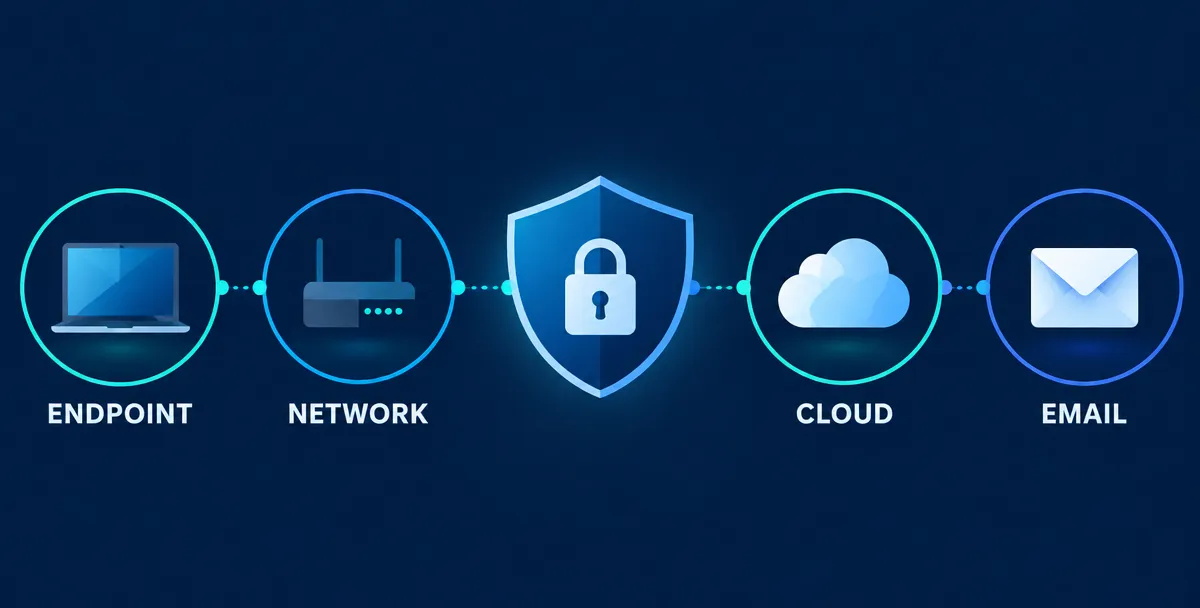
The main types of data loss prevention are endpoint, network, cloud, and email DLP, and each protects data in a different place. Endpoint DLP watches individual devices, network DLP inspects traffic in transit, cloud DLP covers data in SaaS and cloud infrastructure, and email DLP checks outbound messages. Enterprise programs typically combine several of them, because no single type sees every path data can take.
Endpoint DLP runs as software on laptops, desktops, and servers, and it controls what a user can do with data on that device. It can stop a file from being copied to a USB drive, uploaded through a browser, pasted into an unapproved app, printed, or captured in a screenshot. Because it sits on the device, it keeps working when the user is off the corporate network, which matters for remote and hybrid teams. The trade-offs are deployment and upkeep: agents must be installed and maintained on every device, and unmanaged personal devices are out of reach.
Network DLP inspects data moving across the network, usually at a gateway or proxy, and flags or blocks sensitive content as it leaves for the internet. It is effective at catching uploads to unapproved websites, unencrypted file transfers, and bulk data leaving through web traffic. Its main limitation is visibility. Encrypted traffic must be decrypted before it can be inspected, which adds complexity, and traffic from a device off the corporate network may never pass through the gateway.
Cloud DLP protects data that lives in cloud services and moves between them. For SaaS applications such as file-sharing, collaboration, and CRM platforms, it typically connects through APIs or inline controls to scan stored files, spot sensitive content, and restrict risky sharing, like a document set to "anyone with the link." For IaaS and PaaS environments, it focuses on cloud storage buckets, databases, and data pipelines, looking for sensitive data stored where it should not be or exposed to the wrong audience. The hard part is coverage: employees adopt new cloud apps faster than security teams can approve them, so unsanctioned services create blind spots until they are discovered.
Email DLP scans outbound messages and attachments for sensitive content and applies rules before the message is sent. It can warn a user about to send a customer list to an external address, encrypt a message containing payment data, or hold a message for approval. It also helps prevent simple mistakes, like autocomplete sending a message to the wrong recipient. Email DLP focuses on stopping data from leaving, not on detecting phishing or fraudulent requests, which fall under separate email security controls.
Printer and removable-media controls restrict what can be sent to printers, USB drives, external disks, and other physical outputs. They are often delivered as part of endpoint DLP rather than as a separate product. They are worth including because physical channels leave little trace in network logs. IBM's Cost of a Data Breach Report 2026 found that breaches involving removable media took an average of 258 days to identify and contain, among the longest of any attack vector it measured. The usual policy approach is to block removable media by default, allow approved encrypted devices, and log every transfer.
Type | Where it sits | What it catches | Blind spots |
|---|---|---|---|
Endpoint DLP | Agent on laptops, desktops, and servers | Copying to USB, uploads, pasting, printing, screenshots on managed devices | Unmanaged and personal devices; agent upkeep |
Network DLP | Gateway or proxy on the network | Uploads to unapproved sites, unencrypted transfers, bulk outbound data | Encrypted traffic without inspection; off-network devices |
Cloud DLP | API or inline integration with SaaS, IaaS, and PaaS | Risky sharing, sensitive files in cloud storage, exposed buckets and databases | Unsanctioned apps not yet discovered |
Email DLP | Mail gateway or mail platform integration | Sensitive attachments, misdirected recipients, unencrypted sensitive messages | Phishing and fraud (other tools); data sent through non-email channels |
Printer and removable-media controls | Endpoint agent or device policy | Transfers to USB, external drives, and printers | Phone photos of screens and paper; devices outside management |
The right data loss prevention solution covers where your sensitive data actually lives, classifies it accurately, produces alerts your team can act on, and fits the tools you already run. Feature lists matter less than those four things, because a DLP platform that generates thousands of false alerts or misses an entire channel usually ends up in monitor-only mode and gets ignored.
DLP tools come in two shapes: dedicated DLP products, and DLP features built into larger security or productivity platforms such as email suites, cloud security services, and endpoint protection.
A standalone DLP tool usually offers deeper detection, finer policy control, and consistent rules across endpoints, network, and cloud from one console. The trade-offs are cost, deployment effort, and the need for dedicated staff to tune it. DLP built into a broader platform is typically quicker to switch on, cheaper to add, and managed in a console the team already uses. Its trade-offs are narrower coverage, often limited to that platform's own apps, and fewer options for custom detection.
A practical rule: if most of your sensitive data sits inside one ecosystem, built-in DLP can be enough to start. If data is spread across many apps, devices, and clouds, or if regulatory pressure demands detailed evidence, a standalone or multi-channel platform is usually the safer investment.
Evaluate any DLP software against these five questions, and test them with your own data in a pilot, not a vendor demo.
Coverage. Does it cover every channel from your exposure map: endpoints, email, web, SaaS, cloud storage, removable media, and AI tools? IBM's Cost of a Data Breach Report 2026 found that 43% of AI-related security incidents involved shadow AI, up from 20% the year before, so a tool that cannot see employee use of AI services leaves a growing gap.
Classification accuracy. Can it use exact data match, fingerprinting, and contextual rules, not just patterns? Ask for measured detection rates on your real documents.
False-positive handling. How easy is it to tune rules, add exceptions, and see why an alert fired? Poor tuning is the most common reason DLP deployments stall.
Integrations. Does it connect to your identity system, SIEM, ticketing, and cloud apps, and does it work on your operating systems?
Reporting and evidence. Can it produce incident cases, audit trails, and compliance reports without manual work?
Also confirm the basics that rarely appear in demos: how much performance impact the endpoint agent has, how data is handled and stored by the vendor, and what support looks like after the contract is signed.
Managed DLP services make sense when you need the protection but lack the people to run it. DLP is not a set-and-forget product. Someone must tune policies, triage alerts, investigate incidents, and review reports every week, and a small security team can get buried by that workload. A managed model shifts that daily work to specialists while your team keeps ownership of policy decisions and risk calls.
It is also a sensible route when you are starting from nothing, since an experienced partner can help with data discovery, classification, and a monitor-first rollout before enforcement begins. If you are weighing this option, Femto Security can help you scope the program and decide which controls to prioritize.
A data loss prevention policy is built in four moves: inventory and classify your data, write specific rules for how each class may move, assign owners and an exceptions process, and tie it into your wider security governance. The policy sets the intent in plain language, and the DLP software enforces it as technical rules. Starting with the software instead of the policy is the usual reason programs generate noise and get ignored.
A DLP policy can only protect data the organization has identified. Begin by listing the data types you hold, such as customer records, employee files, financial data, source code, credentials, and contracts, along with where each one is stored and which teams use it. Then assign each type to a classification tier. Four tiers are enough for most organizations: public, internal, confidential, and restricted.
Keep the scheme small. If employees cannot remember the difference between tiers, labeling becomes inconsistent and enforcement suffers. For each tier, write one sentence on what belongs in it and one on how it may be shared. Regulated data, such as payment card data or health records, should sit in the top tier by default, since the legal exposure is highest.
An enforceable DLP rule names the data, the channel, the destination, and the action, so both people and systems can tell whether it was broken. Vague statements like "do not share sensitive information externally" cannot be enforced. A well-formed rule can.
Take the example "customer records cannot be emailed to personal domains." Written out as a rule, it looks like this:
Element | Specification |
|---|---|
Data | Content matching customer records, detected by exact data match against the CRM export, or any file labeled Confidential or Restricted |
Channel | Outbound email and attachments |
Destination | Free personal webmail domains and any address outside approved partner domains |
Action | Block and show the sender a message explaining why and how to share the data securely |
Initial mode | Log only for the first two to four weeks, then warn, then block |
Exception | Approved by the data owner, time-limited, and logged |
Notice the last two rows. Starting in log-only mode shows how often legitimate work would be caught before anyone is blocked, helping you avoid breaking critical workflows on day one. Write each rule this way, then test it on a small group before rolling it out widely.
Policy gaps now extend beyond email. IBM's Cost of a Data Breach Report 2026 found that close to seven in ten breached organizations lacked governance policies for managing AI or spotting unapproved use. A DLP policy should name AI tools explicitly: which are approved, which data classes may never be entered into them, and what happens when a rule is triggered.
Every policy needs people attached to it. Three roles cover most organizations. A policy owner, usually in security or compliance, maintains the policy and approves changes. Data owners in the business decide who needs access to their data and approve exceptions. Security operations triage alerts and tune rules.
Exceptions are inevitable, because some legitimate workflows will conflict with a rule. Handle them with a documented request, approval from the data owner, a defined expiry date, and a record in the DLP system, so an exception never becomes a permanent hole.
Escalation should match severity. A first-time accidental violation usually calls for an automatic warning and a short coaching message. Repeated violations go to the employee's manager. Suspected deliberate theft goes to security, HR, and legal together, and evidence must be preserved from the start. Check local employment and privacy law before monitoring employee activity, since requirements differ by country and region.
A DLP policy is one part of a larger information security framework, and it should reference that framework instead of restating it. Acceptable use, access control, incident response, and retention rules belong in your overall information security policy. The DLP policy then covers only what is specific to it: data classes, approved channels, rule actions, exceptions, and review cadence. Keeping the two aligned avoids contradictions, such as a DLP rule that conflicts with a retention requirement, and keeps each document short enough that people read it.
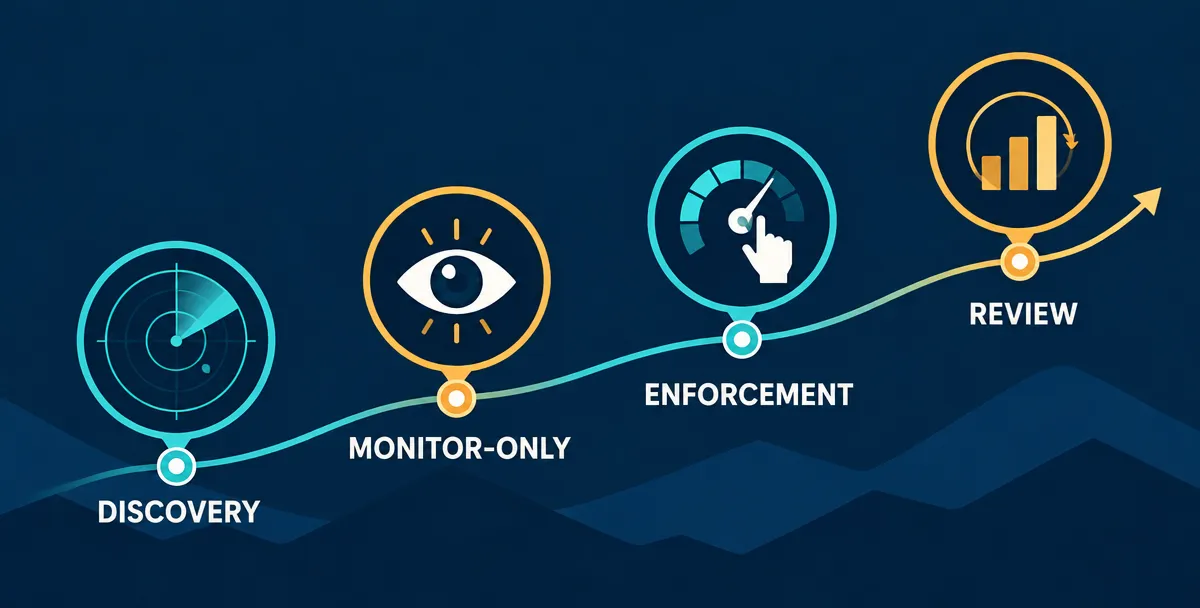
A sound data loss prevention strategy rolls out in four phases: discover and classify your data, run policies in monitor-only mode, tune and then enforce, and finally measure and review. The order matters. Programs that jump straight to blocking tend to disrupt legitimate work, generate alert fatigue, and lose business support before they prove their value.
The first phase answers one question: what sensitive data do we have, and where does it live? Scan endpoints, file servers, databases, email, and cloud storage to build a data map, then apply the classification tiers from your policy. Focus first on the data that would cause the most damage if exposed, such as regulated customer records, payment data, source code, and credentials, instead of trying to label everything at once.
Pair the scan with interviews. Business teams know which spreadsheets and shared folders actually carry sensitive data, and automated discovery often misses informal workflows. The output of this phase should be a short list of priority data types, the channels they travel through, and an owner for each. For a mid-sized organization, a few weeks is a reasonable starting point, though scope and data sprawl will move that.
Deploy your first policies in monitor-only mode, where DLP records events but does not block or warn anyone. This phase shows how data really moves, which is often different from how people think it moves. It also reveals how many alerts each rule would generate and how many would be false positives.
Start with a small set of high-value rules, such as sensitive data sent to personal email or uploaded to unapproved cloud storage. Review the results weekly with the security team and the relevant data owners. A reasonable window is several weeks, long enough to capture month-end and other periodic workflows, since those are where surprises hide.
Once a rule produces alerts the team trusts, tune it. Narrow patterns that fire on harmless content, add exact data match for high-value records, and build exceptions for approved workflows. Then enforce in steps: first show a warning that asks the user for a justification, then block only when the risk is clear.
Roll enforcement out by group or department rather than company-wide, and tell people before it starts. A short explanation of what is changing and how to request an exception does more to prevent frustration than any technical setting. Add rules gradually, so you can tune each one before the next goes live.
A DLP program is never finished, because data, tools, and people keep changing. Track a small set of measures that show whether the program is working: alert volume, the share of alerts that turn out to be genuine, time to investigate and close incidents, repeat violations, and the number of exceptions open. If alerts rise while genuine incidents stay flat, rules need tuning. If incidents fall but exceptions climb, the policy may be too strict for how people really work.
Schedule a quarterly review with security, compliance, and business data owners, and revisit the policy whenever the organization adopts a new cloud service, AI tool, or data type. This is also the point to extend coverage to channels left out of earlier phases.
Most DLP programs that stall fail for organizational reasons, not technical ones. Three patterns account for most of them.
Too many rules at once. Launching dozens of policies on day one buries the team in alerts and makes it impossible to tell which rule caused which problem. Start with a handful and expand.
Ignoring false positives. If analysts see the same meaningless alerts every day, they stop looking, and real incidents get lost in the noise. Treat each recurring false positive as a defect in the rule and fix it.
No business-owner buy-in. When data owners in finance, HR, engineering, and sales don't understand or support a rule, they work around it, and exceptions pile up. Involve them from the discovery phase, give them a say in what is protected and how, and share results with them regularly.
The most effective data loss prevention best practices are to limit who can reach sensitive data, encrypt it, train people to handle it correctly, map your controls to a recognized framework such as NIST, and keep recoverable backups alongside DLP. No single control prevents data loss on its own. DLP software enforces the rules, but these practices decide whether the rules are sound in the first place.
The less data a person can reach, the less data they can leak, so start by narrowing access. Least privilege means giving each user, service, and application only the access its job requires, and reviewing that access regularly as roles change. In practice, that means role-based access to sensitive folders and databases, removing access promptly when someone changes teams or leaves, and keeping a close watch on privileged accounts, which can reach the most data.
DLP and access control work as a pair. Access control decides who can open the data, and DLP governs what they can do with it once they have it. NIST SP 800-53 covers both ideas: AC-6 is the Least Privilege control, and AC-4 is Information Flow Enforcement, which governs how information may move between systems.
Encryption protects data even when other controls fail. If a laptop is lost or a storage bucket is exposed, properly encrypted data is far harder to use. Encrypt sensitive data where it is stored, such as databases, laptops, and backups, and where it travels, such as email, file transfers, and application traffic, and manage the keys separately from the data they protect.
Tokenization goes a step further for high-risk fields like payment card numbers. It replaces the real value with a meaningless token, so systems that only need a reference never touch the actual data, which also shrinks the number of places DLP has to watch.
This is a common gap. IBM's Cost of a Data Breach Report 2026 found that only 37% of breached organizations had encrypted sensitive data both at rest and in transit when the breach occurred. One caution: encrypted traffic can hide data from inspection tools, so make sure your DLP can inspect content at the endpoint or through a gateway that can decrypt it. NIST's control AC-4(4), Flow Control of Encrypted Information, addresses exactly this problem.
DLP catches mistakes after the fact, but security awareness training reduces how often they happen. A blocked email teaches someone only that something went wrong, not why, so pair enforcement messages with short explanations and a clear route to the approved way of doing the task. Keep training specific to the data people handle: finance teams need to know how to share payment data, engineers need rules for code and credentials, and everyone needs guidance on AI tools.
Track repeat alerts by team to find where training or a poorly designed rule is the real problem. Employees who see DLP as a helpful guardrail report problems early, while those who see it as surveillance look for workarounds.
Mapping your DLP program to NIST SP 800-53 gives it a recognized structure and makes audits easier. The most relevant controls for data loss prevention fall into a few families:
Access Control (AC): AC-6 for least privilege, AC-4 for information flow enforcement, and AC-4(15) for detection of unsanctioned information.
System and Communications Protection (SC): SC-28 for protecting information at rest, along with controls governing the protection of data in transit.
Contingency Planning (CP): CP-9 for system backup, which supports recovery.
Awareness and Training (AT): the training and awareness controls that support user behavior.
Treat this list as a starting map, not a full compliance checklist. Control selection depends on your system's risk level and baseline, so confirm the exact control IDs and titles against the current NIST SP 800-53 Rev. 5 publication before you cite them in audit documentation or client deliverables.
Preventing data loss takes two layers working together. DLP and the practices above keep sensitive data from leaking out, while backup and recovery keep data from being lost or destroyed. They cover different failures: a backup cannot undo a leak, and DLP cannot restore a file that ransomware has encrypted.
For the recovery layer, keep multiple copies of critical data, store at least one copy separately from production systems, protect backups with encryption and restricted access, and test restores on a schedule, since a backup that has never been restored is an assumption. Define how quickly each system must come back and how much data loss is acceptable, then design backups to meet those targets. This is the territory of business continuity and disaster recovery planning, covered in our guide to business continuity and disaster recovery.
Data loss prevention helps organizations meet data protection laws such as GDPR, HIPAA, and PCI DSS by enforcing the safeguards those rules require. It finds regulated data, controls how it moves, and records what happened. None of these regimes requires you to buy a DLP product by name. They require outcomes such as secure processing, access control, and timely breach reporting, and DLP is one practical way to achieve them.
GDPR does not mention DLP, but two of its articles map closely to what DLP does. Article 32 requires "appropriate technical and organizational measures" to secure personal data, and it names measures such as encryption, pseudonymization, and ongoing confidentiality of processing systems. DLP supports this by finding personal data across systems, restricting where it can go, and blocking or flagging unauthorized transfers.
Article 33 covers breach notification. Controllers must notify the supervisory authority without undue delay and, where feasible, within 72 hours of becoming aware of a personal data breach. That clock is hard to meet if you cannot tell what data left or when. DLP incident records give investigators a starting point for scoping a breach, and they support the documentation duty that applies even to breaches that are not reported. For the full picture of the regulation, see our guide on what is GDPR.
HIPAA. The HIPAA Security Rule protects electronic protected health information through administrative, physical, and technical safeguards. The technical safeguards in 45 CFR 164.312 cover access control, audit controls, integrity, person or entity authentication, and transmission security. DLP supports access control and audit controls by monitoring how ePHI is handled, and transmission security by flagging unprotected ePHI sent outside the organization. Encryption appears in the rule as an addressable specification, which means you must implement it or document a reasoned alternative. Spoken and paper records fall under the separate Privacy Rule, not the Security Rule.
PCI DSS. The standard organizes its controls into 12 requirements, and two bear directly on DLP. Requirement 3 covers protecting stored account data, and Requirement 4 covers protecting cardholder data with strong cryptography during transmission over open, public networks. A practical DLP use here is detecting card numbers in places they should not be. For example, PCI DSS 4.0.1 prohibits sending unprotected primary account numbers through end-user messaging such as email, SMS, or chat, and email DLP can catch exactly that.
For US organizations, the compliance picture is a patchwork: sector rules like HIPAA, industry standards like PCI DSS, and state privacy and breach notification laws. The financial stakes are high. IBM's Cost of a Data Breach Report 2026 found that the average US breach cost $11.5 million, more than double the global average. A DLP program tied to your classification tiers lets you apply one set of controls across these overlapping rules instead of managing each separately.
In the UAE, the main federal law is Federal Decree-Law No. 45 of 2021 on the Protection of Personal Data (PDPL). It is in force from 2 January 2022 and requires controllers to notify the UAE Data Office and affected individuals of breaches that threaten data subjects' privacy. It applies to businesses operating in the UAE, but not to the DIFC and ADGM free zones, which have their own data protection regulations. Some procedural details depend on executive regulations and regulator guidance that are still developing, so confirm current requirements before relying on them. Our guide to UAE data protection law covers the PDPL, DIFC, and ADGM regimes in detail, and our overview of UAE cybersecurity regulations covers the wider rulebook. Organizations serving customers in several regions should expect to meet more than one regime at once, which is another reason to build DLP rules around data classes instead of individual laws.
AI data loss prevention is the practice of stopping sensitive data from leaving your organization through AI tools, mainly chatbots, copilots, and AI features inside other apps. The core risk is simple: an employee pastes or uploads something confidential into a service the company does not control. Because it looks like ordinary web activity, it often slips past controls built for email and file transfers.
Most AI tools exfiltration is not an attack. It is a helpful employee trying to work faster. A developer pastes proprietary source code to debug it, an analyst uploads a customer spreadsheet to summarize it, or a lawyer pastes contract language to simplify it. Each action sends regulated or confidential data to a third-party service, often through a personal account with no business agreement in place.
Traditional DLP struggles here for a few reasons. The traffic is encrypted and travels over normal web connections, the data is often typed or pasted into a browser window instead of attached as a file, and new AI tools and built-in AI features appear faster than allowlists can be updated. What the provider does with submitted data, including whether it is stored or used to improve models, depends on the service, the plan, and the settings, so a company cannot assume any consumer tool is safe for sensitive inputs.
The cost of getting this wrong is already visible. IBM's Cost of a Data Breach Report 2026 found that shadow AI incidents, meaning breaches tied to employees using unapproved AI tools, averaged $5.39 million, above the $4.99 million global average for all breaches.
Three controls work together, and each covers a gap the others leave.
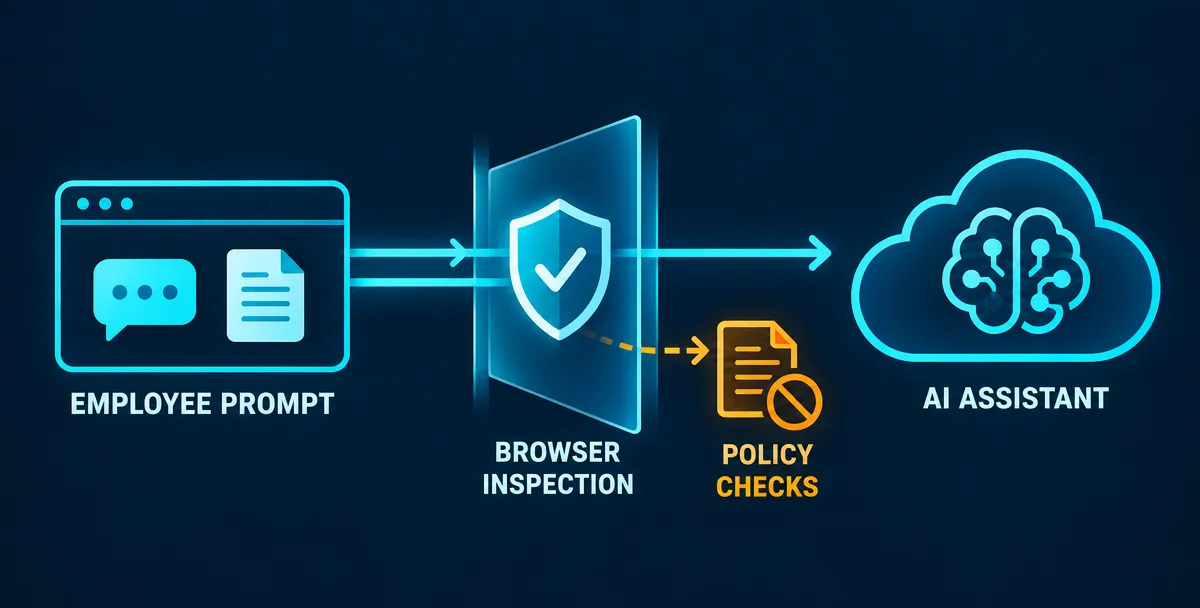
Browser-level inspection checks content when a user pastes text, uploads a file, or submits a prompt, before it leaves the browser. This is where encrypted web traffic becomes readable, so DLP rules can detect card numbers, credentials, customer records, or source code and then warn, redact, or block. It works best on managed browsers and devices.
Approved-tool allowlists define which AI services employees may use for work. The most effective approach pairs the allowlist with a good sanctioned option, such as an enterprise AI tool with contractual data protections. If the approved tool is poor or missing, people route around the rules, and the shadow AI problem returns. Unapproved tools can be blocked outright or set to coach users toward the approved one.
Prompt-content policies state what must never be entered into any AI tool, approved or not. At minimum, name the restricted classification tier, credentials and secrets, regulated personal and health data, and unreleased intellectual property. Turn each into a DLP rule so the policy is enforced, not just published, and tell staff why.
Expect limits. Personal devices outside management stay out of reach, new tools keep appearing, and inspecting what people type raises privacy questions, so involve legal and HR before enabling prompt monitoring.
This section covers the data loss side of AI use. The wider security problems, such as testing models for prompt injection and data leakage, and controlling what autonomous agents can access, are separate topics. For those, see our guides on LLM security testing and AI agent security.
Data loss prevention cannot stop every leak, and most failed programs fail for operational reasons rather than technical ones. DLP misses data moved through channels it cannot inspect, cannot control what happens off-screen, and will not reliably stop a determined insider. Programs also stall when alerts overwhelm the team, rules block legitimate work, or DLP is bought as a product instead of run as an ongoing program.
Knowing the limits lets you design compensating controls, so it helps to be direct about them.
Encrypted covert channels. DLP can only judge what it can read. If data is encrypted before it reaches the inspection point, or hidden inside another file type or protocol, content rules may never see it. Someone who encrypts a file with a personal tool and uploads it, or who tucks data into an innocuous-looking file, can slip past content inspection. Endpoint DLP that inspects data before encryption, plus controls on unapproved encryption tools and unusual upload volumes, narrows this gap but does not close it.
Photographing screens. No software controls a phone camera pointed at a monitor, or a handwritten note. Technical measures can restrict screenshots and printing on managed devices, but the physical channel stays open. The practical answer is policy, training, restricted access to the most sensitive data, and in high-risk areas, physical controls such as limits on personal devices.
Determined insiders. A person with legitimate access and enough patience can find a path DLP does not cover, such as retyping data, splitting it into small pieces, or using an unmonitored device. DLP raises the effort and the odds of detection, and it creates an audit trail that supports investigation and deterrence. It works best alongside least-privilege access, activity monitoring, and sound offboarding, not as the only line of defense.
Two opposite mistakes can sink a program. If rules are too broad, analysts drown in low-value alerts, start ignoring them, and real incidents get buried. If enforcement is too strict, people are blocked from doing legitimate work, complain to their managers, and look for workarounds such as personal devices and unsanctioned tools, which moves the data somewhere you cannot see at all.
The fix is to treat every noisy rule as a defect. Review alert volume and the share of alerts that prove genuine on a regular schedule. Tighten patterns, add exact data match for the highest-value records, create documented exceptions for approved workflows, and move rules from log to warn to block only once they perform. When a blocked user can see why the action was stopped and how to do it the approved way, they tend to adapt rather than resist.
The most common strategic mistake is believing the software is the solution. DLP depends on decisions the software cannot make: what data matters, who owns it, which workflows are legitimate, and who responds when an alert fires. Without data owners, a classification scheme, and staff time for tuning and investigation, even a strong product ends up in permanent monitor-only mode.
Treat DLP as a program with an owner, a roadmap, and regular reviews, as outlined in the implementation plan above. Budget for the people and process around the tool, not just the license. Revisit the program whenever the business adopts a new cloud service, AI tool, or type of regulated data, because the risk map changes whenever the way people work changes.
Data loss prevention works when it is run as a program, not bought as a product: know what data you hold, write rules people can follow, start in monitor-only mode, and tune before you enforce. It will not stop every leak, but it shortens the time between data leaving and someone noticing, which is where breach costs pile up. Your next step is to list your five most sensitive data types and where each one lives. That list is the starting point for your first policy, and if you want help scoping it, talk to the Femto Security team.
No. DLP stops sensitive data from leaking or being misused, while backup restores data that has been deleted, corrupted, or encrypted. A backup cannot undo a leak, because the original stays intact, and DLP cannot recover a lost file. Most organizations need both.
Not on its own. Ransomware defense relies on endpoint protection, patching, and backups. DLP helps with one part of modern ransomware: data theft. Many attacks steal data before encrypting it, and DLP can flag or block unusual bulk transfers to external destinations. It reduces the risk of data leaks but does not prevent encryption.
Small businesses that handle regulated or confidential data, such as customer records, payment data, or health information, benefit from DLP, though not always a dedicated product. Built-in DLP features in email and cloud suites, clear policies, and access controls often provide a practical starting point before investing in a full platform.
It depends on scope. A basic monitor-only rollout on one or two channels, such as email and endpoints, can start within weeks. Reaching tuned enforcement across all channels usually takes months, because discovery, classification, and rule tuning take time. Treat the timeline as a range set by data complexity, not a fixed number.
Yes, to a degree. Browser-level and endpoint DLP can inspect text pasted or files uploaded to AI tools and warn, redact, or block based on content rules. Network-only DLP sees less because traffic is encrypted. Coverage depends on managed devices and browsers, and personal devices remain a blind spot.