
How to Implement a Privileged Access Management System
Continue Reading
October 27, 2026
Learn how API security testing works: OWASP API Top 10 coverage, an 8-step method, a copy-ready checklist, sample test cases, and CI/CD placement for teams.

October 23, 2026
Learn what cloud security posture management (CSPM) is, how it works, key capabilities to demand, and a six-phase rollout plan for AWS, Azure, and GCP.
October 19, 2026
What is MCP security explained: the top risks, tool poisoning & prompt injection attacks, OAuth 2.1 authorization, pass/fail checklist to secure MCP servers.
A privileged access management (PAM) system is a set of controls and tools that secures, limits. It records the use of accounts with elevated permissions, such as administrator, root, service, and cloud admin accounts. It stores those credentials in a vault, grants access only when a task requires it, and logs each session.
This matters because a privileged account is the shortest path from one stolen login to full control of an environment. Verizon's 2026 DBIR shows credential abuse sitting at 39% of breaches when you count every stage of the attack, even though it no longer ranks first as the initial way in. An attacker holding an admin credential can turn off logging, move between systems, and reach backups, which is why privileged access gets its own control layer instead of being treated like any other login.
This guide explains how a PAM system works, how it differs from identity & access management, and where just-in-time access fits. It then walks through a phased rollout, the policy you need, and the audit evidence that keeps the program defensible.
A privileged access management system combines the software, policies, and processes an organization uses to control who can use elevated accounts, when, and under what oversight. It sits between people (or applications) and the systems they administer, approving, limiting, and recording each privileged action.
In plain language, PAM is a checkpoint for powerful accounts. Instead of admins keeping shared passwords or permanent admin rights, they request access, the system issues or injects a credential for one task, and the session is logged. When the task ends, the access ends.
The NIST-aligned version builds on two terms.
NIST's glossary describes a privileged user as someone trusted to carry out security-relevant functions that standard users aren't permitted to perform, and a privileged account as a system account holding that user's authorizations. NIST's NCCoE frames PAM as a domain within identity and access management that focuses on monitoring and controlling the use of those accounts. Put together, PAM is the discipline of governing accounts with security-relevant authority, whether a person or a program holds them.
Privilege is defined by what an account can do, not by the job title of whoever uses it. Six account types cover most environments:
Account Type | What It Can Do | Typical Weakness |
|---|---|---|
Administrator | Manage systems, users, and settings | Shared or permanent admin rights |
Service | Run background services and jobs | Long-lived passwords that are rarely rotated |
Application | Connect an app to a database or API | Credentials hard-coded in scripts or configurations |
Root / Superuser | Full control of an operating system | Used for routine work instead of emergencies |
Cloud | Administer cloud consoles, roles, keys, and tokens | Over-broad roles and unrotated access keys |
Emergency (Break-Glass) | Restore access when normal paths fail | Left active and unmonitored |

"Privileged access manager" is used in two ways, and mixing them up causes real planning mistakes. As a tool, it vaults credentials, brokers sessions, and issues just-in-time access. As a role, it is the person or team that owns the program: setting policy, approving exceptions, running access reviews, and tuning the tool.
A tool without an owner decays. New privileged accounts never get onboarded, reviews lapse, and exceptions pile up. The PAM administrator is also among the most privileged users in the company, so that role needs its own controls, such as dual approval for changes and session monitoring.
Privileged identity management (PIM), privileged access management, and privileged account management are often used interchangeably, and no universal definition separates them. A practical split is that the identity side governs who holds privilege and when elevation is granted (role activation, approvals, time limits). In contrast, the access side governs what happens during the session (brokering, recording, credential injection). Some cloud directory services offer role-elevation features under the PIM label, and they cover the first half well but not necessarily the second.
When comparing products or writing requirements, ignore the label and check capabilities: discovery, vaulting, session control, just-in-time elevation, and audit reporting.
Privileged access management matters because the accounts it protects determine how far an attacker can go after a single compromise. A stolen standard login exposes one person's data, while a stolen admin credential can expose the whole environment. PAM limits, monitors, and time-boxes that access so one mistake doesn't become a company-wide incident.
Attackers go after privileged credentials because they turn a small foothold into broad control. Australia's cyber agency notes that privileged access lets attackers spread malware across many machines and create new accounts, including privileged ones. A regular user account can't do either.
In practice, an attacker who lands on an ordinary workstation looks for cached admin logins, service account passwords stored in scripts, and shared administrator credentials, then uses them to reach servers and identity systems. PAM removes much of that material. Credentials typically sit in a vault, get rotated, and are injected into sessions instead of being typed or stored where malware can read them.
Ransomware becomes an outage instead of an incident when the attacker can move laterally to the systems that matter. New Zealand's CERT describes attackers hunting for a path to domain administrator privileges and key infrastructure such as backup servers before they encrypt anything. Timing matters too: Verizon's 2026 DBIR reports that about half of the ransomware victims it examined had a credential or infostealer event in the 95 days before the attack. Stolen credentials often sit waiting long before they're used.
PAM breaks that chain in four ways:
Unique, rotated credentials mean a password captured on one system doesn't open the next.
Just-in-time access removes standing admin sessions an attacker could hijack.
Tiered access keeps a compromised workstation from reaching domain controllers or backups.
Session recording shows what the intruder did.
PAM does not stop the initial break-in, and the DBIR now ranks vulnerability exploitation as the top entry method. It limits what an attacker can do next. For a full walkthrough of how these attacks unfold, see our guide on how ransomware attacks work.
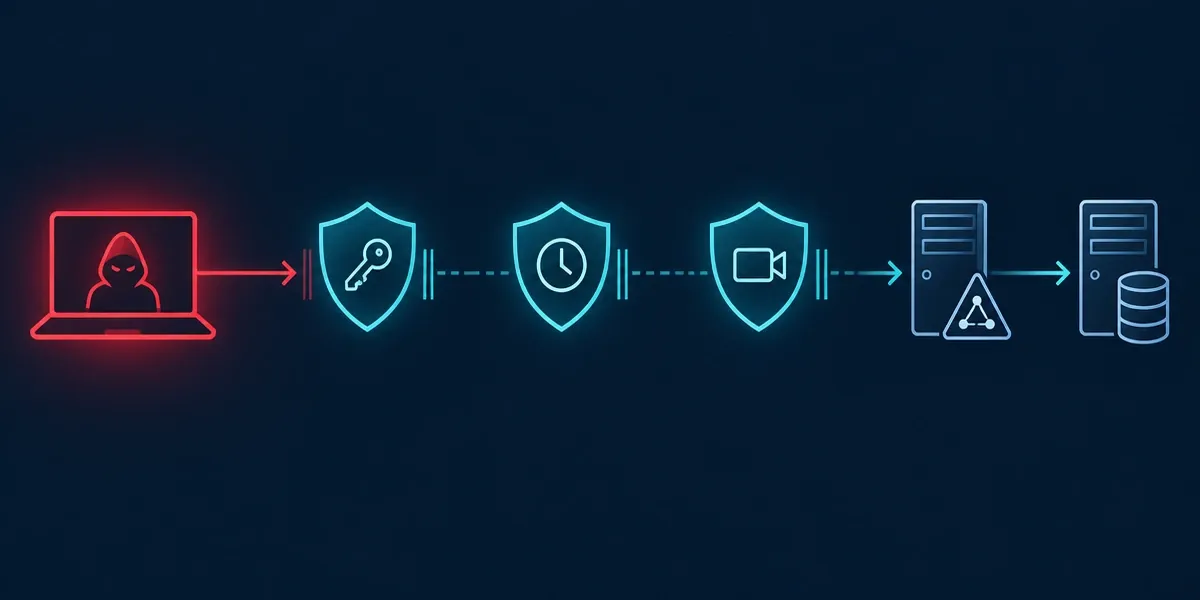
PAM matters for insiders and vendors because it replaces implicit trust with accountability: every privileged session is tied to a named person, approved for a reason, and recorded. Vendor exposure is significant: Verizon found that 48% of breaches involved a third party, up from 30% the previous year.
Contractors, managed service providers, and software vendors often hold admin access through a shared password or a permanent VPN account that nobody reviews. With PAM, you can schedule vendor access, limit it to specific systems, and end it automatically when the work is done. For employees, whether malicious or simply careless (an admin running a destructive command on the wrong server), approval workflows and recorded sessions deter misuse and speed investigations. Recording alone won't stop a determined insider who has legitimate approval, so the most sensitive actions should also require a second approver.
A PAM system works by placing a controlled layer between users (or applications) and privileged accounts. It finds those accounts, locks their credentials in a vault, grants access only through approved and recorded sessions, and reports on everything that happens. NIST's NCCoE describes the aim as protecting, monitoring, and auditing privileged account access to reduce the chance of data destruction, data exfiltration, ransomware attacks, and system failure. The five stages below run as a continuous cycle, not a one-time project.
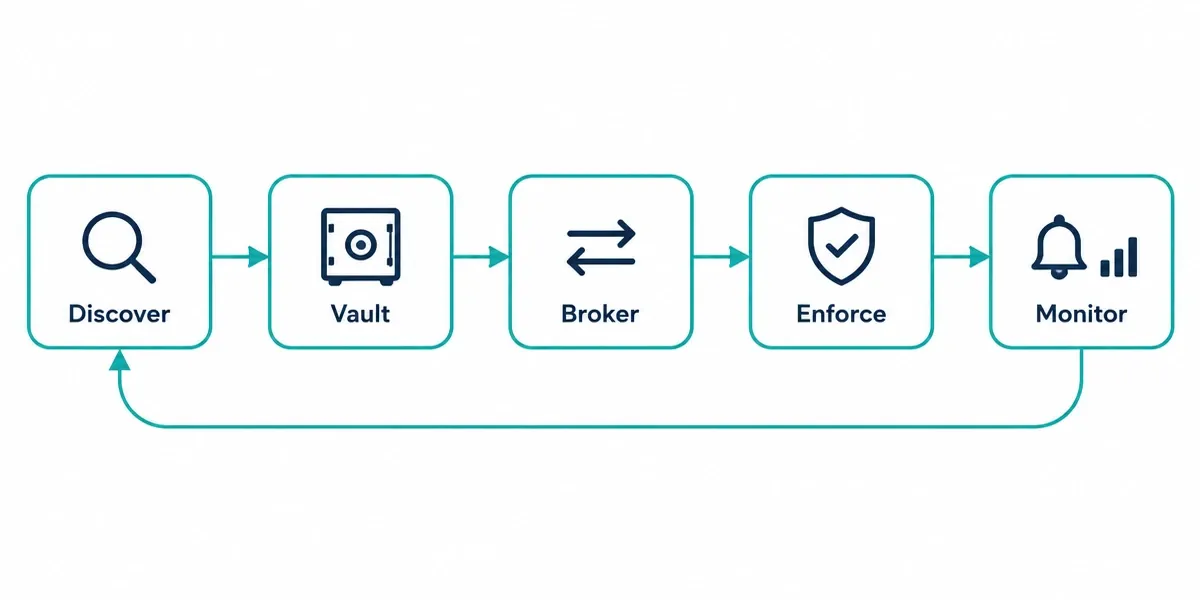
You can't protect accounts you don't know exist, so a PAM system starts with discovery. Scans identify administrator, service, root, and cloud accounts across servers, directories, databases, and cloud platforms, and flag risky conditions: shared accounts, accounts with no owner, passwords that never change, and service accounts that allow interactive login. The output is an inventory showing each account's owner, system, privilege level, and last credential change. Discovery must repeat because new servers and cloud roles appear constantly, and the accounts most often missed are service accounts and credentials embedded in applications.
The vault is an encrypted store for privileged credentials. Instead of knowing a password, an admin requests access, and the PAM system supplies the credential, often injecting it straight into the session so the person never sees it. Rotation closes the loop: after each use, or on a schedule, the system changes the target password and stores the new one, so a copied or leaked credential stops working. You can vault SSH keys, API keys, and tokens the same way. The trade-off is that the vault itself becomes a high-value target, so it needs strong authentication, high availability, and a tested emergency-access procedure.
With session brokering, the user connects to the PAM system, and the PAM system opens the connection to the target, usually through a proxy or jump host. The admin's workstation never holds the credential, and the target sees the PAM system rather than the user's device. The broker can record each session, including commands and sometimes screen video, tied to a named person, which gives auditors and investigators a replayable trail. Recording adds storage and privacy considerations, and some legacy applications are awkward to proxy, so decide which sessions need full recording and which need command logs only.
Least privilege means granting only the access a task needs, for only as long as it needs it, and NIST SP 800-53 lists it as a core access control. A PAM system applies it through role-based access to specific systems, approval workflows that require a manager or system owner to sign off (often with a ticket reference), time limits on access, and command filtering that blocks high-risk actions on sensitive servers. The most sensitive systems, such as domain controllers or production databases, can require a second approver. Time-limited elevation is explained in detail later in this guide.
Monitoring turns the earlier stages into evidence: who accessed what, when, why, and what they did. A PAM system can alert on risky events, such as access outside an approval window, use of a vaulted account without checking it out, failed password rotations, or unusual commands. Forwarding those logs to a SIEM lets the security operations team correlate privileged activity with other signals. The same data produces access-review reports and audit evidence. Accounts discovered during monitoring that aren't yet vaulted go back to the first stage, which is what makes this a cycle. Alerts only help if someone owns triage, so assign that responsibility before go-live.
Just-in-time (JIT) privileged access grants elevated rights only when a task needs them and removes those rights automatically when the task ends or a timer expires. It replaces standing admin permissions, which stay active around the clock, with short-lived elevation tied to a request, approval, and time limit. CISA's Zero Trust Maturity Model describes permanent access with periodic review as the traditional stage and automated just-in-time, just-enough access as the optimal one. JIT is how that principle applies to admin accounts within a zero trust security, so this section focuses on the privileged-access mechanics.
The difference comes down to how long a privileged credential stays useful to an attacker.
Comparison Factor | Standing Privilege | Just-in-Time (JIT) Access |
|---|---|---|
Access Duration | Always on | Limited window per task |
Stolen-Credential Risk | Usable at any time | Expires with the session |
Approval | Granted once, reviewed periodically | Requested and approved each time |
Audit Trail | Broad; hard to tie to a specific task | Each elevation tied to a request and reason |
Day-to-Day Effort | Low | Higher; requires workflows and automation |
Emergency Response | Immediate | Needs a pre-planned fast path |
JIT narrows the window for abuse, but it doesn't help if an attacker compromises an account while an elevation is active. It works best alongside vaulting, MFA, and session monitoring.
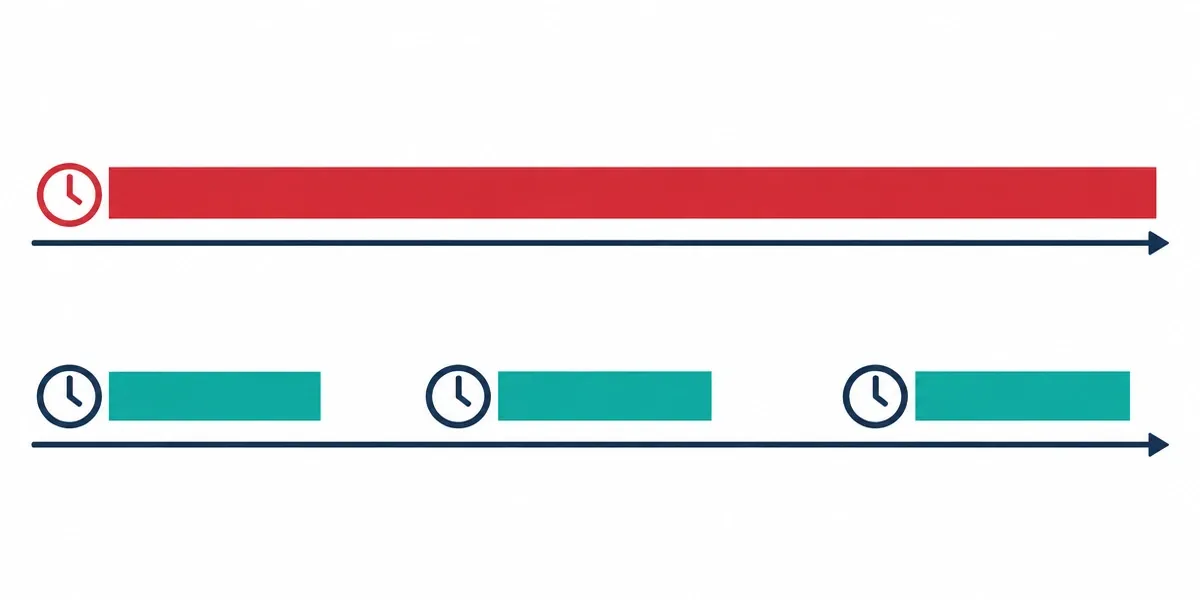
JIT works best for powerful but infrequent access: cloud administrator roles, production database access, vendor and contractor sessions, and on-call engineers who need elevated rights a few times a month. In these cases the request step adds seconds, and the reduction in exposure is large.
It breaks down in four predictable places:
Emergency incidents: If elevation needs an approver who is asleep at 3 a.m., responders will look for workarounds. Pre-approved on-call elevation with review after the fact avoids this.
Legacy systems: Systems with hard-coded local admin accounts or no way to grant and revoke rights programmatically can't be elevated on demand. A vault check-out with rotation after each use gets close to the same effect.
Always-running service accounts: These have no "task" to time-box. Tight scoping and scheduled rotation fit better than JIT.
Long jobs: Migrations and batch jobs can outlast the access window, so build in a controlled renewal path.
Start with your highest-risk, lowest-frequency access, then expand once the approval flow is working smoothly.
A break-glass account is an emergency account that works even when normal access paths, such as single sign-on, MFA, or the PAM system itself, are down. That makes it powerful, standing, and rarely used, which is exactly the profile attackers look for. A few controls keep it safe:
Keep the number small, usually two.
Use a long random credential stored offline and separate from the PAM vault it backs up, ideally split between two custodians.
Alert immediately on any use, so a login pages the security team.
Rotate or reset the credential after every use.
Require a documented review afterward.
Test the account on a regular schedule, so you know it works before the emergency.
Many teams also keep these accounts disabled until needed. NIST SP 800-53 (control AC-2(2)) expects temporary and emergency accounts to be automatically removed or disabled after a defined period, which supports that approach.
Identity and access management (IAM) governs access for every user in an organization. In contrast, privileged access management (PAM) is a specialized layer within IAM that controls accounts with elevated privileges. IAM decides who someone is and what they can generally reach. PAM adds tighter rules, such as approval, time limits, and recording, to the few accounts that can change systems, read all data, or disable security tools. The US federal ICAM playbook treats securing privileged access as a critical capability within identity, credential, and access management.
Comparison Factor | IAM (Identity and Access Management) | PAM (Privileged Access Management) |
|---|---|---|
Scope | All identities: workforce, customers, partners, and devices | Privileged accounts only |
Typical Users | Employees, contractors, customers | Admins, database and cloud engineers, service accounts, and vendors with admin rights |
Core Question | Who are you, and what may you access? | Should you have this access right now, and what did you do with it? |
Main Risk Addressed | Unauthorized access, orphaned accounts, and excessive role permissions | Credential theft, admin misuse, and lateral movement |
Typical Controls | Single sign-on (SSO), MFA, provisioning and deprovisioning, role-based access, and access reviews | Credential vaulting and rotation, session brokering and recording, just-in-time elevation, and approval workflows |
Typical Failure | A departed employee retains access | A shared root password is used by a dozen people |
Some IAM platforms include basic admin-role features, but they often lack session recording or credential vaulting, so check the capabilities instead of assuming coverage.

IAM establishes the identity, and PAM governs what that identity can do with elevated rights. IAM authenticates the person, holds their role and group membership, and manages their lifecycle. PAM uses that information to decide who can request privileged access, then adds approval, time limits, credential handling, and recording.
Consider a new database administrator. IAM creates her identity and places her in the database-admins group. PAM sees the group, so she can request production database access, which she reaches through single sign-on with MFA. The PAM system injects the credential and records the session. When she leaves, IAM disables her account, her PAM eligibility disappears, and any credentials she used are rotated. If that link between the two systems is missing, former staff can keep vaulted access that IAM no longer knows about.
If you lack the basics, such as single sign-on, MFA, and a reliable joiner-mover-leaver process, fix those first, because PAM depends on trustworthy identities. Even then, enforce MFA on every admin account right away instead of waiting for the full program.
If IAM is reasonably mature but admin access is uncontrolled (shared passwords, permanent domain admin rights, unmanaged vendor access), start PAM now, beginning with your highest-risk accounts such as domain admins and cloud root accounts. The same applies if auditors have flagged privileged access, or a recent incident involved an admin credential. A narrow PAM rollout on those accounts is fast and doesn't need to wait for a complete IAM overhaul.
The common mistake is buying one expecting it to cover the other. IAM won't give you session recording or credential rotation, and PAM won't fix onboarding, offboarding, or customer identity.
Privileged access management for cloud applies the same controls as on-premises PAM (least privilege, approval, session control, and auditing) to cloud-native identities such as admin roles, API keys, service principals, and Kubernetes permissions. The difference is that most cloud privilege lives in roles, tokens, and keys created by code and APIs, so discovery and expiry have to be automated. AWS's own guidance recommends that both people and workloads use IAM roles with temporary credentials instead of long-term access keys, which is the direction cloud PAM follows.
Four kinds of cloud access carry the most risk:
Administrator roles: These include owner, global admin, and organization-level roles, plus each provider's root or top-level account, which should be locked down and used rarely.
API and access keys: These are long-lived credentials that stay valid until someone deletes them, and they often end up in code, scripts, and chat messages.
Service principals, managed identities, and service accounts: These non-human identities run applications and automation, and they commonly hold broader permissions than the workload needs.
Kubernetes permissions: Kubernetes documentation advises against using cluster-admin except where specifically needed and warns that boundaries inside a namespace are weak, so a narrowly scoped role can sometimes be used to escalate.
Because infrastructure code creates these identities and they change daily, a one-time inventory quickly goes stale. Discovery has to be continuous.
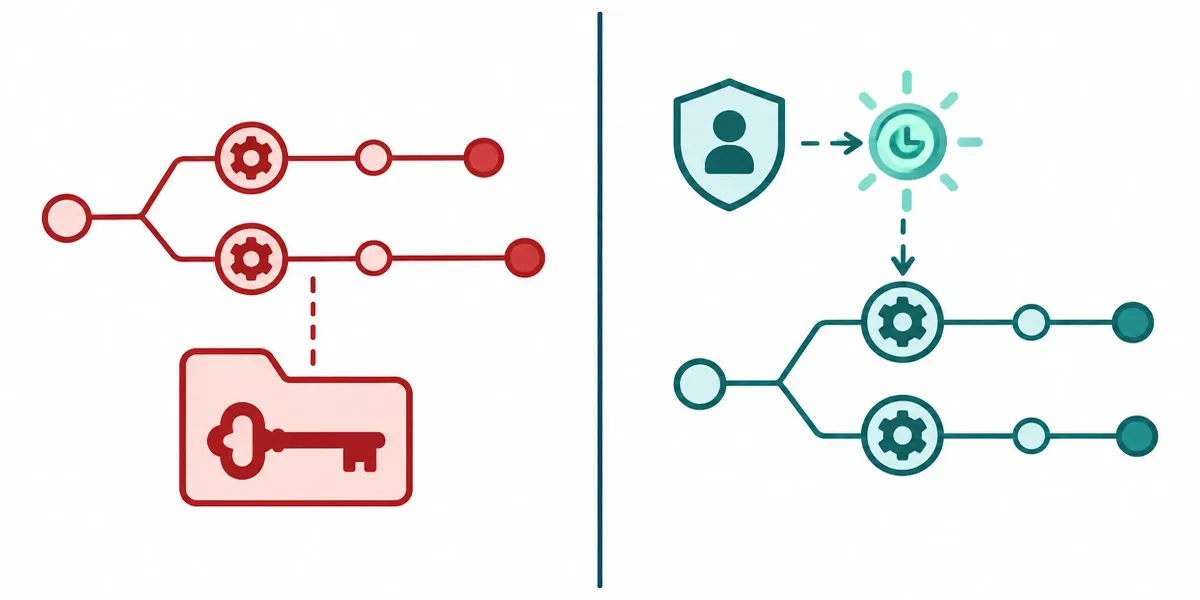
A vault stores and rotates static secrets well, but cloud and DevOps workloads increasingly don't use static secrets. A CI/CD job might exist for ninety seconds, and a container for less. Vaulting alone falls short in three ways:
The pipeline still needs a credential to reach the vault. Storing a secret centrally doesn't remove the first secret that unlocks it. Federated workload identity, where the pipeline proves who it is and gets a short-lived token, avoids creating that secret altogether.
Ephemeral workloads have no human to check anything out. Approval workflows and session recording built for admins don't map onto a container that starts, runs, and disappears. Policy must be enforced as code, and discovery must react to events instead of scheduled scans.
A vault can't fix an over-permissioned role. A rotated credential that grants far more access than needed is still far more dangerous than it should be.
In practice, use temporary credentials wherever the platform supports them, JIT elevation for people, and the vault for the secrets that must remain static, such as third-party API keys and legacy systems.
Each cloud has its own identity model, vocabulary, and definition of "admin," so a policy written for one doesn't translate directly to another. Add on-premises directories, SaaS admin consoles, and legacy servers with static credentials, and privileged accounts get duplicated across systems that don't share a view of who holds what. Logs arrive in different formats, which slows cross-environment audits.
Four steps keep this manageable:
Define who can receive privileged access in one place, usually the central identity provider plus your PAM approvals.
Standardize naming and tagging for privileged roles across clouds.
Send admin and session logs to a single store.
Accept that some controls will stay provider-native when forcing everything through one tool adds friction without adding safety.
Permission drift and misconfiguration across these environments are posture problems rather than access-control ones, and our guide to cloud security posture management covers them.
Privileged access management reduces the damage a stolen or misused admin credential can do, but each benefit depends on how completely the program is deployed and run. The same controls that shrink risk also add cost, friction, and a new high-value target. Judging PAM honestly means weighing both sides.
Smaller attack surface. PAM reduces permanent admin credentials and shortens the life of the ones that remain through vaulting, rotation, and time-limited access. A stolen password becomes less useful the faster it expires. The reduction applies only to onboarded accounts, so the benefit scales with coverage.
Accountability. When each privileged session is tied to a named person, a reason, and a recording, "who did that?" has an answer. NIST SP 800-53 (control AC-6(9)) calls for logging the execution of privileged functions, and its discussion notes that this helps detect misuse by insiders and attackers who have compromised accounts. Logs only help if someone reviews them, so alerting and review need an owner.
Faster audits. Access approvals, session records, and review reports are generated as work happens, so auditors get evidence instead of screenshots and interviews. Auditors will still test whether the evidence covers all privileged systems, not just the ones in the tool.
Safer vendor access. Contractors and vendors can receive scoped, time-boxed, recorded access that is revoked on schedule, without sharing a password you then have to change. This works only if the vendor can't reach the system by another route.
The vault is a single point of failure. If it goes down, admins can't reach the systems they need during an outage. If it is compromised, the attacker gets the company's most valuable credentials. Mitigate with high availability, tested backups, strong MFA on the PAM console, and treating PAM administrators as the most sensitive accounts you have.
Friction pushes people around the system. Slow approvals and clunky sessions lead admins back to shared accounts and direct logins. That shadow access defeats the program while the dashboard still looks healthy. Fast approvals, pre-approved on-call paths, and blocking direct access to covered systems keep people inside the process.
Discovery is never complete. PAM can only protect accounts it knows about, and service accounts, forgotten cloud keys, and embedded application credentials are the usual gaps. Track the ratio of discovered to onboarded privileged accounts and rerun discovery on a schedule.
It can create a false sense of security. PAM limits what happens after an attacker gets in, but it doesn't stop phishing or exploitation of unpatched software, and it doesn't protect data that regular users can reach. An attacker operating inside an approved session also looks legitimate. PAM also needs a named owner, a budget, and ongoing tuning; without those, it decays quietly.
The net result is positive when coverage is high, someone owns the program, and the process is fast enough that people use it. When any of those fail, you pay for the tool and keep much of the risk.
The most common privileged access management use cases are controlling vendor access, administering databases and servers, protecting secrets in DevOps pipelines, and meeting audit requirements in regulated industries. In each case, the pattern is the same: someone or something holds powerful access with little control or evidence, and PAM adds limits, approvals, and records.
Who: A managed service provider's engineer, an ERP vendor's support team, or a contractor who needs admin rights for a few days. Without PAM: The vendor connects through a shared VPN login and a long-lived admin password. Staff turnover at the vendor changes who can use it, and nobody on your side has a record of what was done. With PAM: Each vendor engineer gets an individual identity and requests access to specific systems for a set window. The session is recorded, and access ends automatically when the window closes, with no shared password to change afterward.
Who: Database administrators and system administrators who maintain production servers and data stores. Without PAM: Root and database admin passwords live in a team wiki or spreadsheet, shared across the team. Any administrator can read every table, and when data is changed or exported, logs can't show which person did it. With PAM: Admins check out production credentials only for approved tasks. Sessions are recorded or command-logged, day-to-day work uses separate non-privileged accounts, and credentials are rotated after use. The administrator's real power over sensitive data stays, but it is now attributed and time-limited.
Who: CI/CD pipelines, deployment scripts, and developers whose automation needs cloud or database credentials. Without PAM: Tokens are hard-coded in repositories or stored as long-lived pipeline variables. GitGuardian's 2026 report counted 28.65 million new hardcoded secrets in public GitHub commits in 2025, a 34% increase over the previous year. GitGuardian sells secrets-detection tools, so treat this as an industry indicator, not a neutral benchmark. With PAM: Pipelines retrieve secrets at runtime from a vault or, better, receive short-lived federated tokens so no static secret exists. Credentials are rotated, and each pipeline's permissions are scoped to the systems it deploys to.
Who: Administrators at banks and payment processors, crypto exchanges and custodians, and government cybersecurity. Without PAM: Regulators and auditors ask who did what with administrative access, and the honest answer is "we can't tell," or one person can alter critical systems alone. PCI DSS v4.0, for example, requires audit logs capturing all actions by anyone with administrative access, including interactive use of system accounts. With PAM: Every administrative action is tied to a named person and recorded. High-impact changes, such as altering wallet key-management infrastructure or production configurations, can require a second approver. This supports the separation of duties found in frameworks like NIST SP 800-53 (control AC-5). Evidence for auditors becomes a report instead of a reconstruction project.
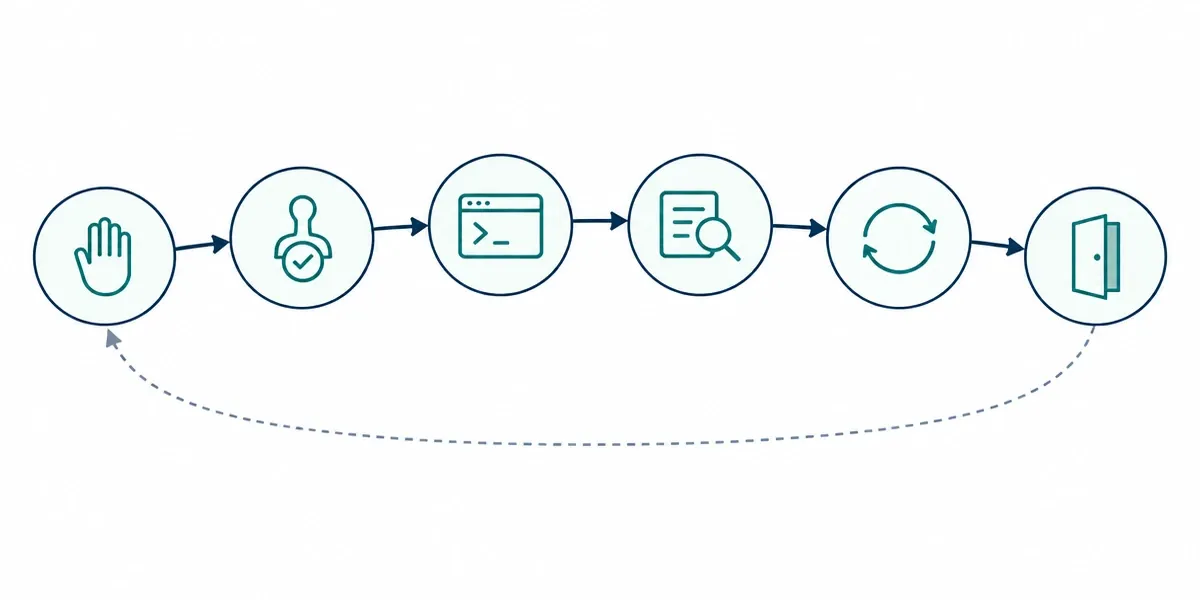
The privileged access management lifecycle is the sequence a privileged account or entitlement follows: requested, approved, used, reviewed, adjusted, and finally removed. NIST's NCCoE lists life-cycle management among the core capabilities of a PAM system, alongside authentication, authorization, and auditing. Treating privilege as something with a start and end date prevents access from piling up until nobody can explain it.
Request and justify. Someone needs elevated access for a defined reason, such as a new admin role, a project, or a vendor engagement. Eligibility usually comes from the identity system, and the request names the system, the purpose, and the duration.
Approve and provision. An owner or manager approves, and the account or role is created or activated with scoped permissions, a named owner, and an expiry date or review date. Access that is created without an owner or end date is where later problems start.
Use under control. The person or workload uses the access through the PAM system, with credentials supplied from the vault and sessions logged.
Review and recertify. At set intervals, the owner confirms that each privileged entitlement is still needed. NIST SP 800-53 includes periodic review of assigned privileges, to remove anything no longer justified. Review is the stage most often skipped, because it produces no visible output until something goes wrong.
Rotate and adjust. Rotate credentials after use or on a schedule, and change permissions when a person moves teams or a system's role changes. Someone who has switched departments shouldn't quietly keep the old team's admin rights.
Deprovision and retire. When a person leaves, a project ends, or a system is decommissioned, disable access, then delete it, and rotate any shared secrets the person knew. Disabling first and deleting after a short hold lets you catch anything that breaks.
Most programs get stuck early at discovery and late at retirement. Discovery stalls because scans find accounts faster than people can assign owners to them. Without an owner, nobody can approve, review, or retire an account, so its lifecycle never starts. A workable rule is that every discovered account needs a named owner before onboarding, and accounts with no owner after a defined notice period are disabled.
Service accounts are the hardest case. They often have no clear owner, are shared across applications, and have passwords that haven't changed in years because nobody is sure what will break if they do. That fear postpones rotation indefinitely. The safer path is to map what depends on each account first, for example by logging where it authenticates, then rotate in a test environment and roll out in stages.
Retirement is the other weak point. Access gets requested constantly and removed rarely, so privileges accumulate. Tie removal to events you already track, such as employee offboarding tickets, project closures, and server decommissioning, so they trigger the cleanup instead of relying on someone remembering.
A privileged access management implementation works best as four phases: scope and inventory, quick wins on the riskiest accounts, session control and just-in-time access, then expansion to cloud, DevOps, and third parties. Each phase delivers risk reduction on its own, so you aren't waiting for a complete rollout to see value. The UK's National Cyber Security Centre advises that administrators should use separate accounts for privileged work and day-to-day tasks, and that is a good first principle to build the whole program on.
Start by deciding what matters most. For most organizations that means identity infrastructure (domain controllers and the identity provider), cloud root and global admin accounts, hypervisors, backup systems, and production databases. Run discovery against that scope, assign a named owner to every account found, and record each account's system, privilege level, and last credential change. Set a coverage metric now, such as the share of in-scope privileged accounts that are vaulted, so you can measure progress by protected accounts, not tool installs. Resist scoping the whole company at once, since a narrow first scope gets finished.
Move the highest-risk accounts into the vault first and rotate their credentials, starting with those with shared passwords or that haven't changed in years. Require MFA on all administrative access and on the PAM console itself, using phishing-resistant methods such as security keys or passkeys where you can. Split each administrator's identity into a standard account and a separate admin account, remove shared and unused admin accounts, and set up and test your break-glass accounts. These steps are fast, visible, and don't change how most people work.
Next, route administrator access to critical systems through the PAM broker so it records sessions or logs commands. Start with a small pilot group of administrators who are willing to give feedback, then tune the workflow before widening it. Introduce just-in-time elevation for the highest-risk roles first, with approval paths that match how people actually work, including pre-approved on-call access for incidents. Expect friction here, so measure approval times and fix slow steps early.
Once the core is stable, extend the same controls outward. Bring cloud admin roles under JIT and move workloads toward short-lived credentials. Replace hard-coded pipeline secrets with runtime retrieval or federated tokens. Put vendor access on individual, scoped, time-boxed accounts. Tackle service accounts by mapping what depends on each one before rotating it. Finally, connect the PAM system to your identity provider's joiner-mover-leaver process, so access ends when employment or a project does, and send PAM logs to your SIEM.
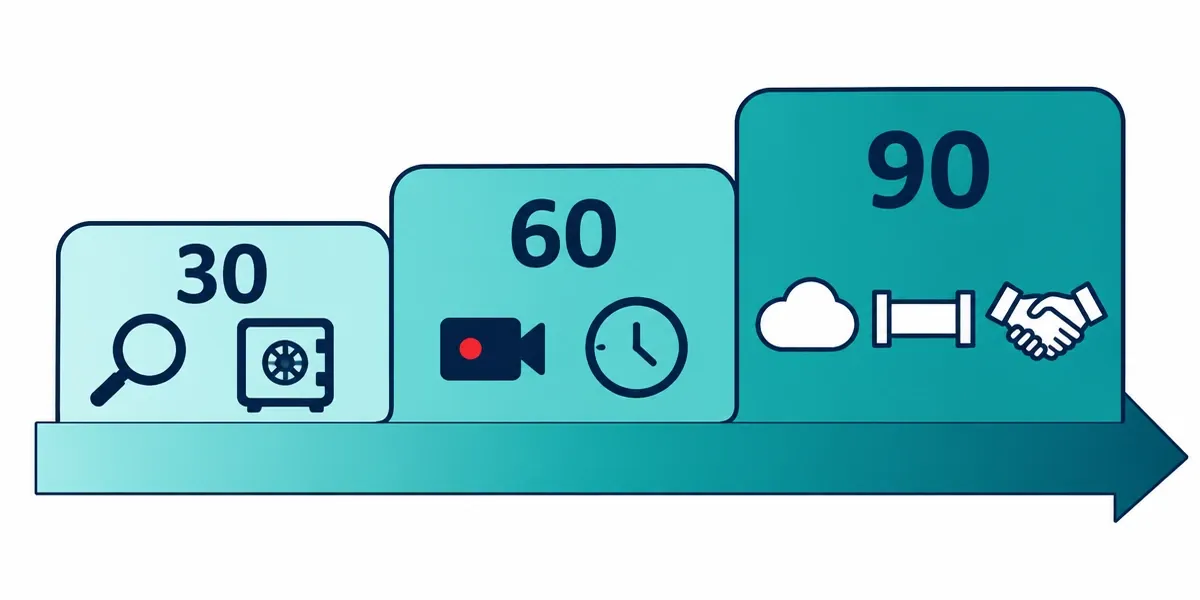
This is a suggested sequence, not a guarantee. Timelines depend on environment size, team capacity, and how many legacy systems you have, and larger organizations will take longer.
Timeframe | Focus | Typical Outputs |
|---|---|---|
Days 1–30 | Scope, discovery, owners, and quick wins | Inventory with named owners; highest-risk accounts vaulted and rotated; MFA enabled for admin access; break-glass access tested |
Days 31–60 | Session control and pilot | Critical systems placed behind the broker; pilot group using session recording and approvals; first JIT roles implemented |
Days 61–90 | Expansion and integration | Cloud and vendor access onboarded; first service accounts rotated; offboarding and SIEM integration enabled; coverage metrics reviewed |
The most frequent mistake is buying a tool before defining scope and owners, which produces an expensive vault holding a handful of accounts. A close second is trying to cover everything at once, so nothing finishes. Programs also stall when no one owns them, when teams skip service accounts because rotation feels risky, and when controls are switched on without telling administrators, who then work around them with shared logins. Two quieter mistakes are measuring deployment (servers with an agent) instead of coverage (privileged accounts under control), and never testing break-glass access until a real outage shows it doesn't work.
A privileged access management policy is a short, enforceable document that sets rules for privileged accounts only: who may hold them, how access is approved, how credentials and sessions are handled, and how access is reviewed and removed. It sits beneath your broader information security policy, which covers company-wide topics such as acceptable use and password standards, so this document should not repeat them. ISO 27001:2022 Annex A 8.2 requires you to restrict and manage the allocation and use of privileged access rights, and a written policy shows that to an auditor.
Start with scope and definitions: which account types are covered (administrator, service, application, root, cloud, emergency) and how exceptions are requested, approved, and given an expiry date. Then set a clear rule for each of five areas:
Approval: State who can approve access to which systems, and require a documented reason and duration for every request. Prohibit self-approval, and require a second approver for the most sensitive systems.
Rotation and credentials: Name which credentials must be vaulted, require rotation after use or at a maximum age, and ban shared and hard-coded credentials. Require MFA for all privileged access.
Session recording: Specify which systems require full session recording and which require command logging, how long recordings are kept, and who may view them.
Emergency access: Define how many break-glass accounts exist, who holds the credentials, when they may be used, and what happens afterward. The policy should require immediate alerting on use, a documented review, and a credential reset.
Review cycle: Set how often privileged entitlements are recertified, with more frequent reviews than for standard access (quarterly for the most sensitive systems is a common example). Also say who signs off, and that access not reconfirmed is removed.
Add a deprovisioning rule for leavers and movers, with a defined time limit for removing privileged access after a role change or departure. Write each rule so an auditor can test it, with a measurable condition, not a general intention.
The CISO or head of security usually owns the policy itself. The IAM or PAM team runs it day to day and writes the supporting procedures. System owners approve access to their own systems and run periodic reviews because they know who should have access. HR and IT operations trigger the joiner, mover, and leaver events that start and end privileged access. Compliance or internal audit should test the policy independently, and senior leadership approves it.
Two points keep ownership honest. The policy owner shouldn't be the only approver of their own privileges, and every rule should have a named role responsible for it. In smaller organizations without a CISO, the head of IT often holds the policy, and an external reviewer can provide the independent check.
A privileged access management audit tests whether privileged access is controlled in practice, not just on paper. Auditors sample accounts, approvals, session records, and reviews, then compare them against your policy and the framework you're assessed under. The same four expectations recur across standards: restrict privileged access, approve it, log it, and review it. PCI DSS v4.0.1 is a clear example, requiring you to review all user accounts and privileges, including third-party accounts, at least once every six months (Requirement 7.2.4).
Auditors usually start with the account inventory: a complete list of privileged accounts with owners, types, and systems, including service and vendor accounts. They test completeness by comparing it with directory and cloud exports, so a report listing only vaulted accounts doesn't prove coverage.
Next they sample approvals: recent privileged grants showing who requested, who approved, why, and for how long, with no self-approval. Then they pick privileged sessions and ask whether each can be tied to a named person and a ticket. Finally, they ask for review evidence: dated recertifications with sign-off, and proof that the access flagged for removal was actually removed. Expect questions on leaver revocation, MFA configuration, and emergency-account use as well.
Framework | Relevant References | Privileged-Access Expectation |
|---|---|---|
NIST SP 800-53 Rev. 5 | AC-2(7), AC-5, AC-6 with enhancements (1), (5), (7), (9) | Manage privileged accounts under a defined access scheme, separate duties, restrict privileged accounts to defined roles, review privileges, reassign or remove access as needed, and log the execution of privileged functions. |
ISO/IEC 27001:2022 | Annex A 8.2, supported by 5.15 (Access Control) and 5.18 (Access Rights) | Restrict and manage the allocation and use of privileged access rights. |
PCI DSS v4.0.1 | 7.2.4, 7.2.5/7.2.5.1, 8.2.2, 8.6.1–8.6.3, 10.2.1.2 | Review all user accounts, including vendors, every six months; enforce least privilege and periodic reviews for application and system accounts; restrict shared accounts, interactive use, and hard-coded system-account passwords; log all actions performed by users with administrative access. |
A single PAM control set can serve all three, so map your evidence once and reuse it.
The same pattern shows up in national and sector rules everywhere. In the UAE, the Information Assurance Regulation (issued by TDRA, formerly NESA) includes privilege management within its access control requirements. Dubai's DESC Information Security Regulation covers Dubai government entities and their suppliers and includes access control. For licensed virtual asset providers in Dubai, VARA Technology and Information Rulebook requires access to systems and data only for demonstrable business need with an access log.
It also requires strict access management for keys with an audit log of access changes, and quarterly internal audits of user-access removal. For the wider UAE landscape, see our guide to cybersecurity regulations in the UAE.
Keep these ready for any privileged access audit:
Privileged account register with owner, type, system, and last credential change
Directory and cloud exports used to reconcile the register
The PAM policy and its approved exceptions, with expiry dates
Request and approval records for sampled grants
Elevation or just-in-time logs
Session recordings or command logs for sampled sessions, with retention proof
MFA enforcement settings for administrative access
Credential rotation logs, including service accounts
Recertification records with sign-off and evidence of removals
Joiner-mover-leaver revocation records with timestamps
Break-glass records: custody, use alerts, post-use reviews, and test results
Vendor access records showing scope and expiry

Start with discovery. You can't vault, approve, or audit privileged accounts you haven't found, so the most useful first step is an inventory of every administrator, service, cloud, and application account, each with a named owner. Once that list exists, the rest follows in a sensible order: vault and rotate the riskiest credentials, require MFA on all admin access, add approvals and session recording, then extend to cloud, pipelines, and vendors. Measure progress by how many privileged accounts are under control, not by how many tools are installed.
No. A password manager stores and fills credentials for individual users, usually without approval workflows, session control, or detailed audit trails. A PAM system governs privileged accounts: it vaults and rotates credentials, grants access through approved sessions, records activity, and ties every action to a named person. A team password manager can be a reasonable stopgap for non-critical shared logins, but it doesn't give you the controls an auditor expects for administrator access.
Small businesses need the principles of PAM, though not always an enterprise platform. Verizon's 2026 DBIR, as reported by secondary sources, found ransomware in 83% of breaches at small and medium businesses, against 48% across all organizations. That makes admin accounts a worthwhile target for organizations of any size. A small company can start with separate admin and standard accounts, MFA on every admin login, no shared admin passwords, a short list of who holds admin rights, and a lighter-weight vault or built-in role-elevation features from its cloud provider.
PAM can limit and expose the damage, but it can't guarantee it will stop it. If a stolen credential is vaulted and rotated, or only valid during a short approved window, it is far less useful to an attacker. Session recording and alerts also make misuse easier to spot. However, an attacker who compromises an account during an approved session, or who bypasses PAM through an unmanaged account, can still harm. Combine PAM with MFA, endpoint protection, and monitoring.
No, they do different jobs. MFA verifies that the person logging in is who they claim to be, while PAM controls what that person can do with privileged access once verified. Most PAM deployments require MFA at the PAM console and again for sensitive sessions, so the two layers work together.
It depends on environment size, the number of legacy systems, and how many people can work on it. As a rough guide, covering your highest-risk accounts can take a few weeks to a few months, while full coverage across cloud, DevOps, vendors, and service accounts often takes much longer, sometimes a year or more in large environments. Plan in phases so each one delivers protection on its own, and measure progress by the share of privileged accounts brought under control instead of by deployment dates.