What Is Cloud Security Posture Management (CSPM)?
Continue Reading
October 19, 2026
What is MCP security explained: the top risks, tool poisoning & prompt injection attacks, OAuth 2.1 authorization, pass/fail checklist to secure MCP servers.
October 15, 2026
Prompt injection, over-permissioned agents, leaked credentials: learn the top AI agent security risks and the controls that stop them before launch.
October 12, 2026
A practical AI incident response guide: how to detect, contain, and recover from prompt injection, data leaks, and rogue agents, plus a readiness checklist.
Cloud security posture management (CSPM) is the continuous process of discovering your cloud assets, checking their configurations against security and compliance baselines, and prioritizing and fixing the misconfigurations it finds. In practice, software usually automates it by connecting to your cloud accounts through APIs and continuously scanning as resources are created, changed, or removed.
The discipline exists because cloud incidents rarely start with a provider's infrastructure failing. They start with how customers configure storage, identities, and network rules, which the shared responsibility model leaves in the customer's hands. Scale makes this harder to see. IBM's Cost of a Data Breach Report 2025 puts the average cost of a breach spanning multiple environments at $5.05 million, compared with $4.01 million for on-premises breaches. Multi-environment breaches are the most expensive category in that report.
This guide gives you a working definition of CSPM and explains how it operates from asset discovery through remediation. It covers the capabilities worth demanding from tools, how coverage differs across AWS, Azure, and Google Cloud, and a phased rollout plan you can adapt to your own organization.
Cloud security posture management helps organizations keep cloud configurations secure as environments change. It replaces periodic manual reviews with continuous, automated checks, because cloud settings can shift dozens of times a day and a single exposed resource can become a breach within hours. The sections below define the term, explain what "posture" covers, and show why the practice exists.
Cloud security posture management (CSPM) is a security practice, usually delivered through automated tools, that continuously inspects cloud environments for misconfigurations and policy violations. It inventories assets across accounts, compares settings against security and compliance baselines, ranks the findings by risk, and guides or automates fixes.
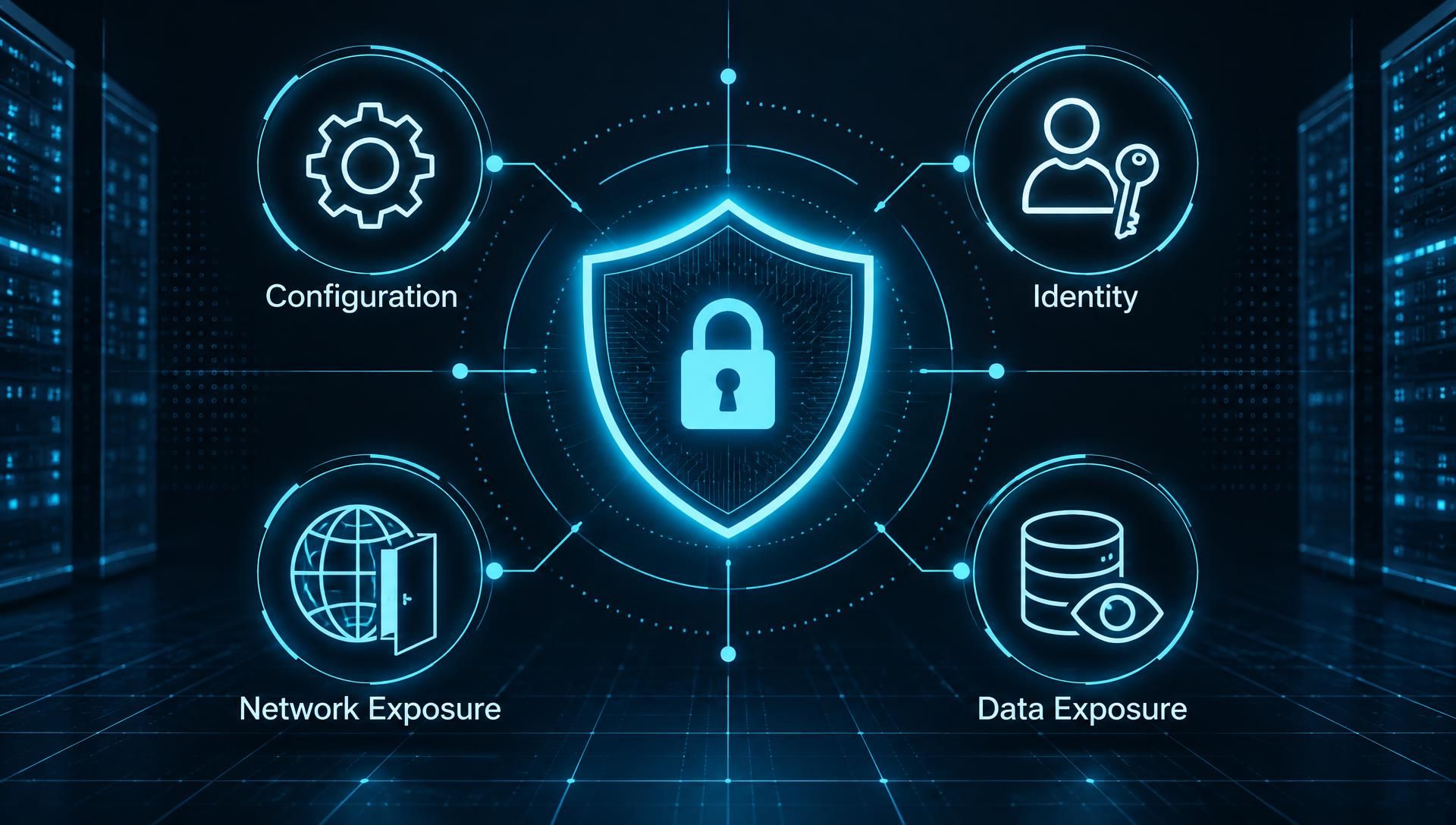
Posture is the overall security state of your cloud environment at a given moment, determined by four factors: configuration, identity, network exposure, and data exposure.
Configuration is how individual resources are set up. It covers whether storage is encrypted, logging is enabled, and databases accept public connections.
Identity is who and what can act on those resources. It includes users, service accounts, and roles, and whether their permissions go beyond what the work requires.
Network exposure is what's reachable from outside. Open management ports, permissive security group rules, and public endpoints belong here.
Data exposure is where sensitive information sits and who can read it.
Posture is a state, not a one-time result. A clean assessment on Monday says little about Friday, after a team opens a port for troubleshooting and forgets to close it.
CSPM exists because cloud providers secure the underlying infrastructure while customers remain responsible for how they configure what they run on it. This split is the shared responsibility model. The provider protects the physical data centers, hardware, and core services. You protect your settings, identities, network rules, and data. Most cloud breaches happen on the customer's side of that line.
The second reason is configuration drift. Environments rarely stay as designed. Engineers make console changes during incidents. Infrastructure-as-code templates fall out of sync with what is deployed. New cloud services ship with defaults that don't match your policy. Each change is small, but together they move the environment away from its approved baseline without anyone deciding that it should.
The Cloud Security Alliance's Top Threats to Cloud Computing 2024 report ranks misconfiguration and inadequate change control as the top cloud threat, ahead of identity and access management. Manual review can't keep pace with that rate of change, and CSPM is built to close that gap.
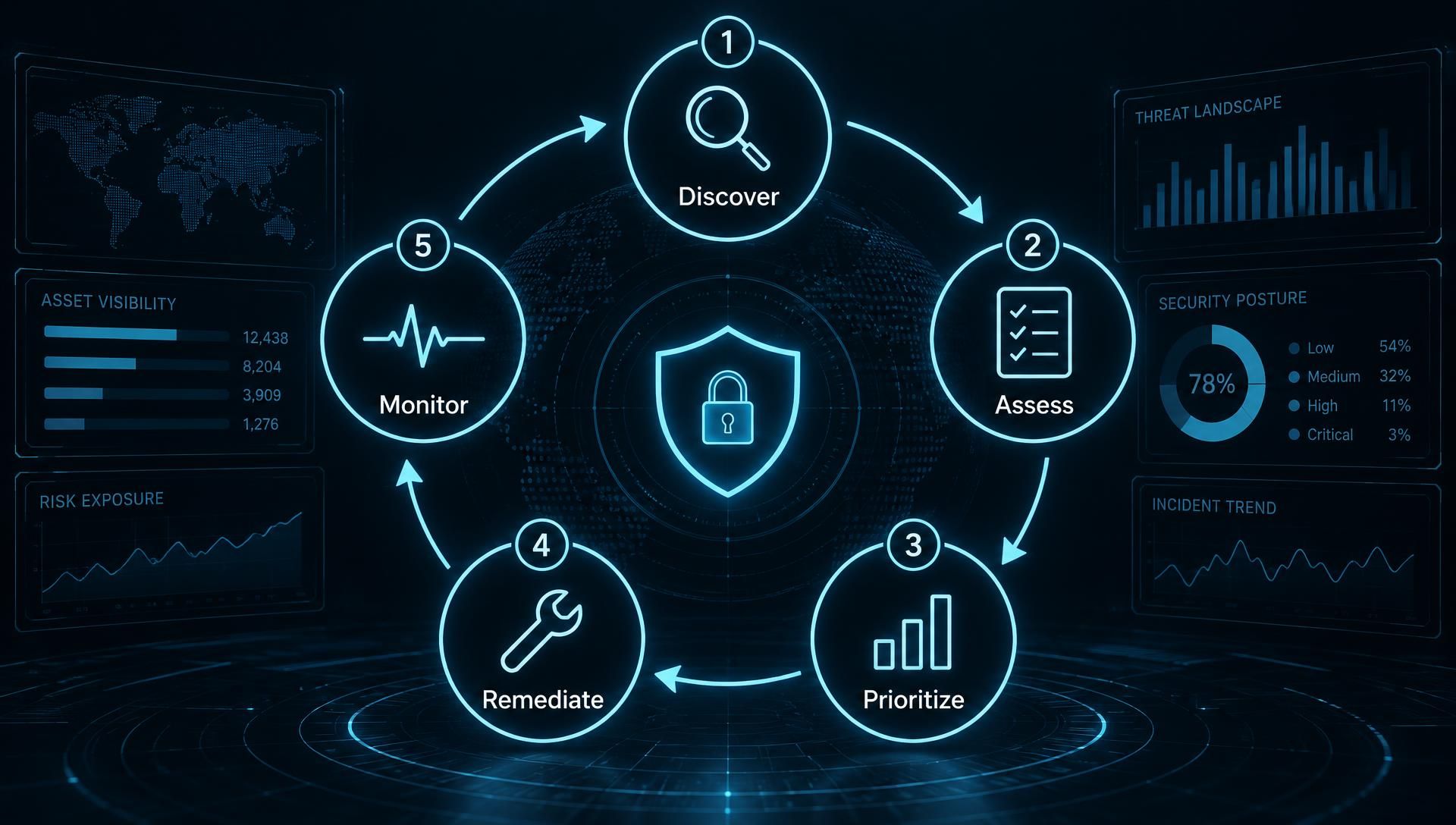
A CSPM program moves through five stages, each with a clear input, check, output, and owner. The table below summarizes them.
Stage | Input | Check | Output | Typical Owner |
|---|---|---|---|---|
Discovery | Cloud accounts, subscriptions, and projects connected through read-only access | Which assets exist, and which are unmanaged or unknown | Complete, current asset inventory | Cloud or platform team |
Assessment | Asset configurations and permissions | Settings compared against security and compliance baselines | List of misconfigurations and policy violations | Security team |
Prioritization | Findings plus context (internet exposure, permissions, data sensitivity) | Which issues are actually exploitable and which matter most | Ranked remediation queue | Security team |
Remediation | Prioritized findings | Whether the fix is safe to apply, manually or automatically | Corrected configuration, ticket, or exception on record | Resource or application owner |
Monitoring | Ongoing configuration changes | Drift from the approved baseline | Alerts, trend metrics, audit evidence | Security and compliance teams |
Ownership varies by organization. What matters is that every finding has a named owner, because unowned findings are the ones that stay open.
Gartner introduced cloud security posture management as a product category, then folded it into a broader category called cloud-native application protection platforms (CNAPP). That is why you'll find CSPM as a standalone tool and as one module inside larger platforms. It also explains why the search for a CSPM "Magic Quadrant" often ends in confusion.
Gartner is credited with introducing the term "cloud security posture management" and describing it as a category of products that automate security and compliance assurance in the cloud. The category grew out of a practical problem. As teams adopted AWS, Azure, and Google Cloud, misconfiguration became a common cause of cloud data exposure, and existing tools weren't built to find it continuously.
Gartner has kept researching space. For example, Gartner's Forecast Analysis: Cloud Security Posture Management, Worldwide is dated July 18, 2023. The full reports sit behind Gartner's paywall.
CNAPP is the broader category, and CSPM is one of its core components. The Cloud Security Alliance describes CNAPP as a Gartner-coined term for products that combine functions previously sold as CSPM and cloud workload protection (CWPP), plus entitlement management (CIEM), Kubernetes posture management (KSPM), API protection, and serverless security.
The shift happened because buyers were running several separate cloud security tools whose findings didn't connect. A misconfigured storage bucket looks different when the same platform knows the attached workload has a critical vulnerability and an over-permissive role. Platforms that correlate those signals can rank risk better than a posture-only tool.
That doesn't make standalone CSPM obsolete. A team that needs configuration visibility and compliance evidence across a few accounts may not need a full CNAPP, while a larger multi-cloud estate usually benefits from one. Gartner's CNAPP market analysis has appeared as a Market Guide, such as the one dated July 22, 2024.
Searches for "cloud security posture management Magic Quadrant" assume a ranked vendor chart exists for CSPM. A Market Guide describes a market and its typical capabilities, while a Magic Quadrant ranks vendors on defined criteria. The two shouldn't be confused.
CSPM works in a five-stage loop. It discovers what exists in your cloud, checks it against a baseline, ranks the problems by real risk, routes fixes to the people who own the resources, and then keeps watching for change. Collection can be agent-based or API-based, and Kubernetes clusters add their own checks.
CSPM starts by connecting to your cloud environments and building an inventory of everything in them. It connects with read-only access to AWS accounts, Azure subscriptions, and Google Cloud projects, then pulls resource metadata through the providers' APIs: compute instances, storage, databases, networks, identities, and managed services.
This step matters because you can't assess what you don't know exists. Large organizations often create accounts through individual teams, acquisitions, or forgotten test projects. A good inventory surfaces those and shows which resources lack an owner, which is usually where the riskiest settings sit. Many teams find their first scan reveals more accounts than their records listed.
Once assets are inventoried, CSPM compares each resource's settings to a defined baseline and flags every deviation. The most common baselines are the CIS Benchmarks, which publish configuration guidance for AWS, Azure, Google Cloud, and Kubernetes, along with each cloud provider's own security best-practice guidance. Compliance frameworks such as ISO 27001, SOC 2, PCI DSS, and NIST are typically mapped on top of those checks.
An example check reads like a simple rule: object storage must block public access, or administrative ports must not accept traffic from the open internet. Each failed check becomes a finding tied to a specific resource and, ideally, to the control it violates, giving auditors usable evidence.
Baselines aren't one-size-fits-all. Start with a recognized benchmark, then tune it to your environment and document any rule you deliberately relax. Unexplained exceptions are hard to defend later.
CSPM ranks findings by how likely they are to be exploited and how much damage that would cause, not by severity label alone. A scan of a real environment returns far more findings than a team can fix, so ordering is what makes the output usable.
Three factors carry most of the weight. The first is exposure: whether the resource is reachable from the internet. The second is identity permissions: whether the attached roles could be used to access other resources. The third is data sensitivity: whether it holds regulated or business-critical information. A publicly accessible storage bucket containing customer records is an urgent problem, and a missing tag on an internal test server isn't, even if a generic scoring system rates both "medium."
Tools differ widely in how well they combine these signals. When you evaluate them, ask how they calculate the ranking and whether you can see the reasoning behind it.
Remediation turns findings into fixes through alerts, tickets, guided instructions, or automation. The simplest path sends a finding to the resource owner through an existing ticketing system, with the exact setting to change. Guided remediation goes further by supplying the command or infrastructure-as-code change. Automated remediation applies the fix without waiting for a person.
Automation is powerful and risky. Automatically closing a public storage bucket is low risk in most cases. Changing a security group rule or revoking a role can break a production application that depended on it. A sensible rule is to automate only well-understood, low-impact fixes, require approval for anything that could interrupt service, and log every automated change.
Remediation also means deciding when not to fix. If a finding reflects a deliberate, reviewed exception, record the reason and an expiry date, so the exception doesn't quietly become permanent.
CSPM keeps watching after the first scan, because cloud environments change constantly. It re-evaluates resources on a schedule or when a change event occurs, and it alerts when a resource moves out of line with the baseline, such as a setting changed in the console or a new service deployed with insecure defaults.
Speed matters here. IBM's Cost of a Data Breach Report 2025 reports that breaches spanning multiple environments take 276 days on average to identify and contain. Continuous monitoring doesn't cover every breach type, but it shortens the window in which a configuration error can go unnoticed.
Monitoring also produces the trend data that shows whether the program is working: how quickly findings are fixed, how many new ones appear each week, and where drift keeps recurring.
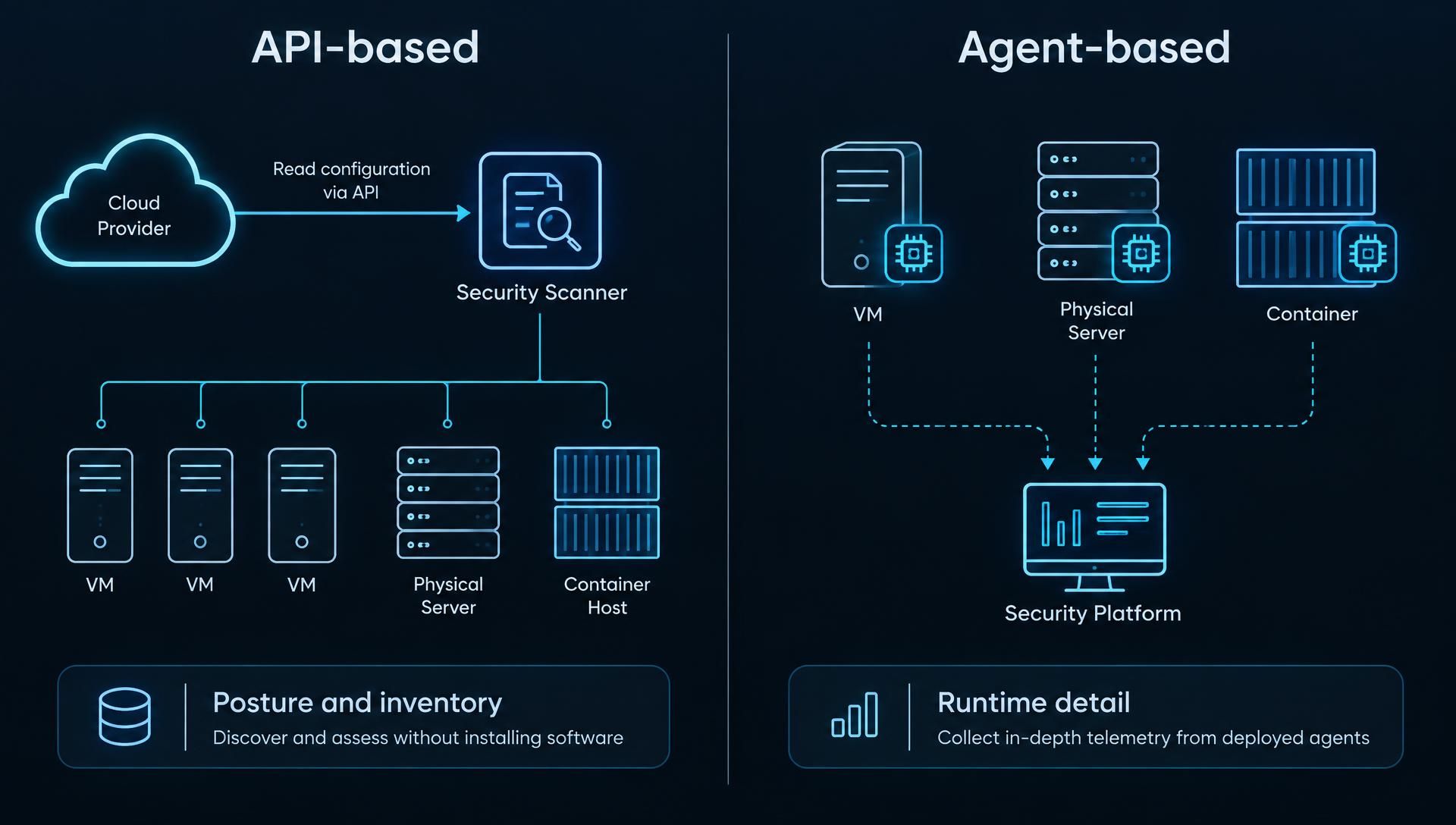
CSPM tools gather data in two ways, and many modern platforms rely mainly on API-based, or agentless, collection. An agentless tool reads configuration data directly from the cloud provider's APIs, so you don't need to install anything on individual workloads. An agent-based tool runs software on virtual machines or containers to collect additional detail from inside them.
Factor | API-Based (Agentless) | Agent-Based |
|---|---|---|
Deployment | Fast; connect with read-only credentials | Slower; software must be installed and maintained |
Coverage | Broad across accounts and services; sees configuration | Deeper inside a workload; sees processes and files |
Overhead | None on workloads | Uses compute resources and needs updates |
Best For | Posture, compliance, and inventory | Runtime visibility and workload-level detail |
Posture work is configuration-focused, so agentless collection covers most of it. Agents matter when you need to see inside a running workload, which usually moves you toward workload-protection tooling rather than CSPM alone. The trade-off is between rollout speed and visibility depth.
CSPM applies to Kubernetes by checking the cluster configuration and the workloads running in it, much like it checks cloud resources. This is sometimes sold separately as Kubernetes security posture management (KSPM), but the principle is the same: compare settings against a baseline and flag the gaps.
The main checks fall into a few areas:
Cluster configuration: API server access, audit logging, and secret encryption, benchmarked against the CIS Kubernetes Benchmark.
Role-based access control (RBAC): overly broad roles, cluster-admin bindings handed out too freely, and service accounts with more access than their pods need.
Pod security: containers running as privileged or as root, host namespace sharing, and missing restrictions. Kubernetes' built-in Pod Security Standards define privileged, baseline, and restricted levels for these controls.
Exposed interfaces: management dashboards or API endpoints reachable from the internet without proper authentication.
Managed services such as Amazon EKS, Azure AKS, and Google GKE split responsibility between the provider and you, so confirm which settings are yours to configure before treating a finding as a gap.
Cloud security posture management most often catches four kinds of misconfiguration: publicly exposed data stores, over-permissive identities, open network access, and missing logging or encryption. Each one is a setting that works fine functionally, so teams ship it without noticing the risk. Verizon's 2025 Data Breach Investigations Report found that the human element was involved in roughly 60% of breaches. That category covers errors, stolen credentials, and social engineering, so it doesn't count misconfigurations alone. Still, it shows how much exposure comes from people and process, not from software flaws.
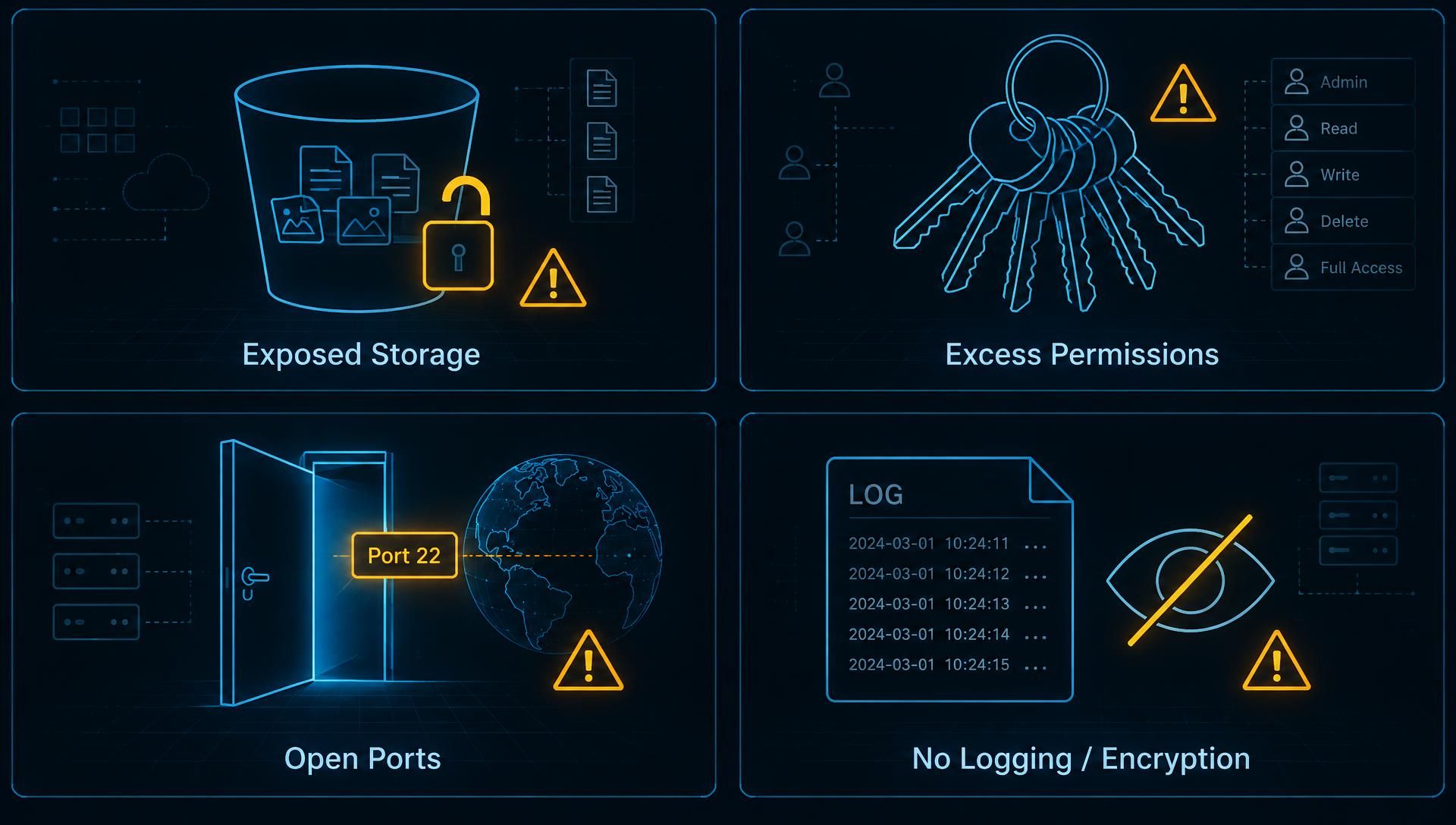
A publicly exposed storage bucket or database is one that anyone on the internet can read or query without authenticating. It usually happens when a team opens access to share data quickly, tests something, or copies a permissive template, and then forgets to restrict it. The same problem applies to database snapshots and backups shared more widely than intended, and to managed databases configured with a public endpoint.
The consequence is direct data exposure. Automated scanners can find customer records, internal documents, and credentials stored in files by continuously probing for open storage. CSPM catches this by reading each resource's access policy and public-access settings and flagging any that allow unauthenticated access, ideally with a note on whether the resource holds sensitive data.
An over-permissive identity is a user, role, or service account that can do far more than its job requires. Common examples include policies that grant all actions on all resources, administrator rights granted for convenience, and roles that too many principals can assume. Unused credentials add to the problem: old access keys, accounts for former employees, and service accounts nobody owns.
These matter because identity is usually how an attacker moves once inside. One stolen key with broad permissions can reach far more than the system it was issued for. CSPM evaluates permission policies against least-privilege principles, a core idea in zero trust security, flags wildcard grants and unused or aging keys, and checks whether multi-factor authentication is enforced on privileged accounts. Tools that also include entitlement analysis can show what a given identity could actually reach.
An open security group is a network rule that allows traffic from anywhere on the internet to reach a resource; in the most serious cases, it exposes remote administration ports. Rules that allow the entire internet to reach SSH (port 22) or RDP (port 3389) are a classic example, as are database ports opened for convenience during development and never closed.
Exposed management ports invite brute-force and credential-stuffing attempts, and any unpatched service behind them becomes reachable. CSPM catches these by evaluating network rules across all security groups, firewalls, and network access lists, and flagging any that permit unrestricted source ranges to sensitive ports. The usual fix is to limit access to known IP ranges, a VPN, or a managed access service.
Disabled logging and missing encryption are weaker controls that don't cause a breach on their own but make it worse. Without audit logging, you can't reconstruct what an attacker did, and incident response investigations stall. Without encryption at rest or in transit, data is readable if someone accesses storage directly or intercepts traffic.
CSPM checks whether the provider's audit logging service is enabled in every region and account, whether logs are protected from tampering, and whether storage, databases, and volumes are encrypted. It also checks transport settings, such as services that still accept unencrypted connections, and how encryption keys are managed. These findings are often quick to fix, and compliance frameworks often require them, so they provide easy wins for audit readiness.
The table below connects each misconfiguration to its likely consequence, how CSPM detects it, and the usual fix. These are generic scenarios, not specific incidents.
Misconfiguration | Real-World Consequence | How CSPM Detects It | Typical Fix |
|---|---|---|---|
Public storage bucket or blob container | Unauthenticated access to stored files and data | Reads access policies and public-access settings on each storage resource | Enable the provider's public-access block; restrict policies to named principals |
Publicly accessible database or shared snapshot | Direct query or copy of database contents | Checks network exposure and sharing permissions on databases and snapshots | Move to private endpoints; remove public sharing; restrict by network |
Wildcard or admin permissions on a role | Stolen credentials reach far more than intended | Evaluates policy documents for broad actions and resources | Rewrite to least privilege; scope to specific resources |
Stale access keys and unowned service accounts | Forgotten credentials become an easy entry point | Compares last-used dates and key age against policy | Rotate or delete unused keys; assign owners; prefer short-lived credentials |
No MFA on privileged accounts | One phished password gives administrative access | Checks MFA enforcement on admin and root-level identities | Enforce MFA; restrict root-account use |
SSH, RDP, or database ports open to the internet | Brute-force attempts and exposure of unpatched services | Evaluates security group and firewall rules for unrestricted sources | Limit to known ranges or VPN; use managed access |
Audit logging disabled or not centralized | Gaps in investigation and compliance evidence | Verifies logging is enabled in every account and region | Enable logging; centralize and protect log storage |
Unencrypted storage or unencrypted connections | Readable data if storage or traffic is accessed | Checks encryption settings at rest and in transit | Turn on encryption; enforce secure transport; manage keys centrally |
CSPM detects the setting, but it doesn't always know the business context. A public bucket hosting a website's images is intentional, while one holding backups isn't. That's why review and ownership assignment matter as much as detection.
The main benefits of cloud security posture management are continuous visibility across cloud accounts, faster detection and correction of misconfigurations, ready-made compliance evidence, less manual review work, and clearer priorities for small security teams. These gains are real, but they depend on how well the program is run, so each benefit below notes what makes it hold up in practice.
CSPM gives security teams one continuously updated view of assets and configurations across every cloud account, subscription, and project, regardless of provider. Most organizations now run multiple environments. Fortinet's 2026 cloud security research reports that 88% of organizations operate in hybrid or multi-cloud environments, and each provider has its own console, terminology, and default settings.
Without a unifying layer, teams review each environment separately, and gaps appear between them: an uninventoried account, or a rule enforced in one cloud but missed in another. CSPM applies the same baseline everywhere and shows where environments diverge. This benefit is only as good as your coverage, so connect every account, including development and acquired ones, before judging the results.
CSPM shortens the time a misconfiguration stays open because it evaluates changes continuously instead of waiting for the next manual review or audit. A storage bucket made public on Tuesday can be flagged within the next scan cycle, where a quarterly review might not find it for weeks.
Detection is only half the gain. Routing each finding to the resource owner with the specific setting to change, usually through an existing ticketing workflow, cuts the back-and-forth that slows fixes. Teams that add guided or carefully scoped automated remediation shorten the loop further. The benefit depends on ownership: a finding without an assigned owner gets detected quickly and then sits open.
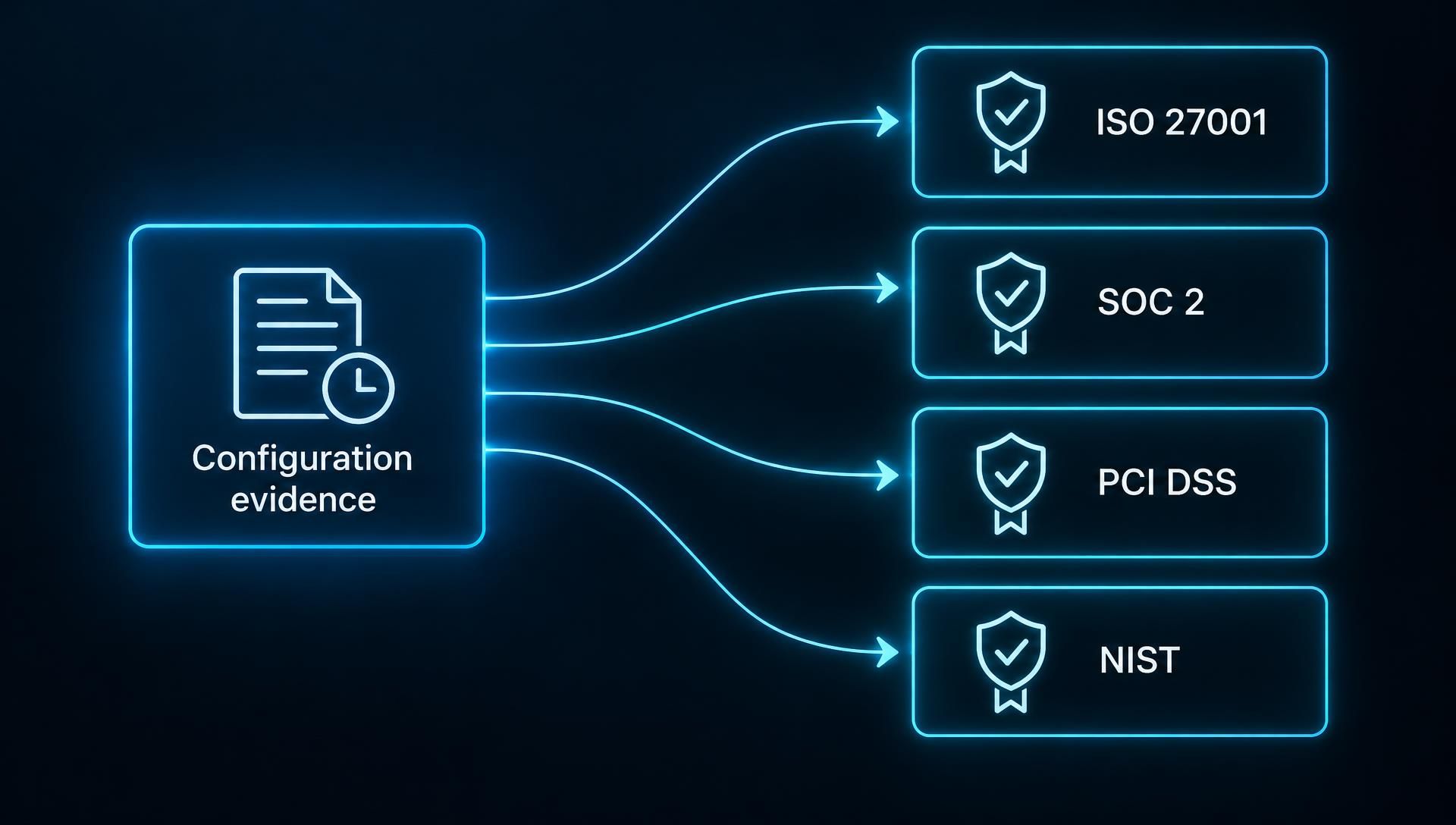
CSPM turns compliance from a periodic scramble into an ongoing record. It maps configuration checks to the controls in frameworks such as ISO 27001, SOC 2, PCI DSS, and NIST, and it keeps timestamped evidence of what passed, what failed, and when each failure was fixed. When an auditor asks whether encryption is enforced on all databases, you can show the current state and its history instead of assembling screenshots.
For organizations operating across regions, the same evidence can often support several frameworks, because many technical controls overlap. CSPM supplies evidence for the configuration layer only, though. It doesn't cover information security policies, training, vendor management, or other parts of a compliance program, so treat it as one input to an audit, not a substitute for it.
CSPM removes much of the repetitive checking that teams otherwise do by hand. Reviewing security groups, storage policies, and identity permissions across dozens of accounts is slow and error-prone, and the results quickly go stale. Automated assessment does the same work continuously and consistently, freeing engineers for tasks that require judgment, such as designing secure architectures and investigating real incidents.
The saving is real, but it shifts effort and doesn't remove it. Someone still has to tune rules, triage findings, and work with application teams to fix them. Expect the work to move from searching for problems to resolving them.
CSPM helps small teams decide what to fix first. A scan of a mid-sized environment can return thousands of findings, and no small team can clear them all. Platforms that rank findings by exposure, identity permissions, and data sensitivity, as described in the prioritization step above, let a lean team concentrate on the handful of issues that create real attack paths.
This is often the most valuable benefit for organizations without a dedicated cloud security group. Ranking quality varies by tool, so check how a platform sets priorities and test it in your own environment before relying on it.
CSPM's main challenges are alert volume, unclear ownership of fixes, and the risk that automated remediation disrupts production. It also has a defined scope: it checks configuration, so it doesn't detect runtime attacks, application flaws, or business logic errors. Knowing these limits up front separates a CSPM program that reduces risk from one that just produces dashboards.
A new CSPM deployment can generate thousands of findings in its first scan, and many of them won't reflect real risk. A 2025 survey of 400 security professionals by CyberEdge Group, commissioned by SentinelOne, found that 53% of organizations say most of their cloud alerts are false positives. That survey covers cloud security alerts broadly and not CSPM alone, and it was vendor-commissioned, so treat it as indicative and not definitive.
Some findings are technically correct but not meaningful. A storage bucket that is public on purpose, such as one serving website images, will trigger the same rule as one holding customer backups. When teams see enough of these, they start ignoring the queue, and real problems get buried.
The fix is tuning, not volume reduction for its own sake. Suppress or downgrade rules for documented, intentional exceptions; rank them by exposure and data sensitivity; and review the rule set on a schedule. Teams that skip this step usually end up with a tool nobody trusts.
CSPM finds problems, but the people who can fix them are usually application or platform engineers, not the security team. A finding about a database exposed to the internet means nothing until someone with access to that database changes it. If ownership is unclear, the finding stays open, even though detection worked.
This gap is organizational, so tooling alone won't close it. Tag every resource with an owner or team, route findings to that owner through the ticketing system they already use, and agree on target fix times by severity. Security teams that must chase fixes manually will be overwhelmed. Teams that publish a clear service-level agreement and report overdue findings to engineering management tend to get more reliable results. Resources with no identifiable owner deserve special attention, since they often point to abandoned assets.
Automated remediation fixes findings without human approval, and it can cause outages if the change breaks something that depended on the original setting. Closing a public storage bucket is usually safe. Tightening a security group rule or removing a permission can cut off an application, a partner integration, or a service account that a deployment pipeline relies on, sometimes at the worst possible time.
Apply automation selectively. Start with well-understood, low-impact fixes; require approval for anything that touches network paths or identity permissions; test rules in a non-production environment first; and keep a log with a rollback plan for every automated change. Also confirm how the platform handles resources managed by infrastructure as code, because an automatic fix can be overwritten at the next deployment unless the template is corrected too.
CSPM checks how cloud resources are configured. It doesn't see what attackers do at runtime, flaws in application code, or logic errors in business processes. The table below shows where those gaps are and which complementary controls address them.
What CSPM Doesn't Cover | Why | Complementary Control |
|---|---|---|
Runtime threats (active malware, suspicious process behavior, lateral movement) | CSPM reads configuration, not live workload activity | Workload protection and cloud detection and response tooling |
Application vulnerabilities (unpatched libraries, insecure code, outdated packages) | Posture checks don't scan software inside the workload | Regular vulnerability assessment and code review |
Business logic flaws (broken authorization flows, abuse of legitimate features) | A correctly configured environment can still run a flawed application | Manual penetration testing by experienced testers |
Identity attacks (phished credentials, session theft, token abuse) | CSPM can flag weak permissions and missing MFA, but not an attacker using valid credentials | Identity threat detection, MFA enforcement, and access monitoring |
Unknown or unmanaged internet-facing assets | CSPM sees accounts you've connected, not shadow IT or forgotten domains | Attack surface management and external attack surface monitoring |
A practical example shows the boundary. CSPM can tell you that an administrative role has no multi-factor authentication. It can't tell you that someone phished that administrator's password yesterday. The two controls answer different questions, and mature programs use both.
A CSPM tool should cover every cloud account you run, map findings to the frameworks you're audited against, analyze identity permissions, scan infrastructure code before deployment, rank risk in context, and integrate with the systems your team already uses. Most products claim all of these, so the useful question is how deep each one goes and whether it holds up in your own environment.
Test coverage first, because a posture tool is only useful for the environments it can see. Check that it supports every provider you use now and plausibly will in the next two years, and that it handles the full account structure: AWS organizations, Azure management groups and subscriptions, and Google Cloud organizations and projects.
Look past the logo list on the vendor's website. Ask which services each provider integration actually checks, because support for a cloud may mean a handful of storage and network rules while newer managed services go unassessed. Also confirm how quickly it discovers new accounts. If a team spins up a project on Friday, you want it inventoried by Monday without a manual onboarding step.
Strong CSPM tools map each check to the controls in the frameworks your auditors use, and they let you see compliance status per framework. Common standards include the CIS Benchmarks, NIST guidance, ISO 27001, PCI DSS, and SOC 2. CIS publishes benchmarks for major cloud providers, which is why they serve as the default baseline on most platforms. Depth matters more than the number of frameworks listed. Ask whether you can build a custom baseline that reflects your own policies, whether mappings show the specific control being satisfied, and whether the report keeps history, so you can show an auditor when a control failed and when it was fixed. A tool that only displays a pass percentage won't hold up during an audit.
Identity analysis shows who and what can do what in your cloud, and it matters because over-permissive access is how many incidents spread. Look for wildcard and administrative permissions, unused roles and keys, privilege-escalation paths, and cross-account trust relationships that are broader than intended.
The strongest implementations answer an effective-permissions question: given every policy, group, and role assumption, what can this identity actually reach? Basic tools check individual policies against a rule list, but miss permissions that combine in risky ways. This capability is sometimes sold separately as cloud infrastructure entitlement management (CIEM), so confirm whether it's included or priced as an add-on.
Shift-left scanning checks configuration before it reaches production, by analyzing infrastructure-as-code templates such as Terraform, CloudFormation, Bicep, and Kubernetes manifests inside the development pipeline. This addresses the root cause of many findings. If a template creates a public bucket, fixing the live bucket does nothing until you correct the template, and the next deployment recreates the problem.
Evaluate how well scanning fits developer workflow. Good tools comment on pull requests with specific fixes, apply the same production policies to avoid mismatches, and support exceptions with a recorded reason. Policy-as-code support, where rules are written in a version-controlled language, makes it easier to keep checks consistent and reviewable. If developers find the feedback noisy or slow, they'll route around it.
Context turns a list of findings into a ranked set of decisions. A capable tool combines exposure, permissions, vulnerabilities, and data sensitivity so it can distinguish an internet-facing server with administrative rights from an isolated test machine with the same misconfiguration. Attack-path visualization goes further by showing how an attacker could chain several weaknesses to reach a sensitive asset.
CSPM is only effective if findings reach the people who fix them, so integration capabilities deserve as much attention as detection. Check for native connections to your ticketing system, your SIEM, and your chat or incident tools. Confirm that there is an API for pulling data and automating workflows, and test whether it covers the same data the console shows.
Reporting should serve different audiences. Engineers need findings with exact resources and fixes. Security managers need trends such as mean time to remediate and recurring drift. Executives and auditors need a summary tied to risk and framework status. Ask whether you can schedule reports, export raw data, and control who sees which accounts, since multi-team environments need that separation.
Open-source CSPM tools are free and transparent, but you handle the operational work. Commercial platforms cost money and offer convenience, but they come with their own trade-offs.
Factor | Open Source | Commercial |
|---|---|---|
Cost | No license fee, but staff time to deploy and maintain | Subscription, often priced by resources or accounts |
Setup and Upkeep | You run, update, and integrate it | Vendor-hosted or supported |
Coverage | Depends on community maintenance; may lag on new services | Typically broader and updated by a dedicated team |
Prioritization and Context | Usually limited to rule-based findings | Often includes risk context and attack paths |
Reporting and Compliance | Basic; you build dashboards | Built-in framework reports and history |
Support | Community | Vendor SLAs |
Open source suits small environments, teams with strong engineering capacity, and proofs of concept. It also works as a second opinion beside a commercial tool. Commercial platforms tend to fit larger, multi-cloud estates and organizations that must regularly produce audit evidence. Neither choice is inherently better, and the cost of maintaining open-source tooling is easy to underestimate.
Use the scorecard below to compare any CSPM option against the same criteria, whether open source or commercial. Score each item from 0 to 3 during a trial on your own accounts, not from a demo.
Area | Question to Answer | What Good Looks Like |
|---|---|---|
Coverage | Does it assess every cloud, account type, and service we use? | All accounts onboarded; new ones discovered automatically |
Accuracy | What share of findings in a trial were false positives? | Low and tunable, with exceptions recorded |
Compliance | Can it report on our frameworks with history? | Control-level mapping and exportable evidence |
Identity | Does it analyze effective permissions? | Shows reachable resources, not just policy text |
Shift-Left | Does it scan IaC and give developers fixes in pull requests? | Same policies in pipeline and production |
Prioritization | Can it explain why one finding ranks above another? | Transparent logic using exposure, identity, and data |
Remediation | Does it support guided and approval-based fixes? | Automation optional, with rollback and logging |
Integration | Does it connect to our ticketing, SIEM, and chat tools, with a usable API? | Works without custom scripts |
Access Control | Can we limit what each team sees? | Role-based, per-account scoping |
Total Cost | What is the full cost, including staff time and add-ons? | Predictable pricing; identity and IaC scanning included or clearly priced |
Exit and Data | Can we export findings and configuration data? | Open formats and API access |
Run the trial for at least a few weeks on a real, messy environment, and include an engineer who will receive the tickets. Their view of how usable the findings are often decides whether the tool gets adopted.
Each major cloud provider ships a built-in posture service, and all three check resource configurations against security standards. They differ in the standards they support, in which features sit behind a paid tier, and in whether they look beyond their own cloud. Knowing those differences tells you whether native tooling is enough or whether you need a layer that works across all of them.
AWS's native option is AWS Security Hub CSPM (previously just Security Hub), which runs automated best-practice checks against your accounts and resources. It supports the AWS Foundational Security Best Practices standard and the CIS AWS Foundations Benchmark, and it also offers standards aligned to frameworks such as PCI DSS and NIST.
For multi-account setups, AWS describes a default configuration policy that can cover all regions and accounts in an AWS Organization, enabling the foundational standard for new accounts as they are added. That matters because gaps tend to appear first in new accounts.
One caveat comes straight from AWS's documentation: its standards and controls don't guarantee compliance with any regulatory framework or audit. Treat passing checks as evidence, not certification. Service names and packaging have also changed recently, so check the current AWS documentation before you plan around a specific feature.
Azure's native posture capability lives in Microsoft Defender for Cloud and comes in two plans. Foundational CSPM is free and enabled by default for onboarded subscriptions and accounts, while Defender CSPM is a paid plan that adds extra capabilities. The free tier provides continuous assessment, security recommendations, Secure Score, and the Microsoft Cloud Security Benchmark across Azure, AWS, and Google Cloud.
The paid plan is where context features live. Microsoft's documentation lists attack path analysis, code-to-cloud mapping, and the cloud security explorer as available only through the paid plan, and says billing is based on specific resources. On native versus third-party coverage, the free tier gives a solid baseline for Azure and can onboard other clouds. A separate tool becomes worth evaluating when you need richer context, custom baselines, or a consistent workflow across providers that the native plan doesn't provide. Test that against your own environment before paying for overlap.
Google Cloud's native service is Security Command Center, offered in three tiers: Standard, Premium, and Enterprise. Standard supports basic posture management for Google Cloud only and carries no additional charge. Premium adds advanced posture and compliance management and attack paths, still for Google Cloud only, while Enterprise is positioned for protecting Google Cloud, AWS, and Azure.
The dedicated posture feature is the security posture service. According to Google's documentation, it lets you define and deploy a security posture, monitor your resources' status, and address drift from that posture. The same page says it's available only with the Premium or Enterprise tier, activated at the organization level. It also offers predefined posture templates, including one based on a CIS Google Cloud benchmark. If you only use the free tier, you have basic checks but not posture deployment and drift correction, so confirm the tier before assuming you have them.
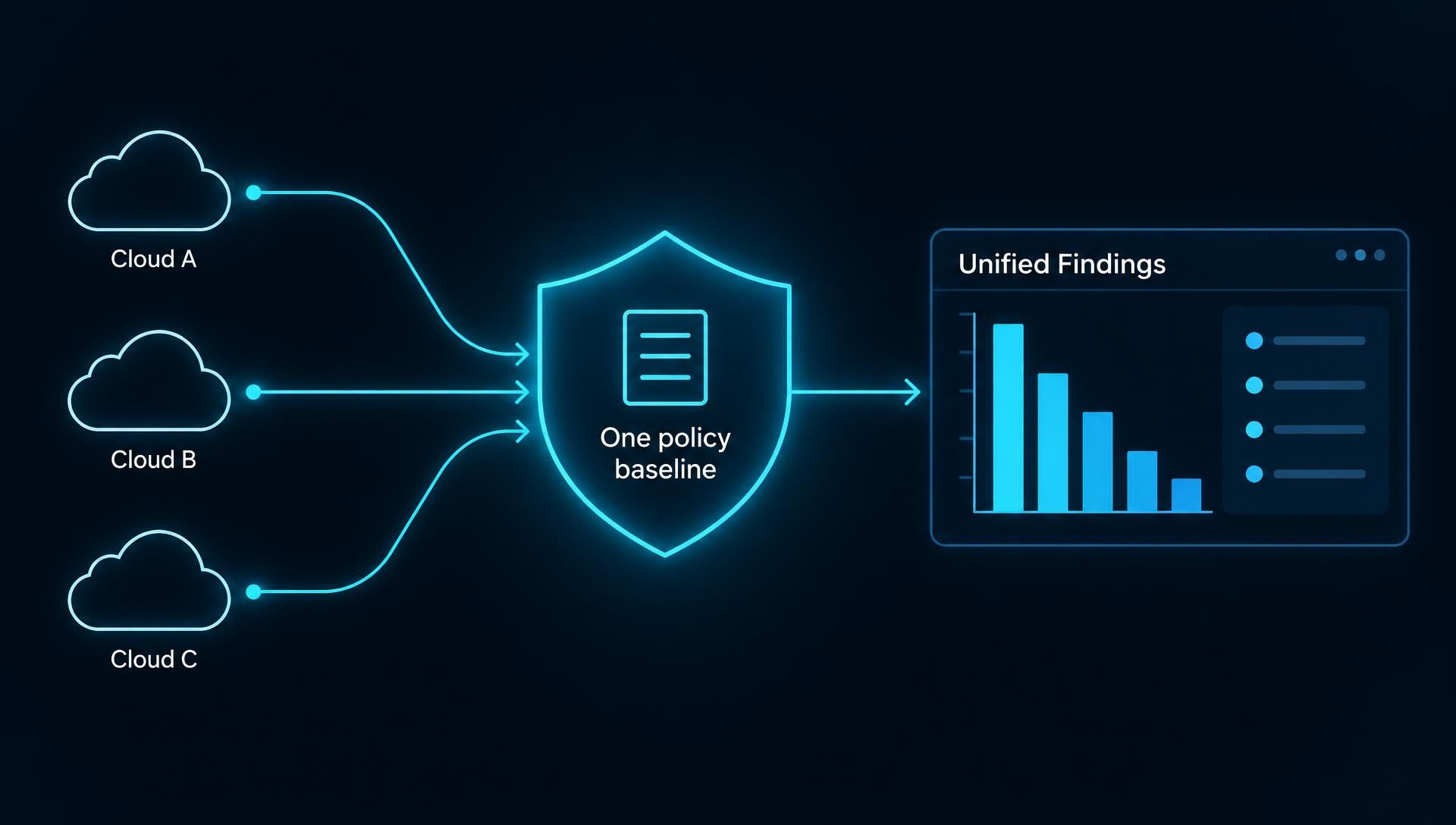
Native tools are strong within their own cloud, but they differ in names, standards, severity ratings, and workflows. Running three of them separately means three sets of findings and no single answer to "are we secure?" In a multi-cloud estate, the goal is one policy baseline applied consistently, so a rule like "no public storage" is enforced and reported the same way everywhere.
Build the baseline once, in plain language, from a recognized benchmark and your own requirements. Then map each cloud's controls to it, and note where a provider has no equivalent. Decide where consolidated reporting will live, whether in a unified CSPM platform, a SIEM, or a governance dashboard. Review the mapping periodically, because providers add and rename controls often. The evaluation scorecard earlier in this guide can help you decide whether native tools cover this or you need a cross-cloud layer.
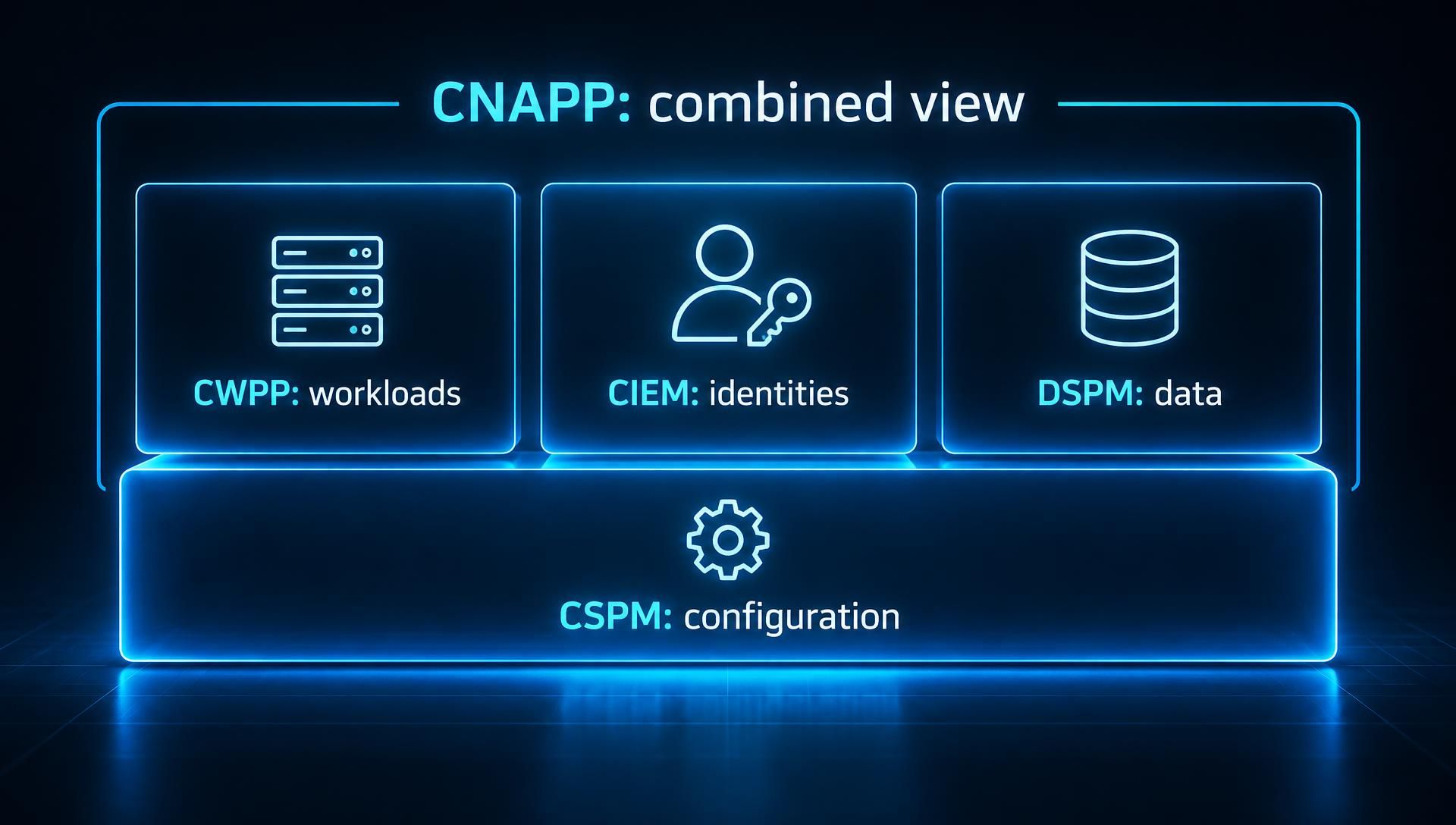
CSPM checks how cloud infrastructure is configured. The related categories cover different layers: DSPM protects the data itself, CWPP protects running workloads, CIEM manages identity permissions, and CNAPP combines several of these into one platform. They overlap, but they answer different questions, so the right mix depends on what you most need to see.
CSPM asks whether your cloud resources are configured safely, while data security posture management (DSPM) asks where your sensitive data lives and who can reach it. A DSPM tool discovers and classifies data across storage, databases, and other data stores, then flags exposure such as sensitive records in a public location or accessible to too many identities.
The two are complementary. CSPM can tell you a bucket is public, but it won't know whether the bucket holds marketing images or customer identity documents. DSPM provides that missing context, sharpening prioritization. Cloud-focused DSPM applies the same idea to cloud data stores, and many platforms now offer it as a module alongside CSPM. If your main concern is regulated data, such as personal or payment information, DSPM adds real value. If you're still fixing basic configuration hygiene, start with CSPM.
CNAPP is the broader category, and CSPM is one of its core components. The Cloud Security Alliance describes it as a category of security products that includes functionality previously found in CSPM and CWPP products, plus more. In practice, a CNAPP combines posture checks, workload protection, identity analysis, and often code scanning into one platform that correlates signals. If you need configuration visibility and compliance evidence across a modest estate, standalone CSPM may be enough. Larger, fast-moving environments often benefit from CNAPP's correlation. Earlier in this guide, the analyst framing section covers how the category developed.
CWPP and CIEM each cover a gap CSPM leaves open. A cloud workload protection platform secures workloads, including virtual machines, containers, Kubernetes clusters, and serverless environments, with runtime protection and vulnerability visibility. CSPM can tell you a virtual machine is exposed. CWPP can tell you it's running suspicious processes.
Cloud infrastructure entitlement management (CIEM) tracks permissions across multi-cloud environments and reports unnecessary access. CSPM flags obvious identity misconfigurations, but CIEM analyzes which identities can actually reach what and recommends right-sizing. If over-permissive access is your main exposure, CIEM goes deeper than a posture tool will.
Category | What It Protects | What It Sees | When You Need It |
|---|---|---|---|
CSPM | Cloud infrastructure configuration | Misconfigurations, policy violations, compliance gaps | Almost always; the baseline for any cloud estate |
DSPM | Sensitive data | Where data lives, how it's classified, who can access it | You hold regulated or high-value data in the cloud |
CWPP | Running workloads (VMs, containers, serverless) | Runtime behavior, workload vulnerabilities | You run production workloads that need runtime defense |
CIEM | Cloud identities and permissions | Effective permissions, unused access, privilege escalation paths | Many roles and accounts; identity is your main risk |
CNAPP | The full cloud-native application lifecycle | Combined posture, workload, identity, and code signals | A larger estate needing correlated, prioritized risk |
These aren't mutually exclusive. A CNAPP often includes the other four as modules, and the real question is whether you buy them separately or together.
Implement CSPM in six phases: inventory your cloud accounts and assign owners, choose baselines and scope, run a first assessment, triage findings with clear deadlines, connect the results to CI/CD and ticketing, and measure progress. The order matters because tooling can't fix an ownership problem, and a scan run before scope is agreed produces findings nobody acts on.
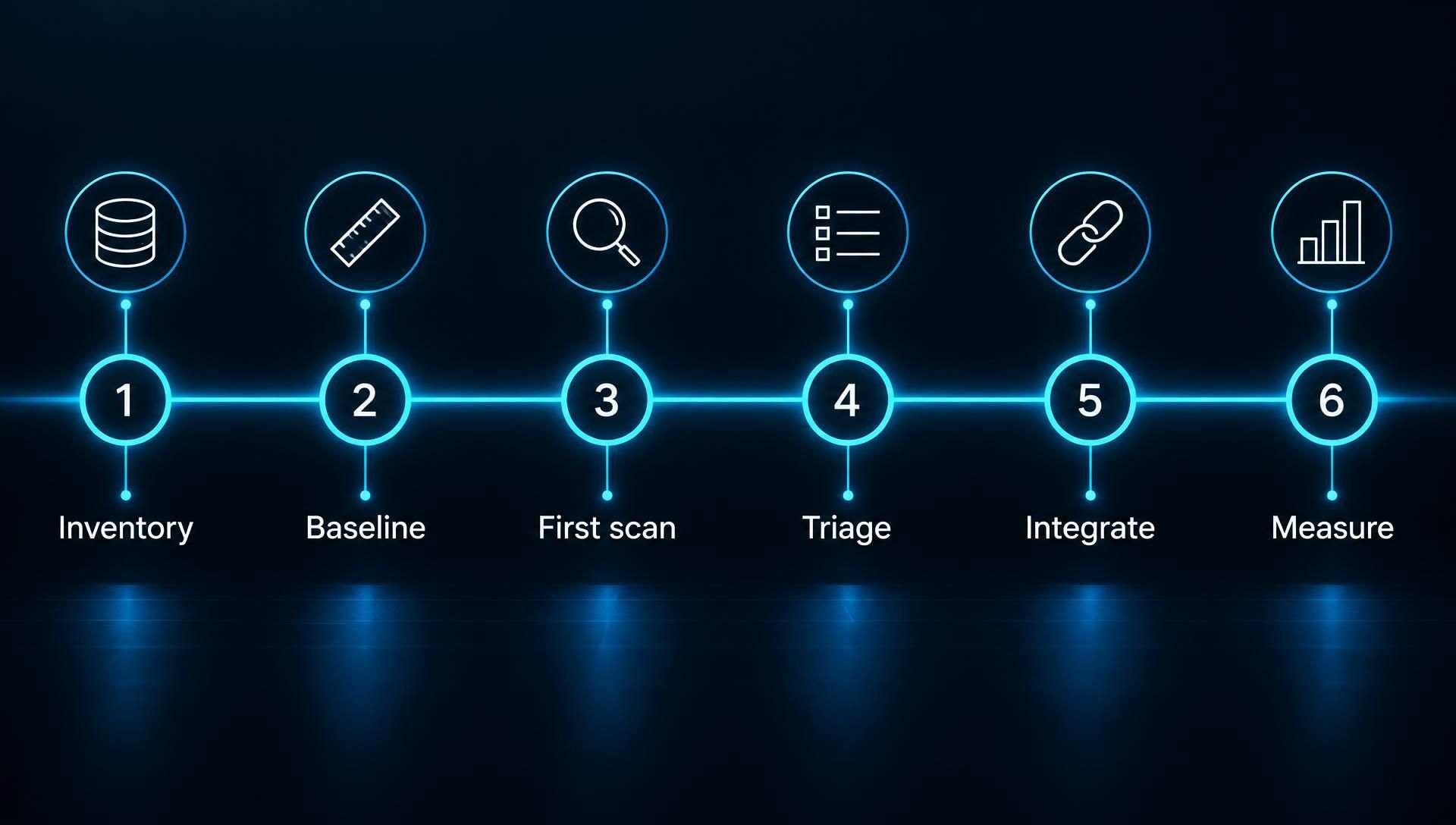
Start by listing every cloud account, subscription, and project in use, and name a responsible owner for each. Pull the list from your cloud organization structure and billing records, not from memory, because accounts created by individual teams, acquired companies, and old experiments are usually the ones missing from internal lists.
For each account, record the owning team, the environment type (production, development, test), and a contact who can approve changes. This record decides how findings get routed later, so do it before connecting any tool. Flag accounts with no identifiable owner immediately. They are often abandoned, and abandoned accounts tend to hold forgotten, unmonitored resources.
A baseline is the set of rules you'll measure your environment against, and scope is which accounts and resources the program covers first. Start with a recognized benchmark, such as the CIS Benchmarks for your cloud providers or the provider's own best-practice standard, then add the frameworks you're audited against, such as ISO 27001, SOC 2, or PCI DSS.
Don't try to cover everything at once. A sensible first scope is production accounts and anything holding sensitive data, with development and test accounts added in a second wave. Write down the baseline and any rules you're deliberately not enforcing yet, with a reason. That record prevents later arguments about why you ignored a finding. If you're still choosing a tool at this stage, the evaluation scorecard earlier in this guide helps you compare options against these requirements.
Connect the CSPM tool to your in-scope accounts with read-only access, then run an initial assessment to establish a baseline. Most tools connect through the cloud provider's APIs, so you don't need to install software on workloads. Confirm that every in-scope account actually appears in the tool's inventory, because a missing account produces a reassuring but false picture.
Expect the first result to be large and uncomfortable. That's normal, and it isn't a reason to start fixing everything. Treat this scan as a measurement. Save the results, because they become your starting point for showing progress later. Review a sample of findings with the engineers who own those resources to confirm the rules make sense for your environment and catch obvious false positives early.
Triage turns a raw list into a plan. Rank findings by real risk, using internet exposure, identity permissions, and data sensitivity as described in the prioritization step earlier, and not by severity label alone. Tackle exposed storage, public databases, open management ports, and over-permissive administrative access first.
Then agree on service-level targets for fixing each category. The numbers should reflect your own risk tolerance and team capacity, and the examples here are only an illustration: critical issues fixed in days, high-risk issues in a few weeks, lower-risk items scheduled into normal work. Assign every finding to the owner recorded in Phase 1, and get engineering management to agree to the targets in advance. A target that only security has agreed to won't hold up.
Handle exceptions deliberately. If a finding reflects an intentional setting, record the justification, who approved it, and an expiry date for review.
Integration moves CSPM from a report people read to a workflow people follow. Connect findings to the ticketing system your teams already use, so each issue lands in the owner's queue with the resource, the failed rule, and the recommended fix. Avoid asking engineers to log into a separate security console to find out what's theirs.
Then move checks earlier. Scan infrastructure-as-code templates in the pipeline so insecure configurations are caught in a pull request, before they deploy. Use the same policies in the pipeline and in production, so developers don't see one set of rules at build time and another after release. Roll this out gradually. Start by issuing warnings for violations, then block only the most serious ones once teams are used to the feedback.
Measure the program with a small set of metrics that show whether risk is actually falling. Three are especially useful:
Mean time to remediate: how long findings stay open, tracked by severity. This is the clearest sign that ownership and workflow are working.
Drift rate: how many new violations appear in a given period. A high rate points to source problems, such as templates or processes that keep recreating the same issue.
Coverage: the share of your cloud accounts and resources actually connected and assessed. A great remediation record means little if a quarter of your accounts aren't being scanned.
Review these monthly with security and engineering leaders together, and report open exceptions alongside them. Use the Phase 3 baseline as the comparison point.
Most failed CSPM rollouts share a handful of causes:
Connecting tools before defining ownership. Findings with no owner stay open indefinitely.
Trying to fix everything at once. Without prioritization, teams burn out and begin ignoring the queue.
Turning on automatic remediation too early. An unreviewed automated change to a network rule or permission can break a production service.
Leaving out non-production and acquired accounts. Attackers don't care which environment a weak setting is in.
Treating CSPM as security's project alone. Engineers fix the findings, so they need a voice in the baseline and the targets.
Never tuning the rules. Without regularly reviewing false positives and exceptions, trust in the tool erodes.
The best CSPM practices are to fix identity and internet exposure first; correct problems in infrastructure code, not just live resources; enforce policy in the CI/CD pipeline; tune alerts; record every accepted risk; and review automated fixes on a schedule. Each targets a common reason programs stall: too many findings, recurring problems, rules nobody trusts, or automation that causes outages.
Start with the findings that give an attacker a way in or a way to move, not the category with the most items. In practice, that means two groups: internet-reachable resources and identities with more access than they need. A public storage bucket holding customer data, an administrative role without multi-factor authentication, or a database open to the world will matter more than hundreds of missing tags or logging gaps on isolated test resources.
Sorting by raw count rewards the wrong work. You can clear a thousand low-risk findings without making the environment meaningfully safer, while one exposed administrative credential can undo it all. Set a standing rule that the top of the queue is always exposed resources with sensitive data or broad permissions, then work down. If a tool can't show why it ranked a finding where it did, treat its ranking as a starting point and verify it.
If a resource was created from a template, fix the template, not just the live resource. Correcting a public bucket in the console solves it until the next deployment, when the same template recreates it. This is why some teams see the same findings reappear every release.
The practice has three parts. Trace each recurring finding back to the template, module, or pipeline that produces it. Fix it there, so every future deployment inherits the correction. Then close the live finding only after the source is fixed, or alongside it. Where teams make manual console changes, add a process to bring them back into code, so the template remains the source of truth. A high drift rate, covered in the measurement phase of the rollout plan, usually signals that teams are skipping this step.
Enforce security policy at code review and merge, the core of DevSecOps, to stop insecure configurations before deployment. Three habits make this work.
Use policy-as-code gates. Write your rules in a version-controlled policy language and run them against infrastructure templates in the pipeline. Because the rules live in a repository, you can review, test, and change them through the same process as application code. Use the same rule set that your production scanning uses, so developers aren't surprised by findings after release.
Give feedback in the pull request. Developers act on feedback they see where they work. A comment on the changed line that names the failed rule and shows the fix is far more effective than a ticket that arrives days later. Keep messages specific and short.
Build an exceptions workflow. Some violations are intentional. Let developers request an exception from the pipeline with a stated reason, route it to a named approver, and give it an expiry date. Without a legitimate path, teams find ways to bypass the checks.
Roll gates out in stages. Start in warning mode so teams see what would fail, then block only the most serious violations, such as public data stores and unrestricted administrative access, once the false-positive rate is acceptable. Blocking everything on day one tends to produce workarounds and resentment.
Alert tuning is ongoing maintenance, and skipping it erodes trust in the tool. Review the rule set regularly, and for each noisy rule decide whether to adjust its scope, lower its severity in specific environments, or suppress it for documented, intentional cases. Track the false-positive rate by rule so you can see where tuning pays off.
Pair tuning with formal risk acceptance, a core part of governance, risk, and compliance work. When your team decides not to fix something, record the finding, the business reason, the compensating controls in place, who approved it, and when it will be reviewed. A suppressed alert with no record is a hidden risk and creates trouble during audits because an auditor will ask why a control failure was left open. Review accepted risks at their expiry date and don't renew them automatically.
Automated fixes need the same ongoing scrutiny as any production change. Keep an inventory of every automated remediation rule: what it changes, which accounts it covers, who owns it, and when it last fired. Review the log of what it changed, looking for unexpected side effects or fixes that engineers later reversed.
Recheck rules whenever the environment changes, such as a new application, a new account structure, or a service that depends on a setting the rule would alter. A rule that was safe last year can cause an outage after an architecture change. Keep high-impact actions, such as changing network paths or revoking permissions, behind human approval, and make sure every automated change can be rolled back. If a rule has never fired, verify it still works before assuming the environment is clean.
CSPM supports compliance by turning cloud configuration into continuous, timestamped evidence that maps to technical controls in frameworks such as ISO 27001, SOC 2, PCI DSS, and NIST, as well as regional rules in the GCC. It covers the configuration layer only. Policies, training, and vendor governance still need their own evidence, and AWS states clearly in its documentation that passing its standards checks doesn't guarantee compliance with any regulatory framework or audit.
Most technical controls in these frameworks ask the same questions: who can access what, whether systems are configured securely, whether data is encrypted, and whether activity is logged. A CSPM finding answers one of those questions for one resource, so the same finding can serve several frameworks at once. For example, an unencrypted database is evidence against an encryption control in all four.
Control Theme | ISO 27001 (Annex A Theme) | SOC 2 (Criteria Area) | PCI DSS (Requirement) | NIST SP 800-53 (Family) |
|---|---|---|---|---|
Secure configuration | Configuration management | Change management and system operations | 2 (secure configurations) | CM |
Network exposure | Network security | Logical access | 1 (network security controls) | SC |
Access and permissions | Access control | Logical access | 7 and 8 | AC |
Encryption | Cryptography | Logical access and confidentiality | 3 and 4 | SC |
Logging and monitoring | Logging and monitoring | System operations | 10 | AU |
Pick a CSPM tool that shows which control each failed check relates to and keeps history. An auditor needs to see not only today's pass rate but when a control failed and when it was fixed. If you are preparing for certification, our ISO 27001 compliance services show how that evidence fits an audit. For a side-by-side look at how the three audit-style frameworks differ, see our guide to ISO 27001 vs SOC 2 vs PCI DSS.
Regional frameworks lean on the same configuration evidence, but each has its own scope and applies to different organizations, so check which ones apply to you before mapping anything.
UAE. The UAE Information Assurance (IA) Regulation, commonly called SIA (formerly NESA) compliance, applies to UAE government entities and designated critical entities. It doesn't prohibit cloud use, but it takes a risk-based approach and expects entities to define security requirements for data retention, processing, and storage in cloud environments. CSPM evidence on encryption, access, and logging supports that. Financial institutions regulated by the Central Bank of the UAE (CBUAE) face additional sector-specific expectations. For a plain-language breakdown, see our guide to cybersecurity regulations in the UAE.
Saudi Arabia. This applies only to organizations operating in or serving the Kingdom. The National Cybersecurity Authority (NCA) publishes Essential Cybersecurity Controls and Cloud Cybersecurity Controls (CCC), the latter aimed at cloud providers and at government and critical-infrastructure customers. SAMA adds requirements for the financial sector. If you serve Saudi customers, check which framework and which version applies, since residency obligations depend on data classification and have changed between versions.
Dubai virtual assets (VARA). Firms licensed by the Dubai Virtual Assets Regulatory Authority must meet its technology and information requirements, and cloud configuration, access, and logging evidence feeds directly into those. This is Dubai-specific and doesn't apply to firms elsewhere. We cover the requirements in detail in our VARA cybersecurity requirements checklist, and our vCISO for VARA compliance service explains how that support works.
Organizations selling into the US and EU can often reuse the same configuration evidence across audits. A US customer may ask for a SOC 2 report or alignment with NIST guidance. An EU customer may ask how you protect personal data under the GDPR, and a card-payment business may need to comply with PCI DSS. Each audit asks for its own report format, but the underlying proof that storage is encrypted, access is limited, and changes are logged is the same.
The practical approach is to maintain one control library, map it to each framework once, and generate framework-specific reports from it. Keep CSPM exports, exception records, and remediation history organized by control. That way, a new audit means a new view of existing evidence, not a new collection exercise. For data protection specifically, our guide to what is GDPR requires covers the legal side, and it's worth checking whether newer EU rules such as NIS2 or DORA apply to your sector.
Data residency determines where data may be stored and processed, and CSPM can check that regions, replication settings, and backup locations match your policy. A bucket configured to replicate to a region outside an allowed list is a configuration finding, and CSPM can catch it early.
Start by classifying data and listing which laws apply to each class, then convert those into an approved-regions policy. The rules vary. The UAE's federal data protection law (Federal Decree-Law No. 45 of 2021, in force since January 2022) allows transfers abroad where adequate protection exists and otherwise relies on safeguards such as contracts or consent, while DIFC and ADGM have their own regimes. Some sectors have separate localization rules, and Saudi requirements depend on the NCA's classification and framework version. Cloud governance should also cover backups, disaster recovery copies, logs, and encryption keys, because these often sit in a different region from the primary data. Take legal advice for your specific situation, since this section describes the technical control and isn't legal guidance.
Treat cloud security posture management as routine upkeep, like patching or backups, and not as an audit you pass once. Cloud settings change daily, so a clean report today says little about next month. The programs that hold up have clear owners, a tuned baseline, fixes made at the source, and a few honest metrics reviewed regularly.
If you're not sure where your environment stands, start with a bounded review: your production accounts, your internet-exposed resources, and your most privileged identities. That gives you a real baseline to work from. Our team can run a cloud-scoped penetration test to show what an attacker could reach, or a vulnerability assessment to show what's exposed and what to fix first.
CSPM continuously checks your cloud settings for mistakes that could expose your data. It finds your cloud resources, compares their configuration to security rules, ranks the problems by risk, and helps you fix them. Think of it as an automated, always-on inspection of your cloud setup.
No. CSPM checks cloud configuration, while a cloud-native application protection platform (CNAPP) is a broader category that includes CSPM along with workload protection, identity analysis, and often code scanning. A small estate may only need standalone CSPM. Larger environments often benefit from a CNAPP, which correlates signals across these areas.
No. CSPM finds misconfigurations by reading settings, while penetration testing has skilled testers actively try to break in, including through application flaws and business logic errors that configuration checks can't see. The two complement each other: CSPM keeps your environment clean continuously, and testing shows how a determined attacker could still get through.
For posture work, agentless collection is usually the better starting point. It connects through cloud provider APIs, deploys quickly, and sees configuration across every account without touching workloads. Agent-based collection adds depth inside running workloads, which matters for runtime protection. Many teams use agentless for posture and add agents only where they need that detail.
CSPM can fix some misconfigurations automatically, but only low-risk, well-understood fixes should run without approval, such as blocking public access on a storage bucket. Changes to network rules or permissions can break production applications. Require approval for those, log every automated change, keep a rollback plan, and review your remediation rules regularly.
It can be, depending on your environment. Open-source tools suit small estates, teams with strong engineering capacity, and proofs of concept, and they cost no license fee. But you handle deployment, upkeep, prioritization, and reporting yourself, and coverage may lag on new cloud services. Larger multi-cloud environments needing audit evidence often outgrow them.
Continuously, if your tool supports it. Modern CSPM re-evaluates resources on a schedule or when a change event occurs, so it flags risky settings promptly, not at the next quarterly review. If you can only schedule scans, run them at least daily for production accounts and weekly for lower-risk environments.