MCP Security | Risks, Attacks, and Best Practices
Continue Reading
October 15, 2026
Prompt injection, over-permissioned agents, leaked credentials: learn the top AI agent security risks and the controls that stop them before launch.
October 12, 2026
A practical AI incident response guide: how to detect, contain, and recover from prompt injection, data leaks, and rogue agents, plus a readiness checklist.
October 9, 2026
LLM security testing explained: compare pentesting, red teaming, and automated scanning, and learn how to test agents, RAG apps, and AI-powered tools.
MCP Security: Risks, Attacks, Architecture, and Best Practices for the Model Context Protocol
MCP security is the practice of protecting the servers, tools, credentials, and data flows that connect AI agents to external systems through the Model Context Protocol. It differs from classic API security because the caller is a model that can be manipulated through text, so a poisoned tool description or document can steer it into harmful actions.
Anthropic introduced the protocol in November 2024 as an open standard, so an agent could reach files, databases, and SaaS tools through one interface instead of a custom integration for each. That convenience is also the risk. Every MCP connection is a path where untrusted text flows into the model and privileged actions flow out of it. A traditional API client does exactly what its code says. An agent decides what to call based on content it reads, and that content may come from an unvetted source.
This guide covers how that changes the attack surface, which attacks matter in practice (tool poisoning, indirect prompt injection, confused deputy flaws, and credential exposure), and how to design authorization and architecture that hold up when the model is the weak link. It closes with a hardening checklist and governance steps for teams running MCP in production, from a single developer workstation to a regulated enterprise.
MCP security is the set of controls that keep the Model Context Protocol from becoming a path for data theft or unauthorized actions. It covers who can connect to a server, what each tool can do, how credentials are stored and scoped, and how untrusted content is kept from steering the model. Because MCP links language models to real systems, a weakness in any one layer can turn into an action in a connected system.
MCP is an open protocol that lets an AI application call external tools and read external data through one standard interface. It has four main parts. The host is the application the person uses, such as a chat app or a code editor, and it runs the model. Inside the host, a client holds a one-to-one connection to a single server. The server is the program that exposes capabilities, either on the same machine over standard input and output or remotely over HTTP. Those capabilities come as tools (actions the model can choose to run) and resources (data the model can read).
This structure matters for security because each connection is a separate trust boundary. A host may connect to many servers at once, and the model sees the combined output of all of them in one context.
MCP security differs from API security because the entity deciding what to call is a model reading natural language, not code written by a developer. A conventional API client sends only the requests its programmer wrote. An MCP client lets the model pick tools and arguments at runtime, based on text it has just read, and that text can come from a tool description, a web page, a ticket, or an email.
This creates two problems that classic API controls do not solve. First, server-side input validation can't tell whether a request reflects the user’s intent or an attacker’s instruction hidden in a document. Second, authenticating the caller proves which application is connecting but says nothing about whether an attacker manipulated the model before it made the call. The MCP specification itself acknowledges this: it treats tools as arbitrary code execution and says tool descriptions should be considered untrusted unless they come from a trusted server. Securing MCP therefore means controlling the whole chain around the model, not just the endpoint.
The phrase is a joke because MCP has no letter S, which is the point: early adopters found that security had been left largely to implementers. The first wave of public servers shipped quickly, often with broad permissions, secrets in environment variables, and no authorization at all, and the protocol’s initial design gave little guidance to prevent that.
The joke gets this right: the protocol alone doesn't make a deployment safe. Later revisions of the specification added authorization guidance based on OAuth 2.1 and a dedicated security best practices document. However, a server is still only as secure as the choices its builder makes. The joke misses that the gap is closing: the specification now names concrete risks such as confused deputy attacks and token passthrough, and provides patterns to avoid them. The practical lesson is to treat MCP as a framework that supports secure design, not one that guarantees it.
MCP security is narrower than AI agent security. It protects the connection layer, meaning servers, tools, tokens, and the data moving through the protocol. AI agent security covers the agent as a whole, including its identity, memory, planning, and behavior across every system it touches. For the broader picture, read our agentic ai security guide.
MCP expands the attack surface by adding new trust boundaries between the user, the model, and every system a server can reach. It also gives text a new role: content the model reads can now trigger real actions. Securing MCP starts with knowing where each boundary sits and which control belongs there.
An MCP deployment has four boundaries, and each needs its own control. The first runs between the user and the host application, where consent and approval decide whether a tool call actually runs. The second runs between the MCP client and the server, where the transport and authorization decide who may connect. The third runs between the server and the downstream systems it touches, such as databases, file stores, and SaaS APIs, where scoped credentials limit what a compromised server can do. The fourth is less obvious: everything a server returns, including tool descriptions and tool output, flows back into the model, so it must be treated as untrusted content.
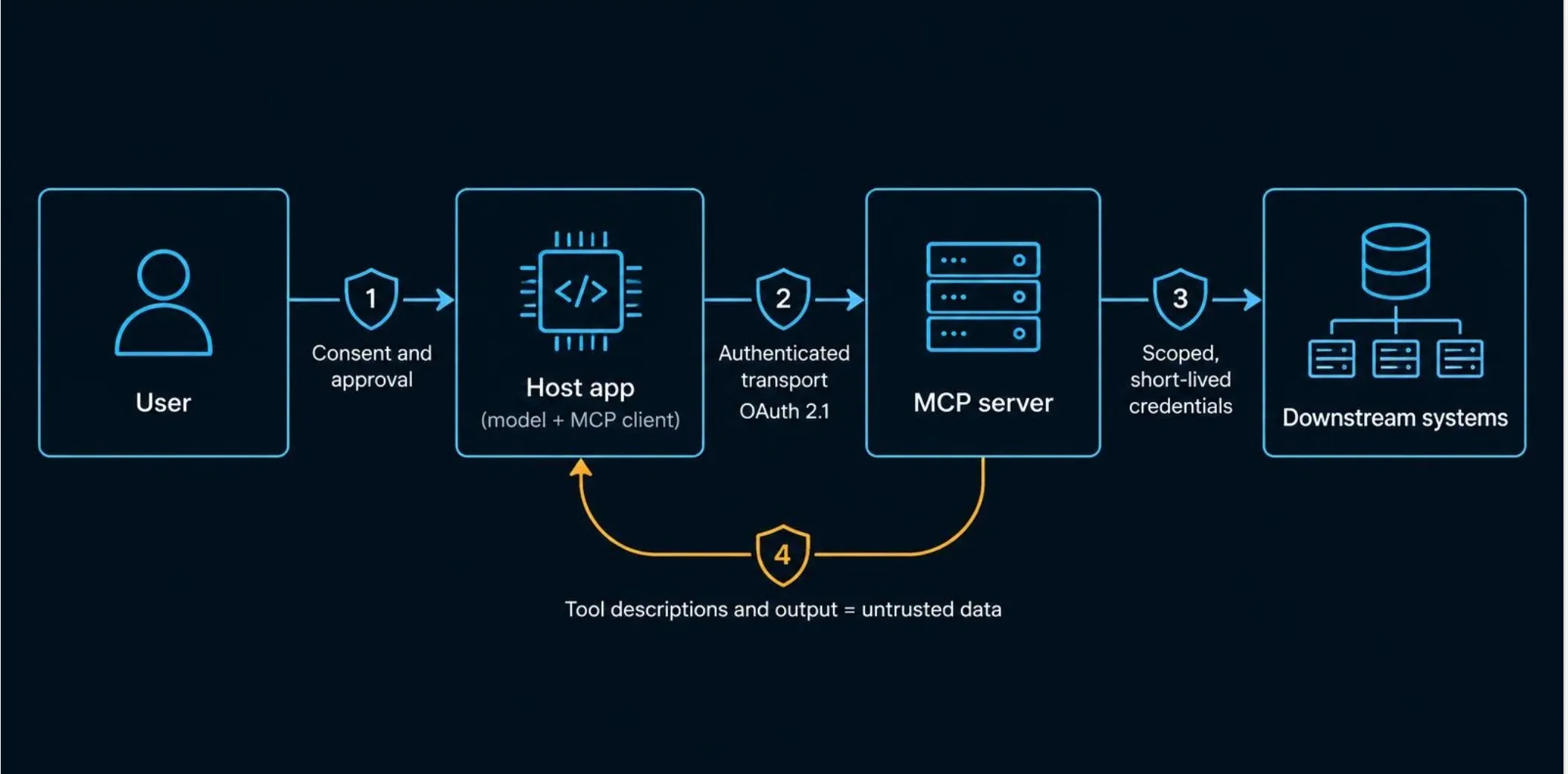
A common mistake is placing every control at boundary two and assuming it covers the rest. Authentication there says nothing about what the model decides to do after reading hostile content at boundary four, and nothing about how much damage a stolen token can cause at boundary three.
Local and remote MCP servers carry different risks because they run in different places with different privileges. A local server usually runs on the user’s machine over standard input and output, so it typically inherits the user’s file access and environment variables. A malicious or compromised local server can therefore read files and secrets without ever crossing a network.
A remote server runs over HTTP, adding network exposure, multi-user session handling, and a real need for authorization. The MCP specification reflects this split: its authorization framework applies to HTTP-based transports, while servers using standard input and output are expected to take credentials from the environment instead. In practice, local servers need sandboxing and careful vetting before installation, and remote servers need strong authorization, token scoping, and network controls.
The model can see everything in its context, call any tool the client exposes, and leak anything it has seen through those calls. That is the core exposure. If a single session combines a server that reads private data with a server that can send messages or make web requests, an attacker who plants instructions in content the model reads can try to chain the two, reading the data and then sending it out.
Tool descriptions deserve particular attention. The server author writes them, the model reads them as guidance, and a user rarely sees them in full. A description can quietly steer the model, and a server can change its descriptions after the user approves them. The defensive principle is to limit what any one session can reach: expose only the tools needed, separate sensitive data sources from outbound channels, and require human approval for high-risk calls.
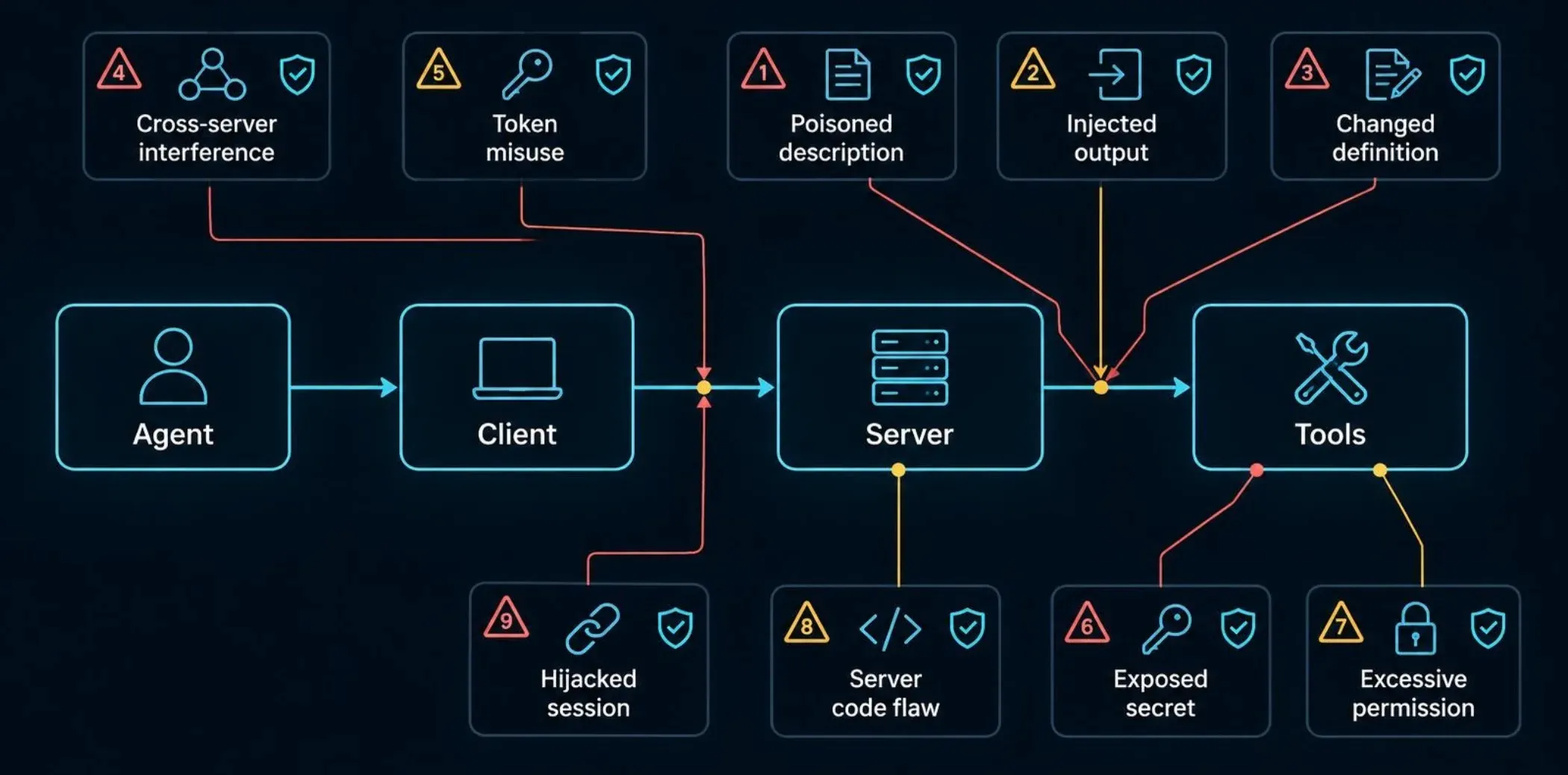
The main MCP security risks fall into nine groups: manipulated tool descriptions, injected content in tool output, tool definitions that change after approval, cross-server interference, token misuse, exposed credentials, excessive permissions, flaws in server code, and weak session or local isolation. Most of them exploit the same weakness: the model trusts text it should treat as untrusted data. The sections below can each be read on their own.
Tool poisoning is an attack in which a server hides instructions in a tool’s description or metadata so the model follows them. The model reads that text as guidance, and users rarely see it in full, so a description can tell the model to read a sensitive file or send data elsewhere while the visible tool name looks harmless. The impact is silent data theft or unauthorized actions under the user’s own permissions. The main defense is to review descriptions before approving a server, show the user the full description, and install only servers from sources you can verify.
Indirect prompt injection happens when hostile instructions arrive inside content a tool returns, such as a web page, a support ticket, a document, or an email. The attacker never talks to the model directly; they plant text the agent will eventually read. Because the model cannot reliably separate data from instructions, it may act on that text with whatever tools it has. The attack matters most when a session combines private data with a way to send information out. Defenses include limiting which tools can run after the model reads untrusted content, filtering and logging tool output, and requiring approval for high-risk calls.
A rug pull occurs when a server behaves honestly during review, then changes its tool definitions or behavior after the user has approved it. The approval was real, but it no longer describes what the server does. The impact is that a trusted integration becomes a malicious one without any new consent prompt. The primary controls are pinning server versions, detecting changes to tool descriptions and schemas, and requiring re-approval when they change.
Tool shadowing is an attack in which one server’s tool description influences how the model uses a tool from a different server. All connected servers feed the same model context, so a malicious or compromised server can redefine a trusted one's behavior, for example, by instructing the model to add a hidden recipient to every message sent through a legitimate email tool. The impact is that a single weak server can undermine the strongest one in the session. The primary control is isolation: connect fewer servers per session, separate high-trust and low-trust servers, and name tools in a way that prevents collisions.
A confused deputy attack tricks a trusted server into using its authority on an attacker's behalf. It appears in MCP when a server acts as a proxy to a third-party API using one static client identity, which can let an attacker obtain an authorization code without the user’s real consent. Token passthrough is a related anti-pattern in which a server accepts tokens that were never issued to it and forwards them downstream. That breaks audience checks, weakens audit trails, and lets a stolen token work across services. The MCP specification’s security best practices document names both. The controls are per-client consent, validating that tokens were issued for the server itself, and never passing client tokens through to other APIs.
Credentials leak from MCP setups because they are routinely placed in configuration files and environment variables, where servers, logs, and the model’s own context can reach them. A local server inherits the environment it launches in, so the server’s code can read any secret in that environment. The impact is account takeover well beyond the MCP integration itself. The primary control is to keep secrets out of configuration committed to repositories, use a secrets manager, issue short-lived tokens, and give each server only the credentials it needs.
Over-permissioning is the most common risk because it is a convenience choice, not a bug. A tool granted broad scopes, such as full read and write access to a repository or mailbox, lets any successful manipulation do maximum damage. The impact scales directly with the permissions attached. The primary control is least privilege: request narrow scopes, split read and write tools, and expand access only when a specific task needs it.
MCP servers are ordinary software, so they carry ordinary vulnerabilities. A server that passes model-supplied arguments into a shell command can allow command injection, and one that fetches URLs on the model’s behalf can be pushed into server-side request forgery against internal services or cloud metadata endpoints. Either can end in remote code execution on the host running the server. The primary controls are strict input validation, avoiding shell calls with untrusted input, allowlisting outbound destinations, running servers in sandboxes, and applying standard secure code review. Verify any specific CVE in the NVD before citing it.
Session hijacking is an attack in which someone obtains or guesses a session identifier and acts as the legitimate user, which becomes possible when remote servers handle sessions carelessly. Local servers pose a different problem: a server running with the user’s full privileges can read files, start processes, and access the network, so a malicious or compromised one gains all that access. The impact is impersonation on remote servers and full local compromise on local ones. Primary controls include secure, non-predictable session handling; binding sessions to the authenticated user; and running local servers in sandboxes with restricted file and network access.
Risk | How it happens | Impact | Primary control |
|---|---|---|---|
Tool poisoning | Hidden instructions in tool descriptions | Data theft, unauthorized actions | Review descriptions, trusted sources only |
Indirect prompt injection | Hostile text in tool output or resources | Model follows attacker instructions | Filter output, restrict tools after untrusted content |
Rug pull | Server changes definitions after approval | Trusted server turns malicious | Version pinning, change detection, re-approval |
Tool shadowing | One server’s text alters another’s tools | Weakest server compromises the rest | Server isolation, fewer servers per session |
Confused deputy / token passthrough | Server acts on attacker’s behalf or forwards foreign tokens | Consent bypass, cross-service token abuse | Per-client consent, audience validation, no passthrough |
Credential exposure | Secrets in config or environment | Account takeover | Secrets manager, short-lived tokens |
Over-permissioned tools | Broad scopes granted for convenience | Maximum damage from any manipulation | Least privilege, read/write separation |
Server code flaws | Unsafe handling of model-supplied input | Command execution, internal network access | Input validation, sandboxing, egress allowlist |
Session hijacking / weak local isolation | Stolen session IDs, full-privilege local servers | Impersonation, local compromise | Secure sessions, sandboxed local servers |
MCP servers are secure only when they are deployed with authorization, least privilege, and isolation. The protocol alone doesn't guarantee any of the three, so a server's security depends on how it's built, configured, and run.
The MCP specification sets security principles and gives implementation guidance, but it leaves most enforcement to the people building and deploying servers. The specification itself says the protocol cannot enforce its security principles at the protocol level. It tells implementers to build their own consent and authorization flows and to treat tool descriptions as untrusted unless they come from a trusted server.
Authorization is the clearest example. The specification defines an OAuth-based authorization framework for HTTP transports, but supporting it is optional, so a server can be fully functional and completely unauthenticated. Servers that use standard input and output are expected to take credentials from their environment instead of following that flow. The security best practices document goes further by naming specific risks, including confused deputy attacks, token passthrough, server-side request forgery, and session hijacking, and by describing mitigations. Those mitigations are guidance for implementers to apply, not behavior the protocol enforces automatically.
In practice, the specification defines what a secure design looks like, and each deployment decides whether to build it. A team that adopts MCP gets a standard way to connect tools, not a security guarantee.
Vulnerabilities in public MCP servers fall into a handful of recurring categories, and most are familiar software flaws in a new setting. These categories come from public security guidance and research, not from a specific incident count.
Injection flaws: servers that pass model-supplied arguments into shell commands or database queries without validation, which can allow command injection or remote code execution.
Path traversal: file-access tools that fail to confine reads and writes to an intended directory, exposing files outside the approved scope.
Server-side request forgery: fetch or browse tools that can be directed at internal services or cloud metadata endpoints.
Missing or weak authentication: remote servers exposed without authorization, so anyone who can reach the endpoint can call its tools.
Exposed secrets: API keys and tokens stored in configuration files, logs, or environment variables that the server or its dependencies can read.
Vulnerable dependencies: third-party packages with known flaws, which matter because many MCP servers are small projects built quickly on top of them.
Individual vulnerabilities in specific servers are assigned CVE identifiers as they are found and fixed. Before naming any of them in published content, look the identifier up in the National Vulnerability Database or the vendor advisory and confirm the affected versions and fix status. Counts and examples change quickly. Hence, a page that lists specific CVEs needs regular review.
The takeaway for anyone choosing or building a server is to treat it like any other internet-facing or privileged software: review the code and dependencies, confirm it enforces authorization, and run it with the narrowest permissions that still let it work.
A secure MCP architecture enforces policy, authorization, and logging in layers the model cannot override, and gives each connection the narrowest access that still lets it work. The model’s judgment is treated as untrusted input to those layers, never as the layer itself.
Security controls for MCP should live outside the agent, because anything inside the model’s context can be changed by the text the model reads. A system prompt that says “never send data externally” is a request, not a control. An attacker who plants instructions in a document can compete with that request, and sometimes win.
Controls that hold are the ones the model cannot negotiate with. The server and the identity provider enforce authorization by checking the token and scope on every call, regardless of what the model intended. The host application or a gateway enforces policy, which can block a tool call, require approval, or strip a parameter before the request leaves. The client or gateway writes logging, so the record of what was called, with what arguments, and by whom survives even if the model’s own account of events is wrong.
The MCP specification points in the same direction. It recommends that hosts keep a human to review and deny tool invocations, placing the final decision outside the model. A useful test for any control is to ask whether it would still work if the model were fully manipulated. If the answer is no, it belongs somewhere else.
A single-server integration is the simplest deployment, but it still requires four deliberate decisions. First, choose the server’s source: install it from a verified publisher, review its tool descriptions and code, and pin the version. The second is credentials: give the server its own token with the narrowest scopes the task needs, and keep it out of repositories and shared configuration. The third is isolation: run a local server in a sandbox with limited file and network access, and put a remote server behind OAuth-based authorization with audience-bound tokens. The fourth is oversight: require approval for tools that write, delete, send, or spend, and log every call.
Consider a server that lets an agent read and update tickets in a project tracker. A safe setup uses a token scoped to one project, splits read and write into separate tools so reads can run freely, and requires approval before any ticket is closed or reassigned. If the token leaks, the damage stays inside one project instead of the whole workspace.
Enterprise deployments add a control plane between agents and servers, so that policy is applied in one place instead of being re-implemented per server. In this pattern, every MCP connection passes through a gateway or proxy that authenticates the user and agent, checks the call against policy, and writes an audit record. Servers come only from an approved registry, so developers can't connect an unreviewed server to production data.
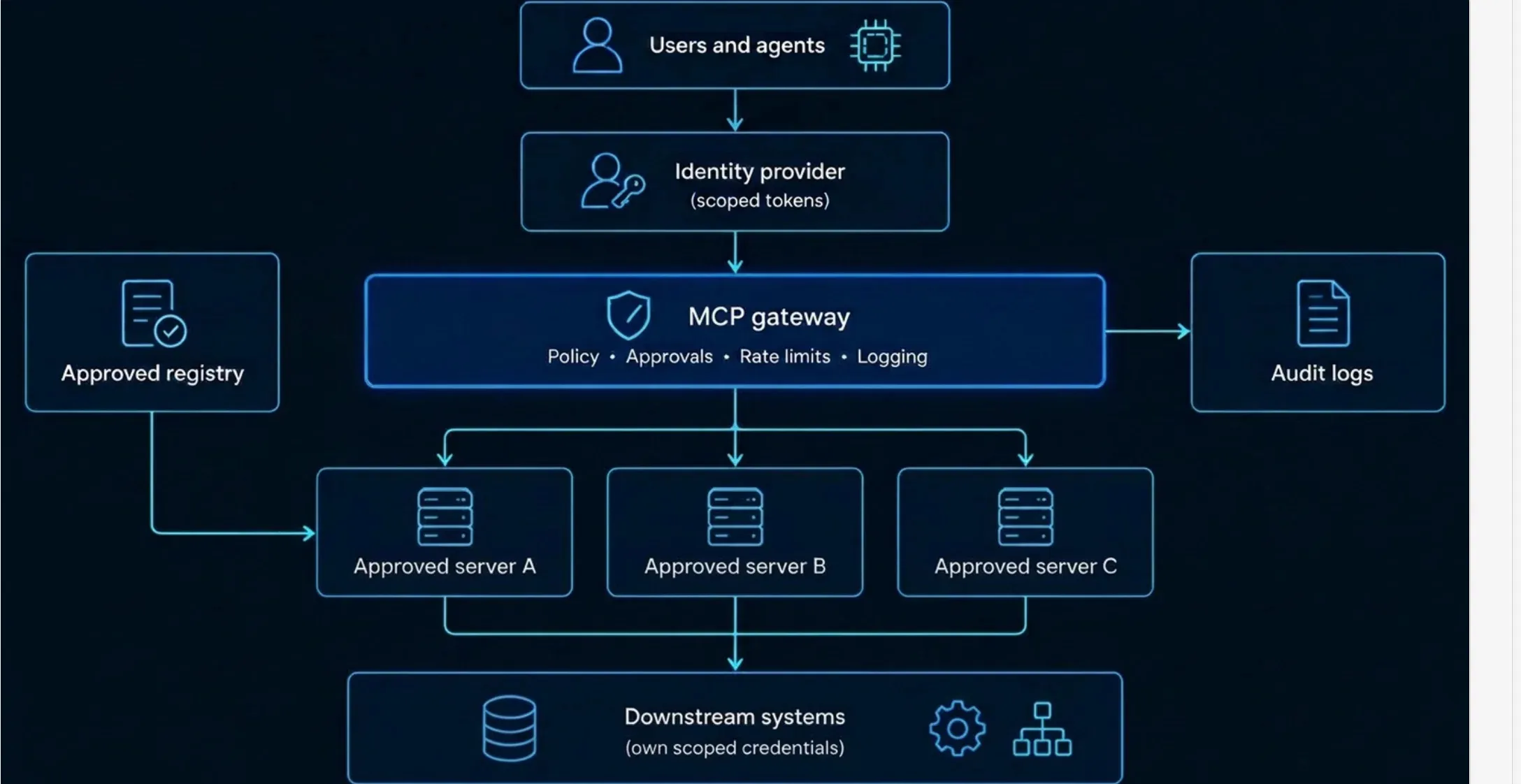
Three design rules keep this pattern effective. Separate high-trust servers that touch sensitive data from low-trust servers that read external content, so a poisoned web page cannot influence a session that also holds customer records. Issue per-user, short-lived credentials instead of one shared service account, so audit trails show who actually acted. Send gateway logs to the same monitoring pipeline the security team already uses, so an anomalous tool call is investigated like any other alert.
When building agents with Anthropic’s Agent SDK or any MCP client, treat the client configuration as part of the security boundary. Most clients let the developer decide which servers to connect to, which tools are allowed, and whether a call runs automatically or waits for approval. Those settings are where least privilege is applied in practice.
Connect only the servers a given agent needs, and allowlist the specific tools it may call instead of exposing everything a server offers. Set approval requirements by risk: let read-only tools run, and gate anything that changes state. Pass credentials to the server through its own configuration or an OAuth flow, never through the prompt, because the model can repeat anything in its context. Finally, log tool calls and results outside the model’s control so you can reconstruct incidents afterward. The exact options differ between SDK versions, so confirm them against the current documentation before copying a configuration into production.
MCP authorization for remote servers is built on OAuth 2.1. The client obtains an access token from an authorization server with the user’s consent, then presents that token to the MCP server, which must confirm the token was issued for it before running any tool. Done correctly, this ties every tool call to a real user, a specific server, and a limited set of permissions.
In the MCP authorization flow, the MCP server acts as an OAuth resource server, and the client discovers where to get a token by asking the server. The client first sends a request without credentials. The server responds with an unauthorized response that points to its protected resource metadata, which names the authorization server that issues its tokens. The client reads that metadata, finds the authorization server’s endpoints, and registers itself if it has not connected before.
The client then runs an authorization code flow with PKCE. The user is sent to the authorization server, signs in, and approves the requested access. The client includes the resource parameter, which names the exact MCP server the token is meant for. It exchanges the resulting code for an access token and sends that token in the authorization header of every later request. The server validates the token on each call, not just at connection time. Tokens are never placed in URLs, because URLs end up in logs and browser history.
This flow applies to HTTP-based transports. Servers running locally over standard input and output are expected to take credentials from their environment instead.
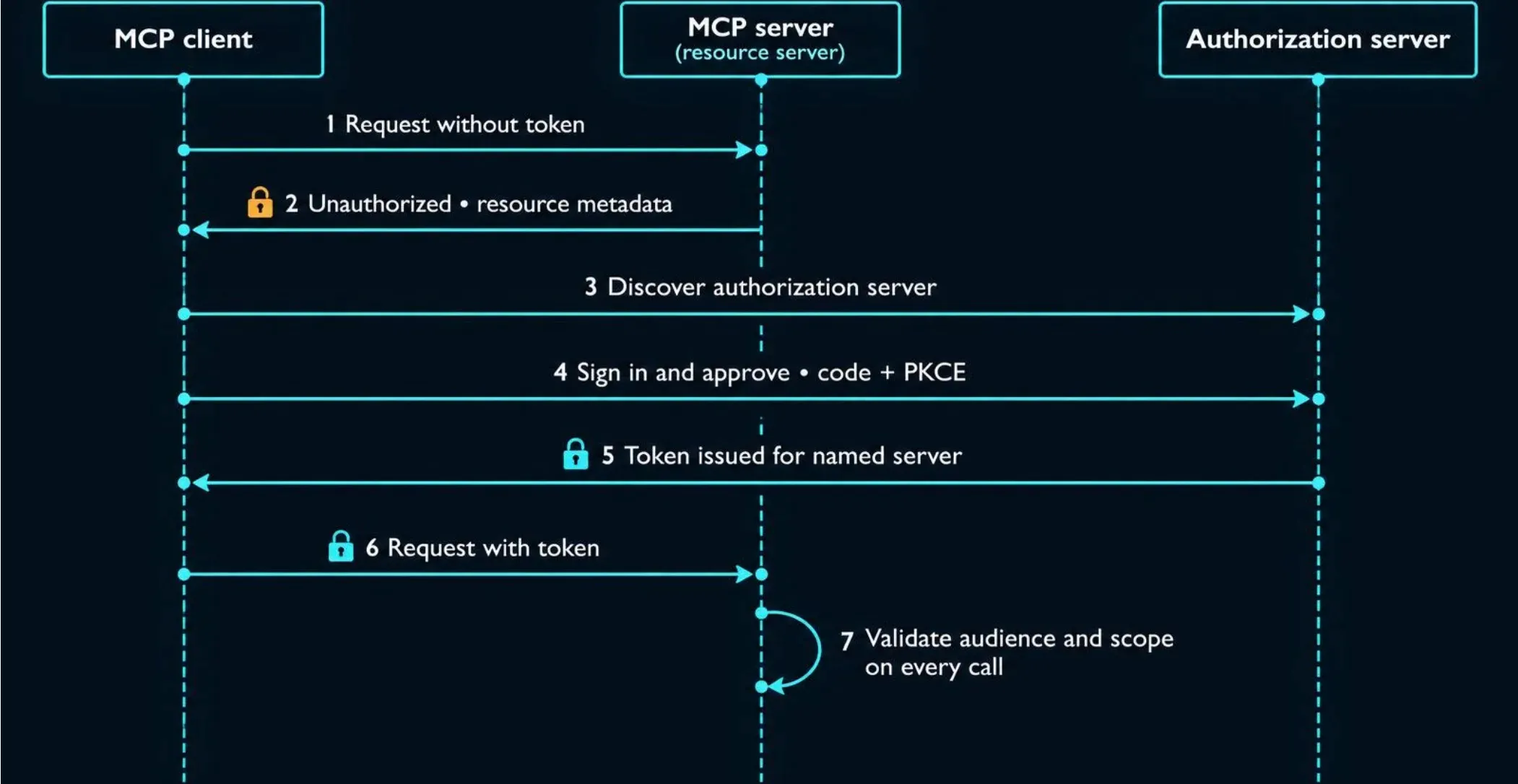
Three token patterns do most of the security work. The first is audience binding: a token should be valid only for the MCP server it was issued to, and the server must reject any token whose audience is something else. Without that check, an attacker can replay a token stolen from one service against another. The resource parameter in the flow exists to make this binding possible.
The second is short lifetimes. A short-lived access token limits how long a stolen token is useful, and refresh tokens should be stored carefully and rotated where the authorization server supports it. The third is no passthrough. If an MCP server needs to call a downstream API, it must obtain a separate token for that API, not forward the one the client gave it. Forwarding breaks audience binding, hides who actually requested downstream audit logs, and lets one compromised token reach every service behind the server. The MCP security best practices document names token passthrough as an explicit anti-pattern.
Scopes should describe the smallest useful unit of access, and a client should request only what the current task requires. A single broad scope, such as full account access, is convenient for developers and dangerous in practice because any successful model manipulation inherits it all. Scopes that separate reading from writing, and one resource from another, keep the damage from a manipulated call small.
A practical approach is to start with minimal scopes and request additional ones only when a specific action needs them, prompting the user at that moment. Split risky tools from safe ones so that read-only tools can run with a narrow token while destructive tools require a separate, explicit grant. The server should also check scopes on every tool call, since a valid token with the wrong scope must still be refused.
Per-user credentials are the safer default, because they let downstream systems enforce each person’s actual permissions and record who acted. When an agent reads a document using the user’s own delegated token, it can see only what that user can see, and the audit trail names a real person.
A shared service credential is simpler to set up but concentrates risk. Every user then acts through the same identity, so access is as wide as the service account, logs cannot separate one person’s actions from another’s, and one leaked secret exposes everything it can reach. This also creates the conditions for confused deputy attacks, where a server uses its own broad authority on someone else’s behalf. Shared credentials are acceptable only for low-risk, non-user-specific tasks, such as reading public data, and even then they should be tightly scoped and rotated.
To secure an MCP server, validate everything the model sends it, keep secrets out of reach, run it in a sandbox with restricted network access, vet its dependencies, log every tool call, and require human approval for risky actions. Each step below stands on its own, and together they cover the main ways a server gets compromised.
Treat every argument a tool receives as untrusted, because the model may have been manipulated before it made the call. Validate each parameter against a strict schema covering type, length, format, and allowed values, and reject anything that does not match. Never build shell commands, SQL queries, or file paths by concatenating model-supplied strings. Use parameterized queries, call programs with argument arrays instead of a shell, and resolve file paths against an approved base directory so a request cannot reach outside it.
Output needs the same care. Anything a tool returns goes back into the model’s context, so a page, ticket, or document the tool fetched can carry hostile instructions. Return only the fields the task needs, strip or flag content from untrusted sources, and avoid echoing secrets or internal error details. The MCP specification requires servers to validate all tool inputs and implement proper access controls, so this step is a stated requirement, not an optional extra.
Keep credentials out of source code, shared configuration files, and anywhere the model can read. A local server inherits the environment it starts in, so the server’s code and any dependency it loads can access every secret in that environment. Load secrets from a dedicated secrets manager at runtime, give each server only the credentials it needs, and prefer short-lived tokens over long-lived API keys so a leak expires on its own.
Never pass credentials through the prompt or tool arguments, because the model can repeat anything in its context. Rotate keys on a schedule, revoke them immediately when a server is retired, and scan repositories and logs for accidental exposure.
Run the server in an isolated environment, such as a container or restricted user account, so a compromise stays contained. Limit its file access to the directories it needs and its process permissions to the minimum. This matters most for local servers, which otherwise run with the user’s full privileges, and the MCP security best practices describe sandboxing as a mitigation for local server compromise.
Restrict outbound network traffic with an allowlist of approved destinations. Egress limits blunt several attacks at once: they stop a server from reaching internal services or cloud metadata endpoints in a server-side request forgery attempt, and they make data exfiltration harder even if the server is manipulated. Block access to private IP ranges and link-local addresses by default unless the server genuinely needs them.
Many MCP servers are small projects built quickly on top of third-party packages, so a vulnerable or malicious dependency becomes the server’s vulnerability. Pin dependency versions, use lockfiles, scan for known vulnerabilities on every build, and install servers only from publishers you can verify. Review what a new server does before connecting it, and re-review when it updates. For the wider picture of model, package, and pipeline risk, see our AI supply chain security guide.
Log every tool call with the user, the agent, the tool name, the arguments, the result status, and a timestamp. Write logs somewhere the model and the server cannot alter, since they are your evidence if something goes wrong. Redact secrets and sensitive data before logging so the logs don't become a leak.
Logging only helps if someone reads it. Send the records to the monitoring pipeline your security team already uses and alert on patterns that signal abuse, such as bursts of calls, access to unusual resources, calls to new destinations, or tool definitions that changed since approval. A recorded trail also supports incident response; read about it in our AI incident response guide.
Require a person to approve any tool call that writes, deletes, sends, pays, or changes permissions, and let read-only calls run without friction. Classify tools by the damage a wrong call could do, then match the approval requirement to that risk. The MCP specification recommends keeping a human able to deny tool invocations, which places the final decision outside the model.
Approval only works when it is meaningful. Show the exact tool, its arguments, and the target system in plain language, and avoid prompts so frequent that people approve everything by habit. If users click through a dozen prompts a day, the control has stopped protecting anyone, so keep approvals for the calls that matter.
A sound MCP security checklist covers three stages: vetting servers and permissions before deployment, monitoring and reviewing them during operation, and enforcing organization-wide policy for everything connected. Each item below is written as a pass/fail test, so a reviewer can answer yes or no without interpretation.
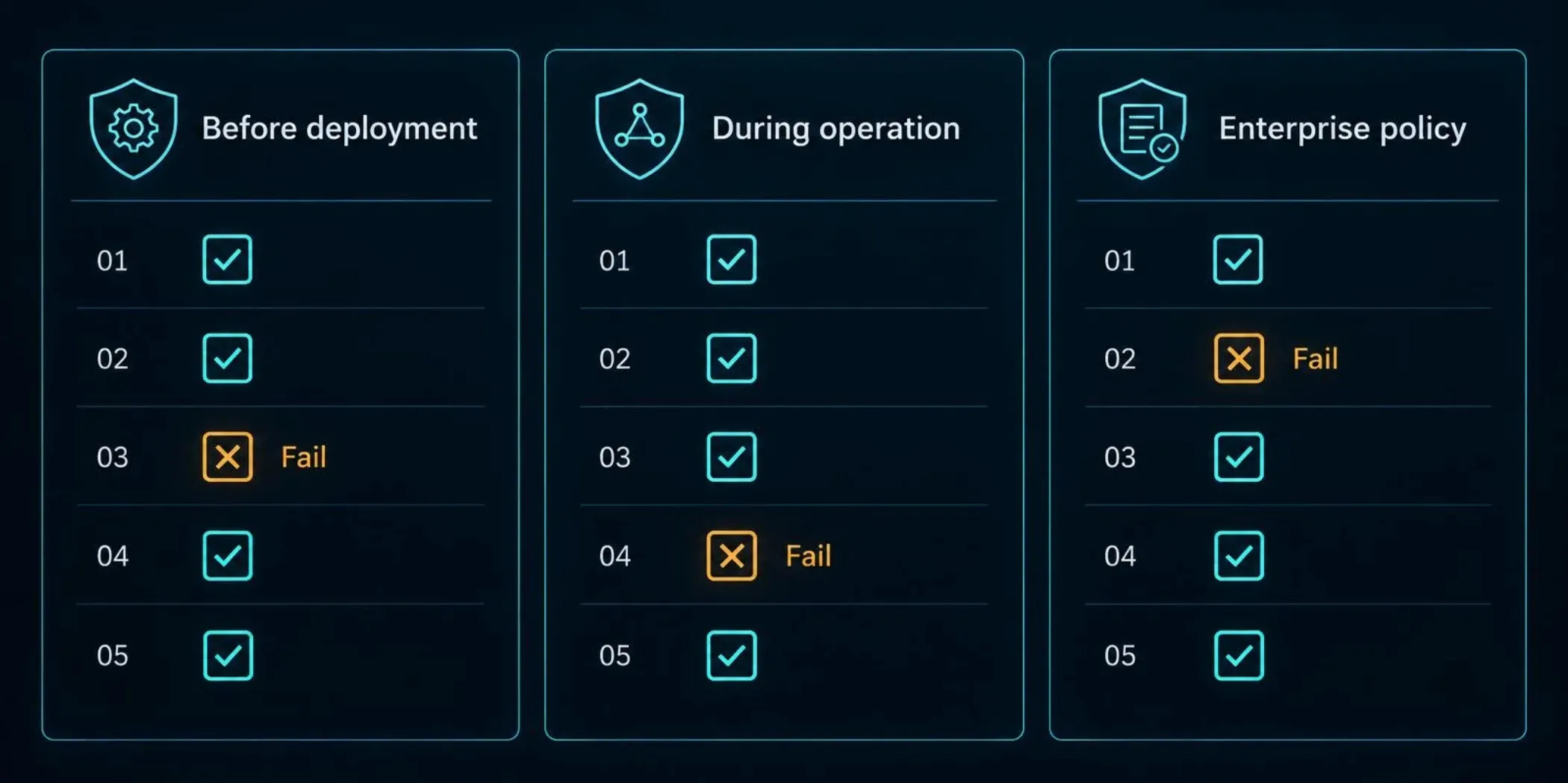
Before a server connects to anything real, confirm what it is, what it can reach, and how it proves its identity. The official MCP security guidance treats server vetting, scoped authorization, and isolation as the basis for safe deployment, and these checks put that guidance into testable form.
Source verified. Pass: the server comes from a publisher you can identify, and you have reviewed its code or a trusted audit. Fail: it was installed from an unknown repository or copied from a snippet.
Version pinned. Pass: the exact version is locked, and updates require review. Fail: the server pulls the latest release automatically.
Tool descriptions reviewed. Pass: a person has read every tool name, description, and schema in full. Fail: descriptions were never inspected.
Authorization enforced. Pass: a remote server requires OAuth-based authorization and rejects unauthenticated calls. Fail: any client that can reach the endpoint can call its tools.
Tokens audience-bound. Pass: the server accepts only tokens issued for it and never forwards client tokens downstream. Fail: tokens are accepted without an audience check or passed through to other APIs.
Scopes minimal. Pass: each token carries only the scopes the task needs, with read and write separated. Fail: a single broad scope covers everything.
Secrets isolated. Pass: credentials come from a secrets manager and appear in no repository, prompt, or shared config. Fail: keys sit in plain-text configuration files.
Sandbox in place. Pass: the server runs with restricted file and network access. Fail: a local server runs with the user’s full privileges.
Egress restricted. Pass: outbound traffic is limited to an allowlist and private address ranges are blocked. Fail: the server can reach any destination.
Once a server is live, the goal shifts from setup to detecting drift and abuse. Run these checks continuously or on a fixed schedule.
Every call logged. Pass: each tool call records the user, agent, tool, arguments, result, and time in a store the model cannot alter. Fail: logging is partial or lives inside the agent.
Logs monitored. Pass: records feed the security team’s alerting, with rules for call bursts, unusual resources, and new destinations. Fail: logs exist but nobody reads them.
Definition changes detected. Pass: any change to a tool’s description or schema triggers re-approval. Fail: definitions can change silently after approval.
High-risk calls gated. Pass: tools that write, delete, send, pay, or change permissions require human approval showing the exact action and target. Fail: destructive tools run automatically.
Approval fatigue managed. Pass: prompts are reserved for meaningful actions, so people read them. Fail: users approve a constant stream of low-risk prompts by habit.
Credentials rotated. Pass: keys rotate on a schedule and are revoked when a server is retired. Fail: long-lived keys persist indefinitely.
Dependencies scanned. Pass: every build checks dependencies for known vulnerabilities. Fail: packages are never rechecked after the first install.
Session mixing limited. Pass: servers that read untrusted content are kept apart from servers that touch sensitive data. Fail: one session combines private data access with open web content and outbound messaging.
At organizational scale, individual good habits aren't enough, so policy must make the safe path the default. These requirements apply when many teams connect many servers.
Approved registry. Pass: only servers that passed security review can be connected, and a central list is maintained. Fail: any developer can attach any server to production data.
Central gateway. Pass: MCP traffic passes through a control point that enforces authentication, policy, and logging in one place. Fail: each team implements its own controls, or none.
Per-user identity. Pass: agents act with delegated, per-user credentials so audit trails name a real person. Fail: a shared service account performs every action.
Data classification rules. Pass: policy states which data classes agents may access and which tools may send data outside the organization. Fail: access follows convenience.
Onboarding and offboarding. Pass: the team reviews new servers and removes retired servers along with their credentials. Fail: abandoned servers stay connected.
Incident readiness. Pass: the team has a documented process to revoke tokens, disconnect a server, and review its logs. Fail: nobody knows who disconnects a compromised server.
Periodic review. Pass: server permissions and approvals are reaudited on a set schedule. Fail: access is granted once and never revisited.
A server that passes every item here is not guaranteed safe, but it will have closed the most common gaps. Any failed item is a concrete task, and the highest priority is usually the authorization and least-privilege checks, since they limit the damage from every other failure.
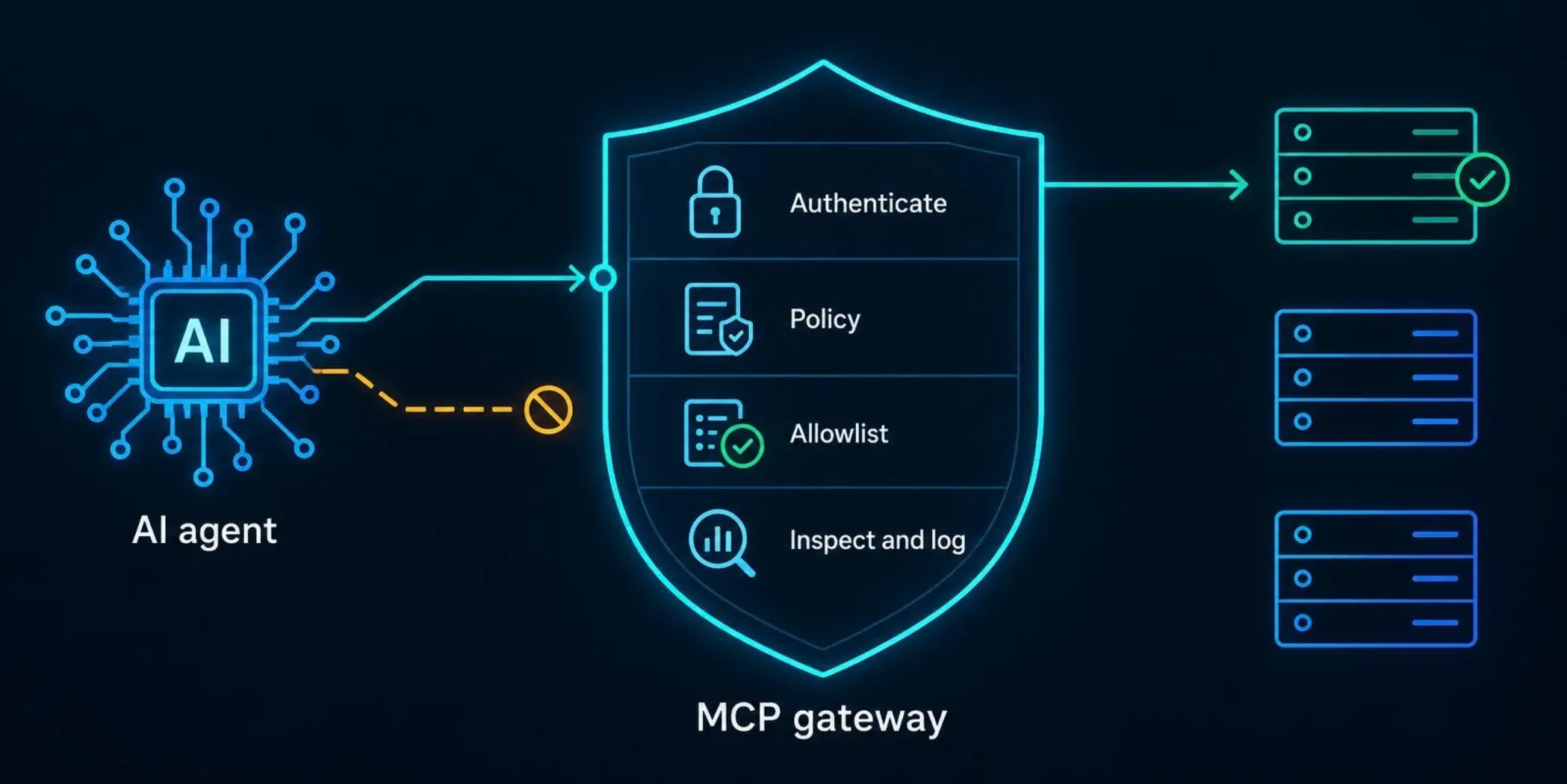
An MCP gateway is a control point placed between agents and MCP servers that authenticates callers, applies policy, and records every tool call in one place. It improves consistency and visibility, but it doesn't make an unsafe server safe or stop a manipulated model from requesting something the policy allows. Think of it as one layer in a defense, not the whole defense.
An MCP gateway solves the problem of scattered, inconsistent controls. Without one, every team and every server implements authentication, logging, and approval rules differently, and gaps appear wherever someone skipped a step. A gateway centralizes those functions: it verifies who is calling, checks the request against policy, forwards it only if allowed, and writes an audit record. It also gives security teams one place to see which servers are in use, who is using them, and what they are doing.
What a gateway does not solve is equally important. It cannot repair a server with command injection in its code, because the flaw sits behind the gateway. It cannot tell whether an allowed request reflects the user’s intent or text an attacker planted in a document. It does not replace least-privilege tokens, sandboxing, or human approval for risky actions. It also becomes a high-value target because it concentrates credentials and traffic, so it needs the same hardening and monitoring as any privileged system. The MCP specification does not define a gateway; it is an architectural pattern layered on top of the protocol, so its features vary by implementation.
Three control categories do most of the work at the gateway layer. Policy enforcement decides which users and agents may call which tools, under what conditions, and whether a call needs human approval. Good policies are specific: a support agent may read tickets but not close them, and a finance tool may run only with a named approver.
Allowlisting limits what can connect at all. A server allowlist means only reviewed servers can be reached, and a tool allowlist exposes only the specific tools an agent needs instead of everything a server offers. An egress allowlist restricts where servers can send data. Allowlists reduce the attack surface before any inspection is needed.
Tool-call inspection examines requests and responses in transit. It can check arguments against expected schemas, block calls to unusual destinations, flag sensitive data leaving the organization, and detect changes to a tool’s description or schema since approval. Inspection catches problems that static rules miss, but it is heuristic by nature, so treat it as a detection layer that supports, rather than replaces, hard limits on permissions.
Prompt-level protection tries to influence or filter what the model reads and says, while protocol-level protection controls what can actually happen at the connection. The two answer different questions. Prompt-level controls ask whether this text looks like an attack: they include instruction hierarchies, content filters, and classifiers that scan tool output for injected instructions. They can reduce risk, but they are probabilistic, because an attacker can rephrase until something gets through.
Protocol-level controls ask whether this action is permitted at all, regardless of what the model intended. They include authentication, token scopes, tool allowlists, approval requirements, and network limits. These are deterministic: a call the policy forbids is blocked every time, however persuasive the injected text was. For that reason, protocol-level controls should carry the weight, with prompt-level defenses added as an extra layer that catches and logs attempts. A deployment that relies only on prompt-level protection is betting that a filter will always recognize a new attack.
Enterprise MCP governance means deciding, in advance, which servers may connect, what data agents may touch, who acts when something goes wrong, and which regulations apply. Without that, MCP spreads the way shadow IT does: one useful connector at a time, each with its own credentials and no owner.
An approved-server registry is a maintained list of MCP servers that have passed security review, and it stops unreviewed connectors from reaching production data. Onboarding should require a short set of questions before adding a server. Who publishes it, and can you verify that publisher? What tools does it expose, and what do their descriptions say? What credentials and scopes does it need? Where does it run, and what can it reach on the network? What happens to the data it handles?
Tie approval to a specific version, and require re-review when the server updates or its tool definitions change. Each entry needs a named owner who is responsible for it, because a server nobody owns is a server nobody patches or removes. Offboarding matters as much: when you retire a server, revoke its credentials and remove its connections so abandoned integrations don't linger with live access.
Agents should follow the same data classification scheme the organization already uses for people, with explicit rules for what each class allows. A practical policy states which data classes an agent may read, which tools may write or send data outside the organization, and which combinations are forbidden in a single session. The most important combination to prohibit is access to confidential data alongside a channel that can send content out, such as email, messaging, or open web requests, because that pairing is what a successful injection needs to turn a read into a leak.
Access should follow the user, not the agent. When an agent acts with the delegated, per-user permissions of the person who invoked it, it inherits their existing access limits and the audit trail names a real person. Policies should also state which actions always require human approval, such as deleting records, moving money, or changing permissions, so approval rules are consistent across teams and not left to each developer.
When an MCP server is suspected of compromise, the priorities are to disconnect it, revoke every token and secret it held, and preserve its logs before anything is altered. Then determine which tools it exposed, which downstream systems those tools could reach, and which calls it handled during the exposure window, so you can establish the scope of access and any data accessed. Rotate credentials for every system the server could touch, review whether tool definitions changed before the incident, and confirm no other server shared its credentials.
MCP has no regulation of its own, so existing data protection, cybersecurity, and sector rules apply to what agents do through it. If an agent retrieves personal data through an MCP server, the same obligations apply as if a person had retrieved it. Which rules apply depends on where the organization operates and what it handles.
In the UAE, the federal Personal Data Protection Law applies nationally, while the DIFC and ADGM have their own data protection regimes for entities in those zones. Our UAE data protection law guide covers how they fit together, and our overview of UAE cybersecurity regulations covers the wider rules.
In Saudi Arabia, the Personal Data Protection Law applies alongside cybersecurity requirements from the National Cybersecurity Authority and, for financial institutions, the Saudi Central Bank. In Dubai, VARA regulates virtual asset service providers, and its Technology and Information Rulebook sets the security requirements those firms must meet. That rulebook is Dubai-specific and does not apply elsewhere in the UAE or the region. Organizations serving EU residents must also consider the GDPR, regardless of location.
Because these rules change, confirm the current text and effective dates with the regulator before relying on any of them, and treat this section as orientation, not legal advice. In practice, the governance controls above, a registry, classification rules, per-user access, and audit logging, give an organization the evidence regulators typically expect.
No single standard covers MCP security end to end. The practical approach is to combine the MCP project’s own security guidance, OWASP’s work on LLM and agentic risks, and NIST’s AI and security frameworks, then map each to concrete controls. Together they give you a defensible basis for design decisions and a shared vocabulary for audits.
The MCP specification includes a security best practices document, the most direct source for protocol-level risk. It describes specific attacks and the mitigations for each, including confused deputy problems in proxy servers, token passthrough, server-side request forgery, session hijacking, local server compromise, and scope minimization. It sits alongside the authorization section of the specification, which defines the OAuth-based model for HTTP transports.
Treat this documentation as the baseline for any MCP deployment, because it comes from the protocol’s maintainers and tracks changes to the protocol itself. It is guidance for implementers, not a certification, so following it demonstrates good practice but does not provide third-party assurance. The specification is versioned and has changed between revisions, so check which version your clients and servers target before applying its details.
OWASP offers the most widely used risk taxonomies for AI systems, and several apply directly to MCP. The OWASP Top 10 for LLM Applications covers model-level risks such as prompt injection, sensitive information disclosure, and excessive agency, which over-permissioned MCP tools can produce. OWASP has also published guidance on agentic applications, covering risks that arise when models plan and act through tools, and an MCP-specific effort focused on the risks of tool connections.
These lists serve two purposes: ensuring a design addresses the recognized categories and giving non-specialists a familiar reference for internal risk discussions. OWASP project names, versions, and maturity levels change often, and some of its newer agentic and MCP material is still evolving, so confirm the current titles and status on the OWASP site before citing them.
NIST does not publish an MCP-specific standard, but its AI and security publications provide the governance structure. The AI Risk Management Framework organizes AI risk work into four functions: govern, map, measure, and manage. Its Generative AI Profile applies that structure to generative systems and lists risks relevant to agents, such as information security and data privacy concerns. Established NIST security guidance, including the Cybersecurity Framework and the SP 800-53 control catalog, covers the access control, audit logging, and configuration management practices that MCP deployments depend on.
NIST has also been working on AI agent security and agent identity and authorization, and that work is still developing. Check NIST’s current publications for drafts or final documents before relying on any specific one. For a detailed look at the AI-specific framework, see our NIST AI Risk Management Framework guide.
These sources overlap more than they conflict, and each maps to specific controls in this guide:
Control Area | MCP Specification Guidance | OWASP | NIST |
|---|---|---|---|
Authorization and token handling | OAuth model, audience binding, no passthrough | Excessive agency, access control failures | Access control families in SP 800-53 |
Least privilege and scopes | Scope minimization | Excessive agency | Least privilege controls |
Prompt injection and tool poisoning | Treat tool descriptions as untrusted | Prompt injection risks | Generative AI Profile risks |
Server hardening and isolation | Local server compromise, SSRF mitigations | Insecure output and tool handling | Secure configuration and system protection |
Logging and monitoring | Human oversight of tool calls | Detection and response practices | Audit and monitoring controls |
Governance and registry | Trusted server sourcing | Supply chain risks | AI RMF Govern function |
In practice, use the MCP documentation to design the connection, OWASP to check that known risk categories are covered, and NIST to structure governance and evidence. An organization that can show a registry, scoped per-user access, audit logs, and approval gates can clearly answer an auditor's question about which standards its controls follow.
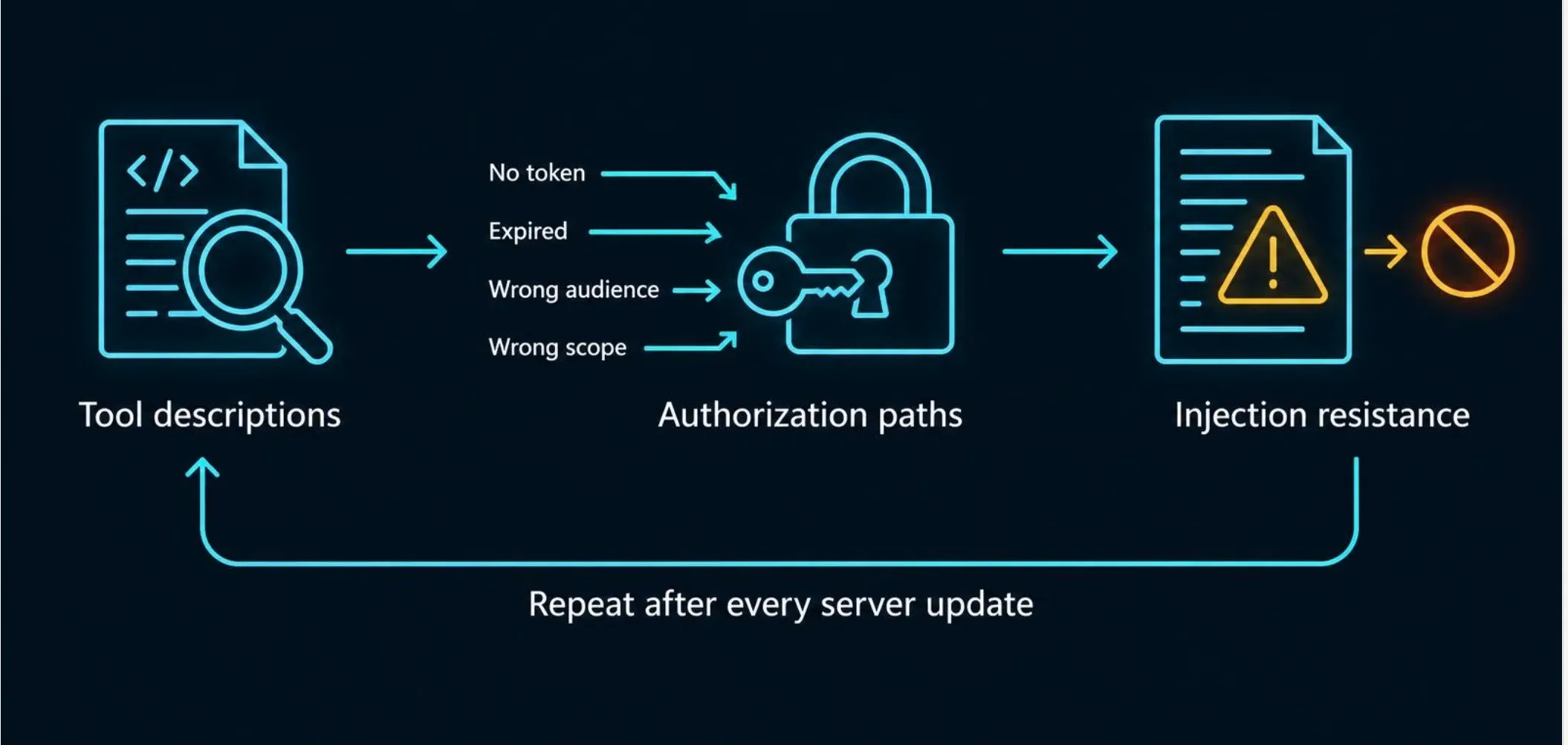
Testing an MCP integration means checking three things: whether the tool descriptions are honest, whether authorization holds on every path, and whether the system resists hostile content. Run it before launch and again after every server update, because a passing result applies only to the version you tested.
Start with tool descriptions, because the model reads them as guidance. Read every tool name, description, and parameter schema in full, and look for instructions unrelated to the tool’s purpose, such as directions to read other files, contact other tools, or hide actions from the user. Then confirm that any change to a description or schema is detected and forces re-approval. The MCP specification advises treating tool descriptions as untrusted unless they come from a trusted server, so a review that skips them skips the main trust decision.
Next, test the authorization paths. Call the server with no token, an expired token, a token issued for a different audience, and a token with too few scopes, and confirm each is refused. Check that a user cannot reach another user’s data by changing an identifier in a request, and that read-only tokens cannot trigger write tools. Test the downstream side too: confirm the server uses its own credentials for backend calls and never forwards the client’s token.
Finally, test injection resistance end to end. Plant instructions in content the agent will read, such as a document, a ticket, or a web page, and observe whether the agent follows them. A useful scenario places a hostile instruction in a low-trust source while the session also holds a tool that can send data out. The test passes only if a deterministic control stops the action, such as an approval prompt, a tool allowlist, or an egress block. A model that ignores the instruction this time doesn't pass because the same input may succeed on another attempt.
Add server code testing to this list. Send malformed and oversized arguments, path-traversal strings, and internal addresses to any tool that touches files, commands, or URLs, and confirm validation rejects them.
Manual review and automated testing find different problems, and a sound program uses both. Manual review is best for judgment calls: reading tool descriptions for hidden intent, assessing whether a scope is broader than the task needs, and designing attack scenarios that fit how your agents actually combine tools. It also catches logic flaws, such as a workflow that requests approval for the wrong action. Its weakness is coverage and repeatability, since a reviewer cannot recheck every server after every update.
Automated testing is best for breadth and regression. Scripts can send malformed inputs to every tool, probe authentication and scope checks on each endpoint, scan dependencies for known vulnerabilities, and compare current tool definitions against an approved baseline to flag changes. Running these in the build pipeline means a server update cannot reach production unchecked. The MCP project provides an official inspector tool for exercising servers directly, which helps with the first round of manual and scripted probing. Automation cannot judge intent, however, so it will miss a poisoned description that is well formed but malicious.
A practical split is to automate everything repeatable, such as authorization checks, input fuzzing, dependency scans, and definition diffs, and reserve human time for scenario design and review of high-risk servers.
Testing the MCP layer does not cover how the underlying model behaves under attack. Jailbreaks, prompt-injection resistance, and data leakage from the model itself require their own methods, which our LLM security testing guide covers in depth. For organizations that want experts to test how their agents behave across real tool chains, including MCP connections, our AI agent security testing service simulates the attacks described in this guide against your deployment.
Start with the one control that limits damage from every other failure: give each MCP server its own narrowly scoped, per-user token, and require human approval before any tool can write, delete, send, or pay. Then audit what you already have connected, because unreviewed servers are more likely to hurt you than the ones you plan to add. Treat every tool description and every piece of returned content as untrusted, and rely on controls the model cannot override, since a model that reads text can always be steered by text.
MCP security protects the servers, tools, credentials, and data flows that connect AI agents to external systems through the Model Context Protocol. It covers who can connect, what each tool may do, how tokens are scoped, and how untrusted content is kept from steering the model into harmful actions.
MCP servers are secure only when they are deployed with authorization, least privilege, and isolation. The protocol defines security guidance but leaves enforcement to implementers, so a server can work perfectly and still be unauthenticated, over-permissioned, or vulnerable in its own code. Treat each server like any other privileged software: review it, restrict it, and monitor it.
Tool poisoning is an attack in which a server hides instructions inside a tool’s description or metadata so the model follows them. The model reads that text as guidance, while the user usually sees only the tool’s name, so the instructions can trigger data theft or unauthorized actions without any visible warning. The main defenses are reviewing full descriptions, installing servers only from verified sources, and detecting post-approval changes to descriptions.
Yes, the MCP specification’s authorization model for HTTP-based transports is built on OAuth 2.1 concepts. The server acts as a resource server, and the client obtains a token through an authorization code flow with PKCE, binding the token to a specific server using the resource parameter. Authorization is optional in the specification, so support depends on the server, and servers using standard input and output take credentials from their environment instead. Details have changed between specification revisions, so check the current version.
Validate every input against a strict schema, keep secrets in a secrets manager instead of configuration files, and run the server in a sandbox with an outbound network allowlist. Then vet and pin its dependencies, log every tool call somewhere the model cannot alter, and require human approval for any tool that writes, deletes, sends, or pays. Enforce authorization on every call, using narrow scopes and tokens issued for that server only.
An MCP gateway is a control point between agents and MCP servers that authenticates callers, applies policy, and records every tool call. It centralizes controls that teams would otherwise implement inconsistently. It does not fix flaws inside a server or stop a manipulated model from requesting an action your policy allows, so it works best alongside least-privilege tokens, sandboxing, and approval gates.
Yes. Hostile instructions can arrive in tool output, documents, tickets, or web pages that an agent reads through MCP, and the model may act on them using its available tools. The risk is highest when one session combines access to sensitive data with a way to send content out. Deterministic controls, such as tool allowlists, approval prompts, and egress limits, are more reliable than filters that try to recognize attacks in text.
No. MCP sits on top of the APIs and systems it connects to, so those systems still need their own authentication, authorization, input validation, and monitoring. MCP adds new risks because the caller is a model that can be manipulated through text. Secure the downstream APIs as before, and add MCP-specific controls for the connection layer.